
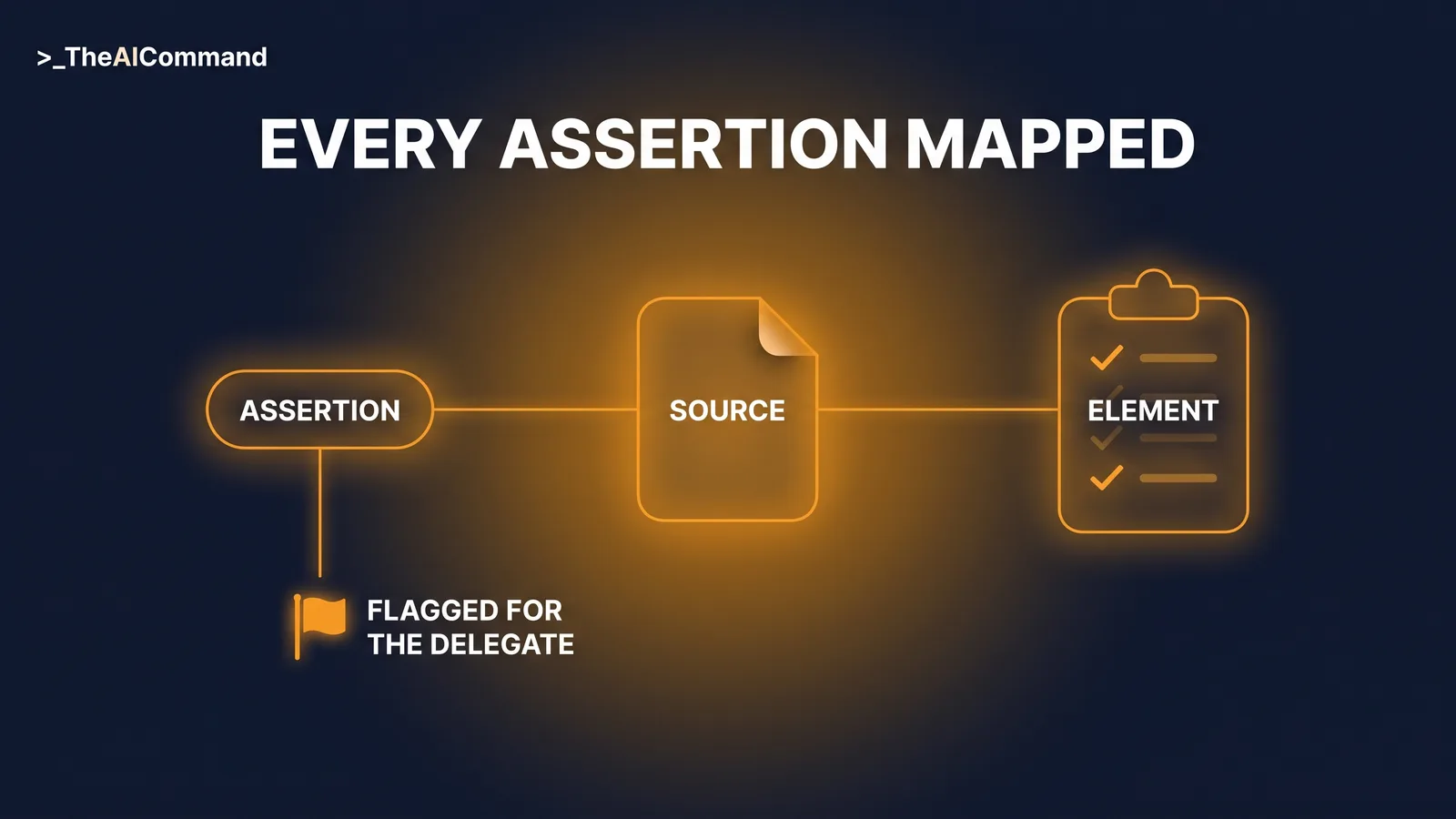
The safest place for AI in determination work is behind the draft, not in front of it. A determination evidence-check skill file audits a draft against the statutory elements of the Safety, Rehabilitation and Compensation Act 1988 (SRC Act): it maps every factual assertion to a source document, checks the sections 5A, 5B and 14 elements are addressed with evidence, flags hedged language, and never writes or recommends the outcome. The decision stays with the delegate.
Part 10 of The Skill File Series: ten reusable AI skills for Australian professional teams, two for every domain we cover. This advanced workers compensation instalment builds on the claim chronology skill file and assumes the workspace basics from LM-S01: Set Up Your AI Command Centre.
De-identification callout: Nothing here touches real claim material. De-identification with placeholders such as [CLAIMANT_NAME], [CLAIM_NUMBER] and [DATE_OF_BIRTH] happens before any text is pasted, and the skill's guardrails tell the AI to stop and ask if an apparent real identifier slips through. Claim numbers, dates and combinations of facts can identify a person even without a name.
Why a checking skill and not a drafting skill?
The closer AI gets to a determination, the higher the value and the higher the risk. The advanced move is not a better drafting prompt but a change of role: review-support design. The skill checks the completeness of the draft's evidence chain, not the correctness of its outcome. It answers one question only, which is whether every assertion and every statutory element in the draft is backed by a document the delegate can point to. That division of labour is deliberate, and it is what makes the skill safe to run this close to a decision.
Teams wanting the full determination-drafting project space, with locked custom instructions and human gates at every step, will find it in LM-W01: AI for SRC Act Claims Practice. This article ships a narrower artefact: one skill, one job, run at the review step. The wider case for pairing structured prompts with human review before anything is saved, sent or relied on is made in the prompt libraries article, and this skill assumes that discipline as its floor.
The six-part anatomy, recapped
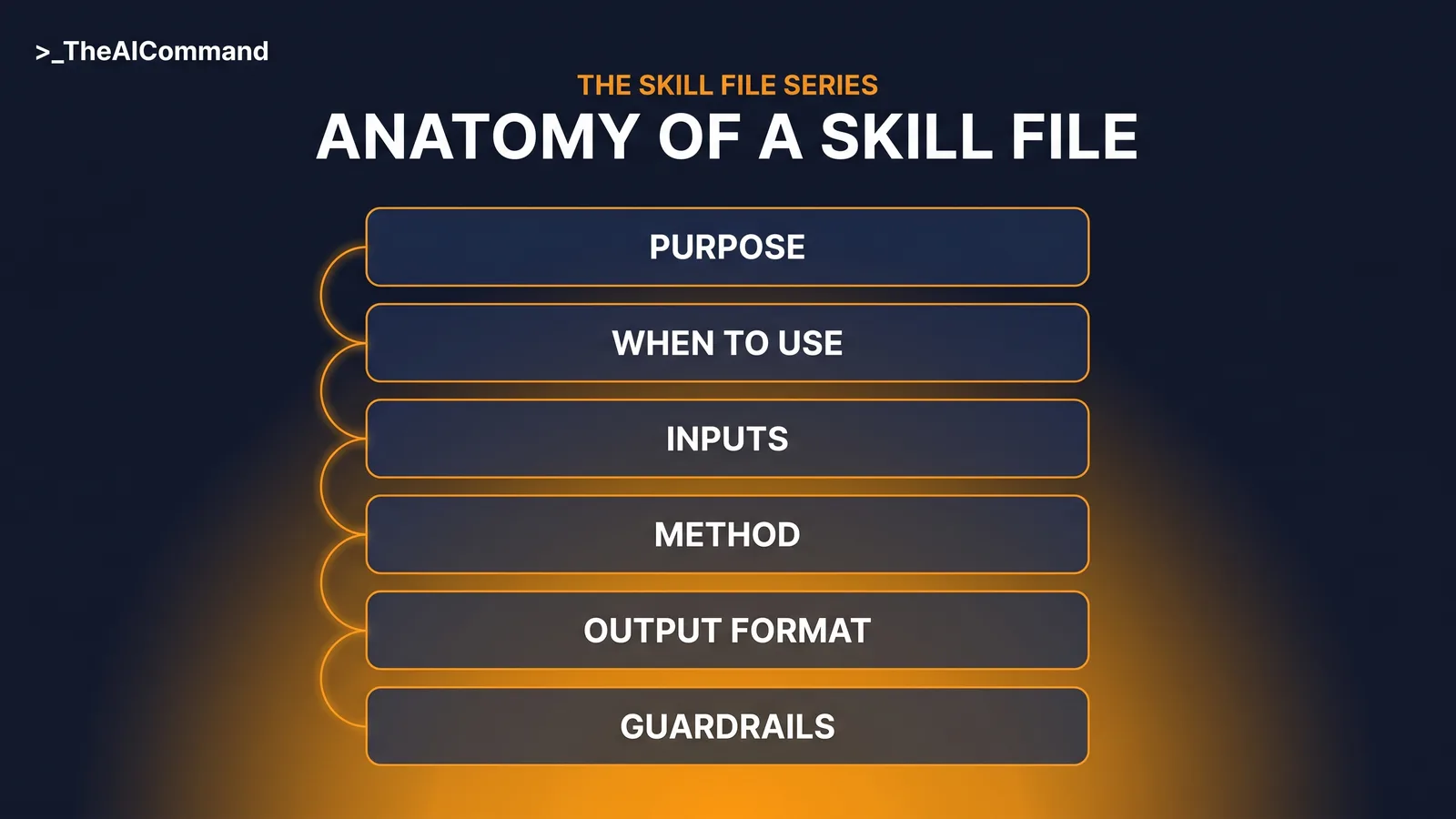
Every skill in this series uses the same six-part markdown anatomy: Purpose, When to use, Inputs required, Method, Output format and Guardrails. The file is platform neutral, written once and reused; the full teach, including why this beats re-prompting, lives in Part 5.
What the skill checks under sections 5A, 5B and 14
The checklist tracks the compilation currently in force, No. 82, C2026C00285, in force 1 July 2026. Liability sits in section 14(1): "Subject to this Part, Comcare is liable to pay compensation in accordance with this Act in respect of an injury suffered by an employee if the injury results in death, incapacity for work, or impairment." Each limb of that sentence is an evidence question. Was the person an employee? Is there an injury within section 5A? Did it result in death, incapacity for work, or impairment?
Section 5A carries its own boundaries. The definition of injury "does not include a disease, injury or aggravation suffered as a result of reasonable administrative action taken in a reasonable manner in respect of the employee's employment." Where the facts raise that exclusion, the draft must show it was considered, with the section 5A(2) examples, such as reasonable performance appraisal, counselling, suspension and disciplinary action, as the reference list. Disease claims route through section 5B, which requires employment to have contributed to a significant degree, and section 5B(3) sets the bar: "significant degree means a degree that is substantially more than material." The section 14(2) and 14(3) exclusions, intentional self infliction and serious and wilful misconduct, are checked where the facts raise them.
One more check earns its place. Under section 60(1), a determination made under section 14 sits inside the Act's review framework, so the skill confirms review rights text is present and flags it for human verification. It never drafts that text.
The complete skill file
Worked example: two unmapped assertions and one hedged sentence
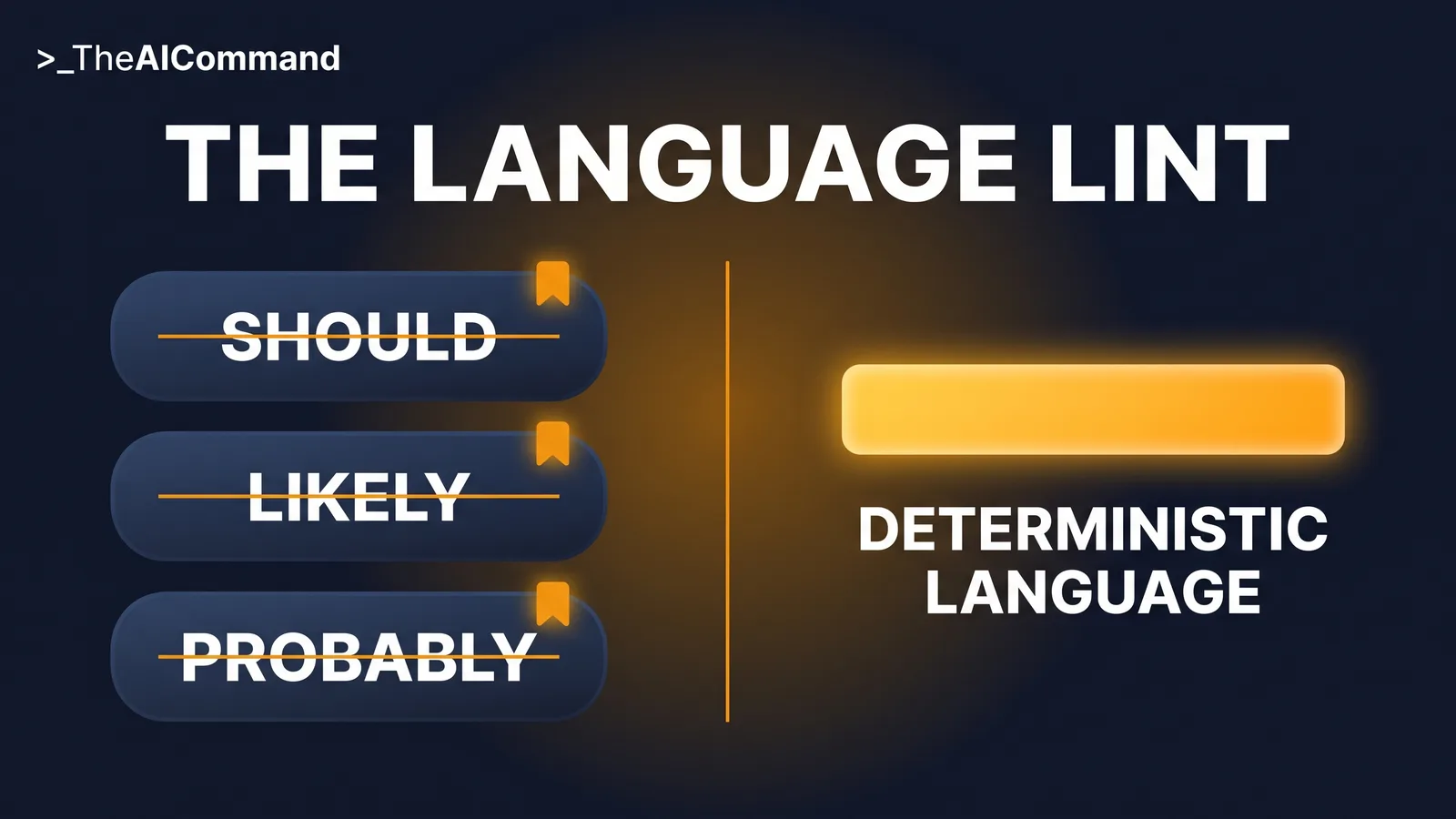
A fictional draft determination for [CLAIMANT_NAME], claim [CLAIM_NUMBER], concerned an aggravation claim. Without the skill, the draft read cleanly and went forward. With the skill, three problems surfaced. Two assertions came back UNMAPPED: that [CLAIMANT_NAME] reported symptoms to a supervisor in [MONTH_1], and that duties changed in [MONTH_2]; neither appeared in any document in the evidence index. The language check flagged one hedged outcome sentence, which read that the employment "likely contributed to a significant degree" to the condition.
The delegate located a file note supporting the first assertion, removed the second, and rewrote the flagged sentence in deterministic terms: "The evidence establishes that the employment contributed, to a significant degree, to the aggravation. The claim is accepted under section 14(1)." The skill found the gaps. The delegate decided everything.
Advanced pattern: lint the language, not just the evidence
A determination states what is decided and the evidence basis for it. Hedged outcome wording invites dispute and reads as an unfinished decision, so this skill treats language as a checkable property of the draft, the same way it treats evidence. The lint list is small and boring on purpose: "should", "likely", "probably", "it appears", "arguably" and their relatives, flagged only where they appear in outcome statements. The distinction matters because hedging has a legitimate home elsewhere in the document, particularly in summarising competing medical opinions, but it has no home in the outcome. A flag is not a rewrite. The skill points at the sentence and states why it was flagged, and only the delegate decides what deterministic wording replaces it.
Test on fiction, version on compilations
Two habits separate a governed skill from a pasted prompt. First, test before live use. Run the skill against wholly fictional draft determinations seeded with known defects, such as a planted unmapped assertion and a planted hedged sentence, and log what it misses. A checking skill that misses a planted defect is not ready, and the test log is the proof either way. Second, version when compilations change. Section references and review rights wording drift as compilations commence, so the file carries a version line and the maintenance prompt re-verifies both against the compilation in force. Both habits generate records worth keeping, because test outputs and change logs are exactly the evidence a governance lead wants to see for a tool operating this close to decisions.
The five-prompt build chain
Build the skill with your team's own standard in it, not this article's assumptions. Five prompts, in order: interview, draft, test, refine, maintain.
Prompt 1: interview. Extract the team's actual review standard before anything gets drafted.
Prompt 2: draft. Turn the answers into the six-part file.
Prompt 3: test. Stress the file against fiction before it sees real work.
Prompt 4: refine. Fix exactly what the test exposed, nothing more.
Prompt 5: maintain. Run on a schedule, and always after a new compilation commences.
How do you install it?
Both vendors now ship a native feature built on the convention this series teaches: a folder with a SKILL.md file, read by progressive disclosure. Install natively where your plan supports it; run the file as project instructions plus knowledge everywhere else.
On ChatGPT, the native Skills feature is generally available on Business, Enterprise, Healthcare and Edu: a skill is a folder with a SKILL.md manifest, loaded only when relevant, created in chat, in the Skills editor, or uploaded. On individual plans, use project instructions plus markdown files uploaded as project knowledge; projects exist on every plan, project instructions override account-level custom instructions inside the project, and a new project can be set to project-only memory. ChatGPT treats project files as retrieval-based reference material rather than guaranteed full reads, so keep the Method and Guardrails in the project instructions themselves.
On Claude, a skill is a folder with a SKILL.md file: YAML name and description, instructions below. Claude reads the full instructions only when a request matches the description, so the description must say what the skill does and when to use it. Enable Code execution and file creation under Settings > Capabilities, then upload the skill as a ZIP, folder at the ZIP root, via Customize > Skills. Skills are available across Claude plans, including Free per the Claude help centre, with code execution enabled, and the same format works across the Claude apps, Claude Cowork, Claude Code and the API, installed separately on each surface. Projects exist on every Claude plan as the fallback route.
If your organisation runs Microsoft 365 Copilot instead, the same file adapts directly: paste its contents into an agent's Instructions field in Agent Builder, which caps at 8,000 characters, noting Copilot's uploaded knowledge accepts .txt and .docx but not .md.
Guardrails that keep the delegate in charge
The guardrails live inside the file, but four warrant restating as team rules. De-identification is mandatory before input, always, with placeholder fields retained in every output. The skill never states a liability position and never drafts an outcome sentence; if a test or a live run ever produces one, that is a defect to log and fix, not a convenience to keep. A human verifies statutory references and review rights wording against the current compilation before anyone relies on the checklist. And the approvals question comes first: tool, workflow and data handling approved before any claims material, even de-identified material, goes near the skill.
The bottom line
The highest-value use of AI near a determination is also the highest risk, and the design answer is to point the AI at the evidence chain instead of the decision. The skill maps assertions to sources, checks the sections 5A, 5B and 14 elements, lints hedged outcome language and lists gaps. The delegate decides, drafts and owns every word. That boundary is the feature.
Do this Monday
Take one already-decided, de-identified determination and its evidence index. Build the skill with the five prompts, run it over that historical draft, and count what it flags. Then set the version line, name an owner, and book the first maintenance review for the next compilation change.
Take it with you
The blank template, ready to fill for any domain:
And the five build prompts by name: Interview, capture the team's review standard first. Draft, turn the answers into the six-part file. Test, run it against a wholly fictional determination and log every failure. Refine, fix exactly what the test exposed. Maintain, review on a schedule and whenever a new compilation commences.
The Skill File Series
Parts publish daily from 27 July to 7 August 2026; links go live as each part publishes.
- The decision memo skill file
- The policy-grounded HR query skill file
- The reg-change impact assessment skill file
- The safety comms skill file
- The claim chronology skill file
- Team skill library governance
- The investigation chronology skill file
- Skill files as controlled documents
- The incident notification triage skill file
- The determination evidence-check skill file (this article)
Content disclaimer: This article is for general educational and informational purposes only. It does not constitute legal, compliance, claims, or professional advice, and it is not a determination under the Safety, Rehabilitation and Compensation Act 1988 (SRC Act). The SRC Act 1988 should always be consulted directly. Workers compensation decisions must be made by authorised individuals using current legislation, policy, evidence and delegation requirements.
TheAICommand. Intelligence, At Your Command.