The incapacity cross-check workflow uses AI as a second pair of eyes on section 19 calculations, not as the primary calculator: the case manager computes the figure manually, then prompts an AI tool to recompute it and treats any divergence as a prompt to slow down. Calculate first. Cross-check second.
The workflow problem
Section 19 of the SRC Act governs the calculation of incapacity benefits where the claimant has a capacity for some work. The arithmetic is detailed. Normal weekly earnings under section 8, actual earnings, the prescribed statutory amounts (indexed annually under section 13; Comcare's published rate for the employee's own prescribed amount is $615.86 a week as at 1 July 2026), the section 19(3) adjustment percentages that apply once the first 45 weeks of incapacity have been used (75% to 100% of normal weekly earnings depending on hours worked), and the interaction with redemption (section 30) or superannuation/lump sum adjustments (sections 20 and 21) all need to be combined correctly.
Calculations under section 19 are the single highest source of mathematical error in workers compensation determinations. The errors are usually small and recoverable, but they generate avoidable rework, claimant frustration, and sometimes review proceedings.
This is exactly the kind of task where AI tools in claims handling have something to offer. Not as the primary calculator. As a second pair of eyes.
The principle
Two ideas underpin the cross-check workflow.
The first idea is that the case manager owns the calculation. Section 19 is a delegated decision, and the practitioner framework for AI-assisted SRC Act determinations treats the arithmetic as part of the decision. The case manager runs the maths, fully and personally.
The second idea is that AI tools are well suited to finding discrepancies between two computed figures. Given the same inputs and the same statutory tests, an AI that has been correctly prompted will compute the same figure as a careful case manager. Where the figures match, the calculation is more likely to be correct. Where the figures diverge, one of them is wrong, and the divergence is a useful prompt to slow down.
The case manager calculates. The AI audits.
What are the five steps in the cross-check workflow?
The workflow has five steps. It adds five to ten minutes to a section 19 calculation and removes a layer of arithmetic risk.
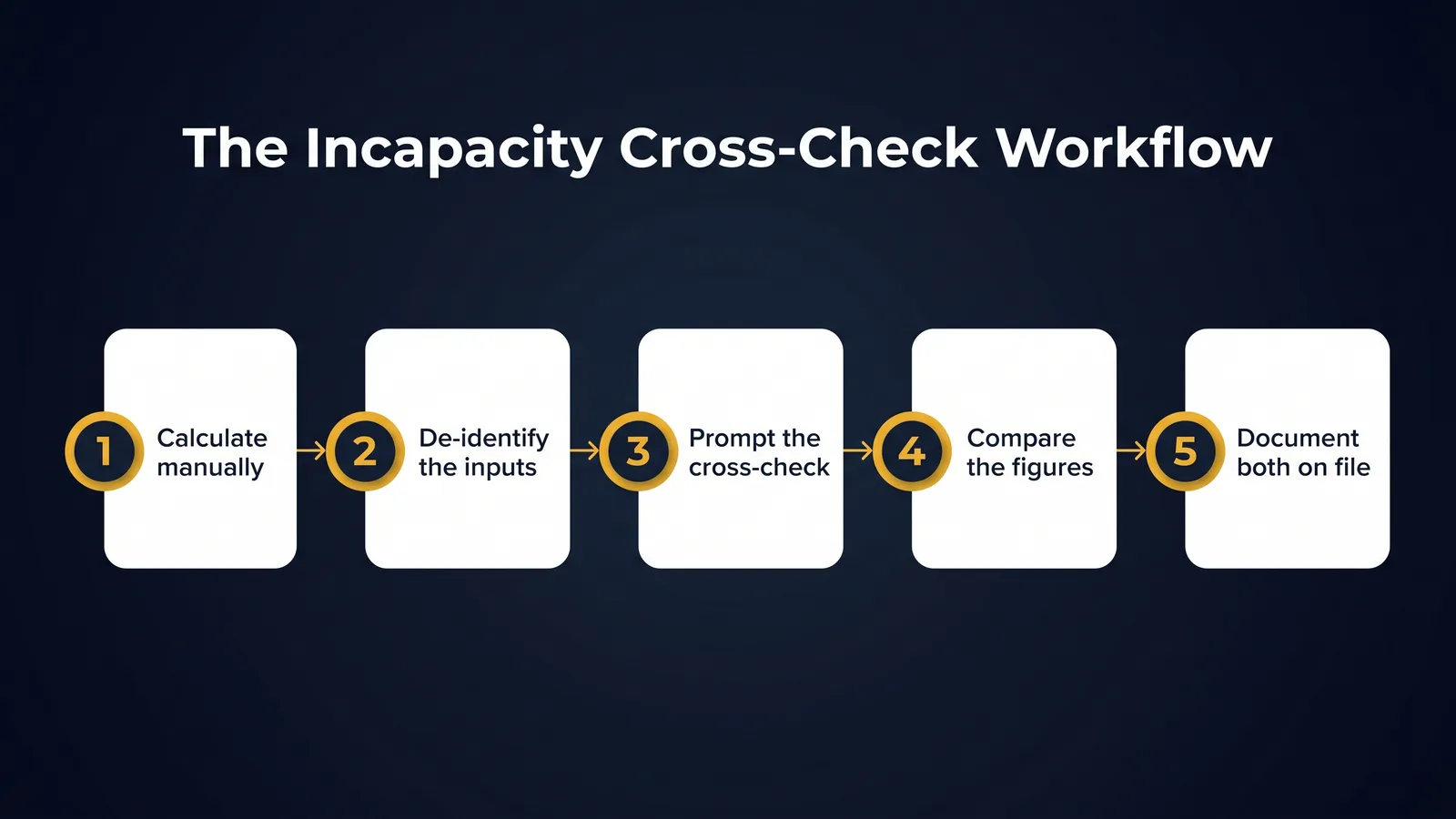
Step one. Calculate manually. The case manager prepares the section 19 calculation in the usual way. Normal weekly earnings under section 8. Actual earnings. The prescribed amounts. The applicable statutory percentages. The relevant adjustments. The result is the calculated incapacity figure.
Step two. De-identify the inputs. Replace claimant identifiers with placeholders before any AI involvement, applying the de-identification toolkit for case managers. The figures are what matter for the cross-check, not the names.
Step three. Prompt the cross-check. Give the AI tool the de-identified inputs, the statutory framework, and ask it to compute the section 19 figure step by step. The prompt is structured. It names the section, sets out the inputs, and asks for the result with workings shown.
Step four. Compare the figures. Two figures now exist. The case manager's figure and the AI cross-check figure. There are three possible outcomes.
- The figures match. The case manager's calculation is more likely to be correct. Proceed with the manual figure.
- The figures differ in a small way. Identify the source of the difference. Usually one figure has a rounding or interpretation error. Resolve, then proceed.
- The figures differ substantially. Stop. Re-examine the inputs and the calculation logic. Do not rely on either figure until the source of the discrepancy is identified.
Step five. Document both figures on file. A brief file note records that the manual calculation was cross-checked against an AI tool, that the figures matched (or that any discrepancy was resolved), and that the manual figure is the authoritative one. This is a one-paragraph note. It is also a defensible record.
De-identification callout. Any text used in the AI cross-check, including the inputs, the prompt, and the discussion of the result, must be in placeholder form. The AI tool sees [CLAIMANT_NAME], [CLAIM_NUMBER], [DATE_OF_INJURY], [INJURY_DATE], the figures, and the statutory framework. It does not see anything that could identify the claimant.
What errors does the AI cross-check catch?
In practice, the cross-check finds three classes of error most often.
Transposition errors. Numbers entered in the wrong order, decimal points in the wrong place, or figures pulled from the wrong column of a wage record.
Statutory interpretation errors. Most often these involve the interaction of section 8 normal weekly earnings with allowances or shift loadings, or the application of the prescribed amounts in the relevant year, both of which move on 1 July, per Comcare's guidance on calculating normal weekly earnings.
Sequencing errors. The order in which adjustments are applied matters, particularly around the point where a calculation crosses the 45-week threshold and the section 19(3) adjustment percentage begins to apply. The AI cross-check often surfaces sequencing differences that, although small in dollar terms, are meaningful for the legal correctness of the determination.
What can the AI cross-check not detect?
The cross-check has limits. The case manager remains responsible for these.
Inputs that are wrong on file. If the wage record itself is wrong, the AI cross-check will not detect it. It will compute the wrong answer correctly. The case manager must confirm the inputs against the source documents.
Legal characterisation errors. Whether a particular payment is part of normal weekly earnings, whether a redemption interacts with weekly compensation, whether an entitlement period is correctly defined. These are legal questions, not arithmetic ones.
Choice of facts. Any time the case manager has to decide which of several available figures to use, the AI cannot resolve the choice. The AI computes given inputs. The case manager picks the inputs.
A worked example
A case manager is recalculating incapacity benefits for [CLAIMANT_NAME], claim [CLAIM_NUMBER], following a vocational assessment. The case manager:
- Calculates the section 19 figure manually using the wage record on file, the prescribed amounts for the relevant year, and the assessed actual earnings capacity.
- De-identifies the figures and the framework into a working prompt.
- Asks the AI tool to compute the section 19 figure given the inputs, with workings.
- Compares the two figures. They are within rounding tolerance.
- Records on file that both figures were calculated and that the manual figure is the authoritative one.
The case manager owns the figure. The AI confirmed it.
Risks and guardrails
Three risks specific to this workflow.
Over-reliance on the cross-check. The risk is that case managers begin to lean on the AI figure as authoritative because it is faster. The control is the explicit rule that the manual figure is the authoritative one, every time.
Hallucinated workings. The risk is that the AI produces plausible-looking workings that contain a subtle interpretation error. The control is to scan the workings, not just the final figure, particularly where the AI figure differs from the manual one.
Incorrect prompt framing. The risk is that the AI is prompted with the wrong statutory framework and produces a confidently wrong result. The control is a standardised prompt template that is reviewed periodically and updated as the prescribed amounts change.
For practitioners
- Run your section 19 calculation manually before any AI involvement
- Use AI to find arithmetic discrepancies, not to produce the figure
- Confirm normal weekly earnings are correctly characterised
- Document both the manual and the AI cross-check on file
- Treat any AI flagged discrepancy as a prompt to slow down
For governance leads
- Embed the cross-check workflow in your section 19 procedure
- Audit a sample of cross-checked calculations each quarter
- Brief delegates on what AI cross-checks can and cannot detect
- Maintain a register of recurring discrepancy patterns
- Train your team to redo, not just retrieve, AI flagged figures
Variations on the workflow
The five-step workflow is the spine. Three useful variations apply to specific situations.
Variation one. The retrospective audit. A team running the workflow can periodically pull a sample of historical section 19 calculations and run them through the cross-check. This is a quality assurance exercise, not a determination workflow. Where discrepancies appear, the team can review whether any historical determinations need to be revisited. Where the discrepancy touches a backdated determination, reconciling incapacity against payroll and leave records needs three ledgers, not one, because those records do not carry the same legal meaning.
Variation two. The complex calculation. Where a calculation involves multiple periods, multiple adjustments, or interaction with redemption or lump sum elements, the cross-check is most valuable. The case manager runs the calculation in stages, and the AI cross-checks each stage. The discipline of staged cross-checking surfaces interaction errors that a single end-to-end check might miss.
Variation three. The training context. New case managers benefit from learning section 19 calculations with the cross-check workflow built in. The cross-check makes errors visible quickly, which accelerates learning. The senior case manager remains the authoritative reviewer; the AI is a second pair of eyes that operates between the trainee and the senior.
What this is not
Three things the cross-check workflow does not do, that bear stating clearly.
It does not replace the senior reviewer. Where a calculation is complex enough to need senior review, the cross-check is a complement to senior review, not a substitute.
It does not certify correctness. Two figures matching does not prove correctness. They might both be wrong if the inputs are wrong. The case manager remains responsible for the inputs.
It does not reduce the case manager's responsibility. The workflow adds a layer of assurance. It does not move responsibility off the case manager. The figure on the determination is the case manager's figure.
A note on prompt design
The cross-check is only as good as the prompt. Three principles apply.
Be explicit about the statutory framework. Name section 19, name section 8, name the prescribed amounts for the relevant year. Do not assume the AI knows. Provide the framework.
Be explicit about the inputs. List the inputs as discrete fields rather than burying them in narrative. The AI reads structured inputs more reliably than narrative ones.
Be explicit about the format you want. Ask for the workings step by step. Ask for the final figure clearly stated. Asking for "show your work" is a meaningful difference in how the AI responds.
A good prompt template for section 19 cross-checks runs to about 200 words. It is reusable across calculations, and a WC prompt library stays safe only when human review comes first. Once a team has a working template, the cross-check itself is fast. The greatest risk to a reusable template is that it goes stale exactly where the prescribed amounts and the section 19(3) percentages change each 1 July; a stale statutory rate reference is a documented AI failure mode worth building a review date around.
What the file note records
The file note for a section 19 calculation that has been cross-checked records four things. The case manager calculated the figure manually. The case manager cross-checked the figure against an AI tool with de-identified inputs. The figures matched (or any discrepancy was resolved). The manual figure is the authoritative one and the basis for the determination.
Four short sentences. One paragraph. Defensible at audit, defensible at review, and aligned with the SRC Act delegation requirements.
The file note is not optional. It is the record that ties the calculation to the case manager's judgement and demonstrates the human-in-the-loop discipline. A determination without the file note is a determination that relies on the case manager's memory of the workflow at any subsequent review. A determination with the file note is a determination that documents the workflow contemporaneously.
The bottom line
Section 19 is one of the few places in workers compensation where AI's strengths line up neatly with the human task. Arithmetic, given inputs, with statutory rules. The cross-check workflow puts AI to work as the second pair of eyes that scheme operators have always wanted but rarely budgeted for.
Calculate first. Cross-check second. Trust the manual figure.
---
Content disclaimer: This article is for general educational purposes only and does not constitute legal advice, liability determination guidance, or a substitute for professional judgement. Workers compensation decisions must be made by appropriately qualified and authorised persons under the Safety, Rehabilitation and Compensation Act 1988. All AI outputs described in this article require human review before use in any claims management context.
Do this Monday
- Run your next incapacity calculation the way you always have, by hand, and write the figure down before any AI tool is opened.
- Replace the claimant identifiers with placeholders, so the tool sees the figures and the statutory framework and nothing that could identify the claimant.
- Name the statutory framework and the prescribed amounts in the prompt rather than assuming the tool knows them, and ask for the workings step by step.
- Compare the two figures, and treat a divergence as a reason to slow down rather than a reason to pick the faster answer.
- Read the workings, not only the final figure, because plausible-looking workings can carry a quiet interpretation error.
- Write the file note in one paragraph: calculated manually, cross-checked against an AI tool on de-identified inputs, figures matched or the discrepancy resolved, manual figure authoritative.
- Save the prompt as a reusable template and diarise a review of it, because the prescribed amounts change and the template goes stale with them.
- Start a register of the discrepancy patterns the cross-check keeps surfacing, so the team learns from them rather than one case manager.
TheAICommand. Intelligence, At Your Command.