
The file opens, but a relationship has disappeared
A claims team receives a spreadsheet exported from a system. The rows look complete and the headings are familiar. During a quality review, a referenced attachment cannot be located. Another field is missing entirely. The export has succeeded as a file operation, but its suitability for the intended task remains unresolved.
This article uses a fictional Australian Government agency working in a Comcare claims context. It examines export fidelity, meaning whether specified information and relationships survive a defined transfer. It does not assess liability, clinical evidence, rehabilitation suitability or entitlement. Those decisions remain outside the model's role.
The distinction is practical. A file can preserve the current status of a claim without preserving every earlier status. It can contain an attachment identifier without containing the attachment itself. It can display a date correctly while losing the explanation of what event that date represents. The test must identify which of these features the receiving task needs.
Begin with wholly constructed records. Use the placeholders [CLAIMANT_NAME], [CLAIM_NUMBER], [DATE_OF_BIRTH] and [TREATING_PRACTITIONER] where those fields appear. Do not copy a real case and change its name. The purpose is to exercise the export method without bringing a person's claim into the drafting or demonstration environment.
Read the report definition before judging completeness
An export is a representation designed for a particular purpose. Its report specification establishes which fields it includes and how they are described. Comparing it with an imagined complete claim record can produce both false alarms and missed omissions. First establish what the report promises, then what the receiving workflow requires.
Comcare's Report 66 documentation describes a CSV export and provides field definitions. Its Liability Status description identifies a current value, rather than a complete status history. That is a source-specific reason to distinguish a snapshot from a chronology. It is not evidence of a defect in the report. Report 66's published field list contains no document or attachment fields, so the attachment relationships later in this article are constructed for teaching and do not describe that report. Source: Comcare Report 66
The same documentation distinguishes liability status, claim status and a status date. Do not collapse fields with similar names into a generic status column. A receiving analyst needs to know which concept each field represents before comparing values or interpreting a change. A model's preferred terminology cannot replace the source definition.
Record the report name, selected parameters and extraction time. Separately record the date or time the underlying data represents. Comcare states that CIS is updated daily with data as at close of business on the day before, so the extraction date and the data-as-at date can differ. Comcare's CIS information describes report access and export arrangements; the available report and format depend on the context. Recheck the documentation for the actual task instead of generalising from one export. Source: Comcare CIS information
Define the receiving task in plain language
Ask what someone needs to do with the exported information. Preparing a list of current cases is different from reconstructing a sequence of decisions or checking attachment availability. The receiving task determines the acceptance criteria. A missing history field may be irrelevant to one task and disqualifying for another.
Write those criteria before examining a model's comparison. Otherwise, a plausible summary can influence what the reviewer decides should have been preserved. The criteria need to identify required fields, meaningful relationships and permitted transformations. Include the expected treatment of empty values and unsupported content types.
A permitted transformation might change a display format while preserving the underlying date and meaning. An impermissible transformation might replace an unknown value with a default that looks confirmed. Whether a change is acceptable depends on the agreed purpose. Keep that decision with the claims or systems owner.
Do not use the exercise to create a universal claims-export standard. Different systems, report specifications and access roles may expose different information. The reusable checklist is a starting point for a scoped test. It becomes an acceptance specification only after the responsible people confirm its applicability.
Build a small source fixture with an answer key
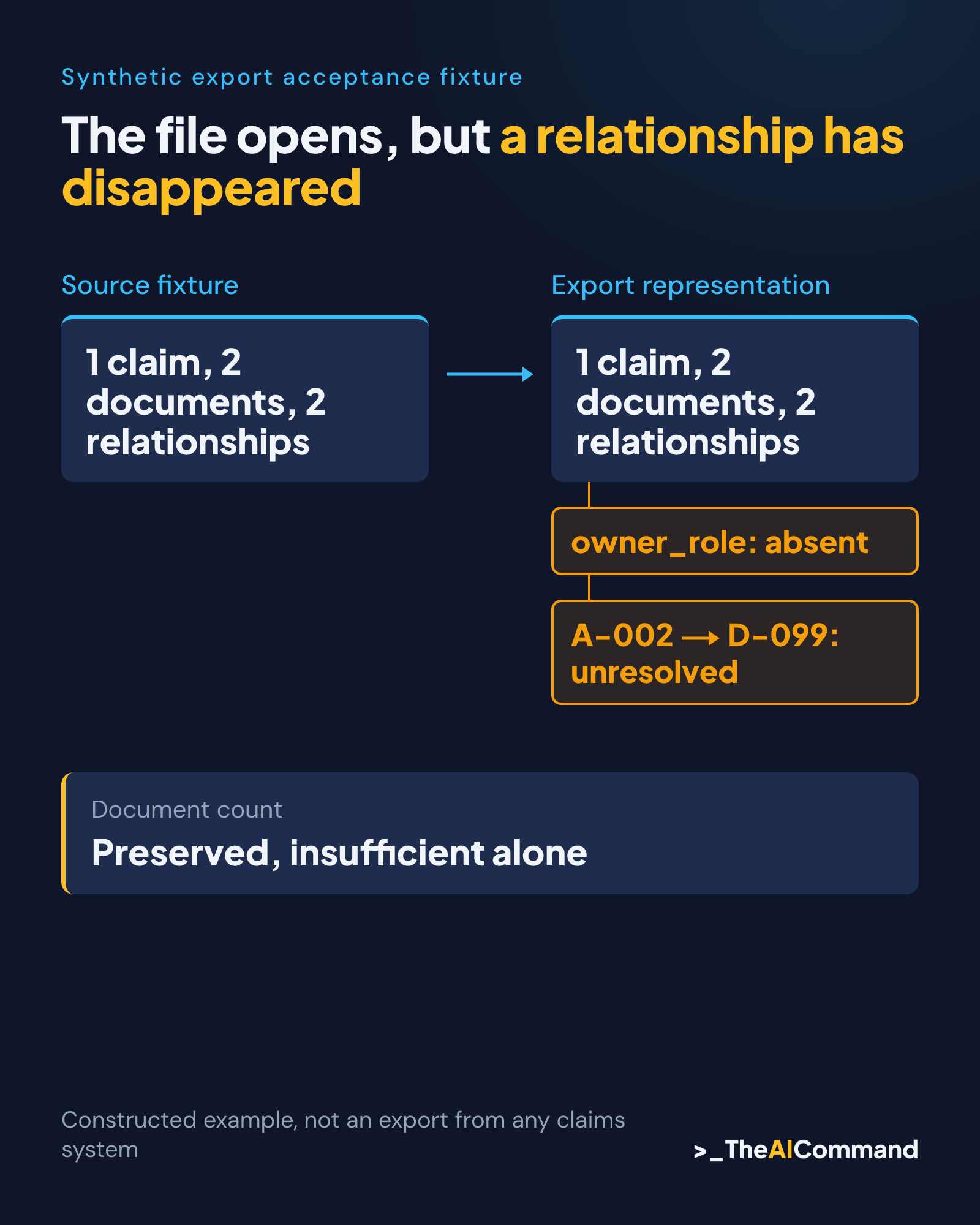
The constructed fixture has one claim record, two document records and two attachment relationships. The claim record uses a neutral source ID, C-001, alongside the required claimant placeholders. Its operational status is a fictional workflow label, not a liability determination. The fixture also contains an owner-role field and an explicit data-as-at date.
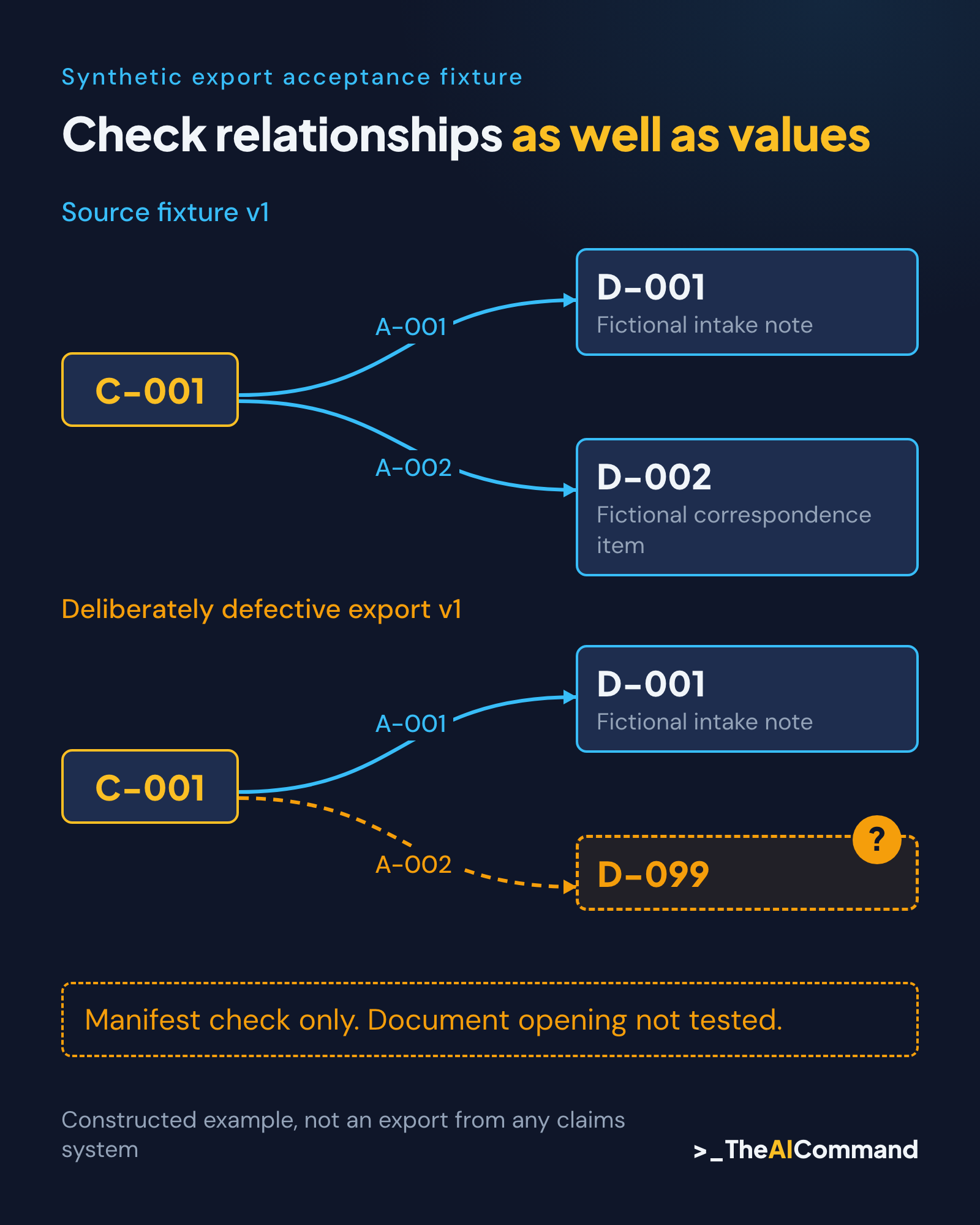
Document D-001 is a fictional intake note and D-002 is a fictional correspondence item. Each has its own ID, title and date. Relationship A-001 connects C-001 to D-001. Relationship A-002 connects C-001 to D-002. The example contains no clinical narrative or entitlement conclusion because neither is needed to test the relationships.
The answer key states that both document IDs must remain resolvable and the owner-role field must remain present for this particular receiving task. It also states that the data-as-at date must retain its meaning. These requirements are constructed test criteria, not claims about what a particular production report exports.
Now create a second, deliberately defective representation. Remove the owner-role field and change the target of A-002 from D-002 to D-099. Leave the claim row and both document rows present. The row counts can therefore look reassuring while one required field and one relationship fail the agreed criteria.
This is a teaching fixture, not an observed export from Comcare or another production platform. The defect locations are known because the example was designed that way. The exercise demonstrates how to specify and compare the structures. It does not demonstrate a vendor's performance or establish the completeness of a real claims system.
Give AI a comparison task it can explain
Supply the source fixture, defective representation and answer key as separately labelled inputs. Ask the model to compare them by stable IDs. For each criterion, require the source value or relationship, the exported representation, a difference description and the evidence location. Missing information must remain missing.
The expected output identifies the absent owner-role field and the unresolved D-099 reference. It also records the relationships and fields that match within the supplied fixture. A useful response distinguishes missing, changed, preserved and not assessed. It does not produce a single overall assurance score that obscures the failed requirements.
Do not ask the model to repair the export as part of the comparison. Replacing D-099 with D-002 would make the example look consistent, but it would erase the evidence of the failure. The reviewer needs to understand what happened before deciding whether the export process or downstream handling requires correction.
Keep the original fixture and observed comparison together. If an authorised systems team later changes the export, rerun the same test against the new version and retain both results. The comparison becomes useful evidence of a specific change only when the inputs, method and output versions are identifiable.
Check relationships as well as values
A field comparison asks whether a value survived. A relationship check asks whether the reference still points to the intended object. Both matter. An attachment title can remain visible while the underlying link is broken or points to the wrong document. Counting titles would not expose that difference.
For a real authorised test, define what resolving a reference means. It may require opening a document through a supported application, checking an exported package or confirming a stable identifier against a manifest. A text match alone may be insufficient. Do not claim that a link was tested when only its characters were compared.
Also check the effect of duplication. If two exported rows share an identifier, a downstream process may attach information to the wrong record or discard one row. The correct handling depends on the specification. The model can flag duplicate IDs, but the owner decides whether they represent a valid relationship or an error.
Preserve distinctions between an absent field and an empty field. In the constructed example, owner role is absent from the exported schema. That is different from an owner-role column containing a blank value. The remediation and the impact on the receiving process may differ, so the exception record must describe the actual condition.
Keep the comparison outside claims judgement
A status mismatch can be an export issue, a timing difference or a legitimate update between snapshots. The comparison alone cannot decide which explanation applies. Record the two values, their source times and the question for the responsible role. Do not reinterpret the claim to make the records agree.
Likewise, a missing attachment does not prove that the underlying evidence never existed. It may be outside the report's scope, inaccessible to the current role or omitted during packaging. A reviewer must establish the cause through the appropriate system and records process. The model's role is to preserve the discrepancy accurately.
Avoid importing statutory assumptions into a technical checklist. This article sets no retention period, claims deadline or evidentiary threshold. If the receiving task depends on one, the responsible reviewer must verify the applicable current authority. The synthetic fixture should exercise that verified requirement without turning a model-generated statement into the source of law.
Keep access boundaries intact during investigation. A broken reference does not authorise a wider search through personal records. Escalate through the approved route with the minimum information needed to identify the issue. The test pack can use role labels and neutral IDs while the authorised team handles any real-system investigation separately.
Write an exception record that supports action
For each discrepancy, record the criterion, source reference, exported reference, observed difference and affected use. Name an owner role and a proposed next check. Distinguish the observation from a suspected cause. "D-099 is not in the supplied document manifest" is an observation; "the exporter lost a document" is a causal claim requiring more evidence.
Assign impact in relation to the receiving task. The missing owner role prevents a fictional routing step in this example. The broken document relationship prevents the second attachment from being resolved against the supplied manifest. Neither finding is presented as an assessment of the merits or management of a person's claim.
A useful disposition can be hold for this use, acceptable with a documented limitation, or retest after correction. The authorised owner chooses it. The model can organise the options against supplied criteria, but it must not approve a real export for operational use merely because most fields matched.
Retain the test's limits beside its result. One synthetic claim with two attachments is a narrow structural test. It says nothing about performance at scale, every file type or all historical combinations. Additional scenarios are needed when the intended use introduces different risks. Expand the fixture deliberately rather than treating a small passing sample as universal assurance.
Repeat the test when the export changes
Version the fixture, criteria and comparison method together. A change to a column heading, report option or attachment packaging method may affect the receiving workflow even if the export still opens. Keep the previous result so the team can see whether a new difference appeared or an old one was resolved.
The companion article explains how to construct more varied test inputs. Use that approach to add a missing value, duplicate identifier or conflicting date when those cases matter. Each addition needs an expected result established independently of the tool being tested. Otherwise, the same mistaken assumption can appear in both input and answer.
Start with one export purpose and a small, explicit contract. Check what was preserved, what changed and what was not assessed. The useful conclusion is bounded: this representation meets, or does not meet, these criteria for this use. That is stronger than calling a file complete because it opens.
Reusable materials
Synthetic export acceptance fixture
Constructed public-sector Comcare-context example. Not a CIS export, real claim, clinical record or production test. Operational labels below do not determine liability or entitlement.
Source fixture v1
Deliberately defective export v1
All source values and rows retained except:
- The
owner_rolefield is omitted entirely. - Relationship A-002 points to D-099, which is absent from the two-document manifest.
No files or live links are attached. Reference resolution here means membership in the supplied manifest, not successful document opening.
Answer key and illustrative comparison
Prompt
Exception template
Related reading
- From a Pile of PDFs to a Brief You Can Check
- Build a WC Evidence Chronology Tool Without Outsourcing Judgement
- Create Synthetic Test Data for a Real Workflow
References
- Comcare, 66. Customer data report - claim detail (CIS report), accessed 24 October 2026: https://www.comcare.gov.au/claims/employer-information/access-claims-information/report-66
- Comcare, Access your claims performance information, accessed 24 October 2026: https://www.comcare.gov.au/claims/employer-information/access-claims-information
TheAICommand. Intelligence, At Your Command.