
Generic AI output is a context problem, not a prompt problem, and the fix is a governed knowledge spine that grounds the model in real organisational knowledge. Ask a frontier model for an operational risk briefing and it will write something fluent, confident and almost useless. It does not know your control taxonomy, your risk appetite language, your recent issue themes or the phrases that make an executive committee switch off. So it reaches for the average of everything it has ever read. The result is polished and generic, which in professional work is another word for wrong.
The fix is rarely a cleverer prompt. The fix is the knowledge sitting behind the prompt. When organisational knowledge is scattered across SharePoint folders, old slide decks, inboxes, chat threads and the memory of one experienced person about to take leave, the model has nothing solid to stand on. This article sets out how to build the layer that fixes that: a governed enterprise knowledge spine.
General guidance and education only. This is not legal, compliance, privacy or professional advice. Verify any approach with the relevant people in your own organisation before you act on it.
A useful way to frame the choice: AI works well as a structure engine, a critique partner and a drafting accelerator, while the source evidence, the professional judgement and the accountable approval stay with named people. The knowledge spine is what feeds the first three without surrendering the last three. That line is the difference between adoption that holds up under scrutiny and automation that only looks impressive in a demo.
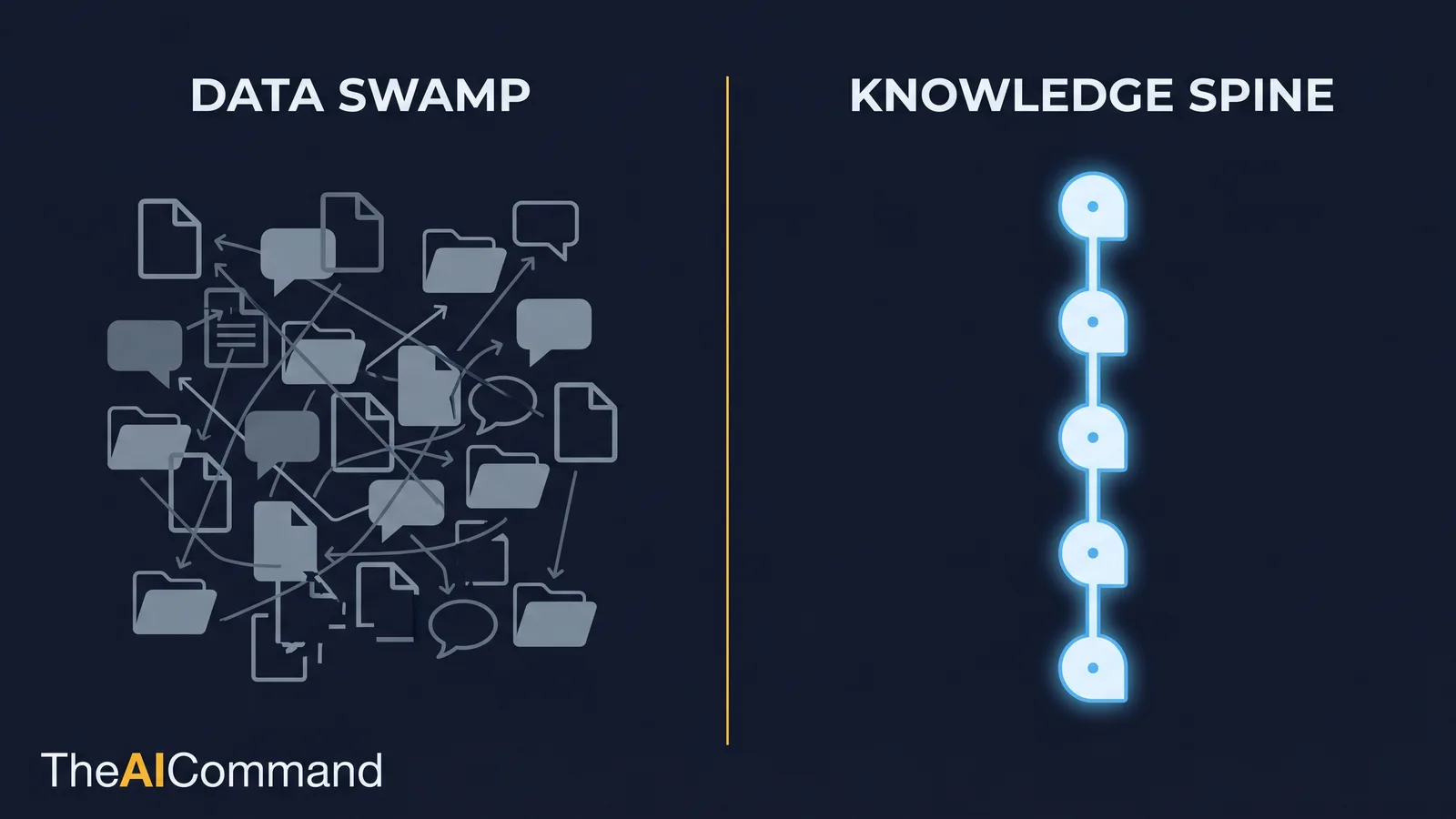
What is a knowledge spine, and how does it differ from a data swamp?
Most organisations already have a data swamp. It is the accumulated sediment of a decade of documents: dozens of near-duplicate policy versions, a "final_v3_REVISED" naming convention, decks that contradict the SOPs they were meant to summarise, and tacit knowledge that exists only as habit. A swamp is searchable in theory and unusable in practice. Point a retrieval system at it and you get confident answers grounded in stale, conflicting or sensitive material.
A knowledge spine is the opposite. It is a deliberately curated, owned and governed body of knowledge that an AI workflow is permitted to draw on. "Knowledge spine" is the term TheAICommand uses for this layer because it does the job a spine does: it holds the structure upright, carries the signal between parts, and protects the soft tissue. It is not the whole organisation digitised. It is the small, trusted core that makes the difference between generic output and grounded output.
The spine has a specific shape. It is built from atomic notes rather than long documents. Every note carries metadata about its owner, source, sensitivity and freshness. Notes link to the things they relate to, so a policy connects to the SOP it governs and the lesson that last changed it. Retrieval is bounded by zone, so an HR prompt cannot quietly pull claim-level medical detail. And there is a loop that turns reviewer corrections back into better context. The rest of this article is how to build each of those parts.
What a personal vault teaches, and where it stops
Personal knowledge management offers a clean illustration of the underlying pattern, and Obsidian is the most legible example. Its documentation describes internal links between notes, a graph view of how notes connect, a Canvas for laying out relationships visually and structured properties for attaching metadata to each note [1][2][3][4]. The lesson worth borrowing is the habit, not the brand: knowledge becomes more useful when notes are atomic, linked, searchable and reusable.
The mistake is to stop there. A personal vault is one illustrative pattern for one person's thinking. An enterprise spine is a governed system with owners, sensitivity rules, retrieval boundaries and an audit trail. You can store the spine in Git, in SharePoint, in a knowledge platform or in a retrieval pipeline. The storage choice matters far less than the discipline: context must be inspectable before it becomes retrievable. Borrow the vault's atomic-note habit and drop the assumption that one note app is the architecture.
This article is the knowledge layer of a small set. If you want the tools that sit on top of this layer, see the companion guides on setting up a Claude workspace and a ChatGPT and Codex workspace. Those guides cover the assistant; this one covers the knowledge it stands on. A polished workspace pointed at a data swamp still produces generic output.
The domain pack: the unit you actually build
You do not build a spine by mapping the whole enterprise. You build it one domain pack at a time. A domain pack is a curated bundle for a single business area: the notes, policies, approved examples, decision rules, lessons and prompt patterns that area needs, plus the metadata and retrieval boundary that keep it safe. It is small enough to govern and rich enough to change model output.
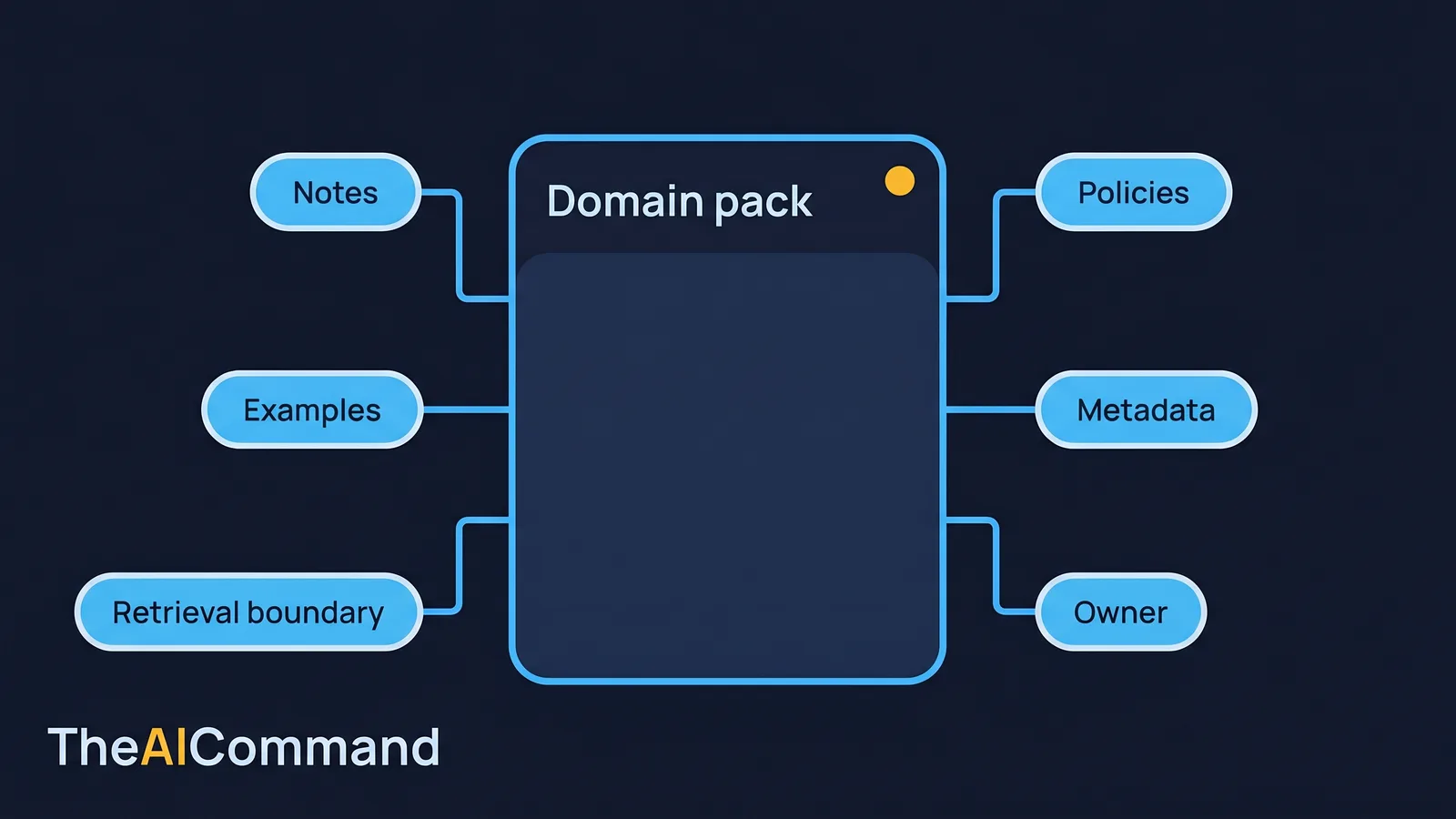
A good domain pack has a named owner, a defined sensitivity classification, an explicit list of permitted uses and an explicit list of excluded content. It is built from readable formats such as Markdown, plain text and CSV, because a human can inspect them and a retrieval system can chunk them cleanly. It carries backlinks so relationships are visible. And it has a review cadence, so freshness is a property of the system rather than a hope.
Designing a domain pack is the first prompt in the stack, and it is deliberately the narrowest. Narrow the task before you generate anything.
Generic versus grounded: the same prompt, two answers
The clearest way to see what a domain pack does is to run the same request with and without it. Take a workers compensation example. A case manager asks a model to summarise the next steps after a liability decision.
Without a domain pack, the model produces something like this:
The injured worker should be informed of the decision in writing. The organisation should review the medical evidence and ensure the claim is managed in line with relevant legislation. Consider whether further information is needed and keep accurate records throughout the process.
It is not wrong. It is also not worth the cost of running it. It names no Act, no section, no timeframe, no document, no role. It is the average of every claims-management article ever written.
Now give the model a domain pack containing the relevant SRC Act 1988 obligations, the organisation's de-identification rule, its standard determination templates, the review and notification timeframes, and a set of approved example letters. The same prompt returns something closer to this:
Issue the section 14 liability determination in writing, stating the decision and the reasons, and include the worker's reconsideration rights under section 62. Confirm the medical evidence on file supports the decision under the relevant SRC Act provisions before sending. Where the file is incomplete, list the missing evidence rather than asserting a conclusion. Apply the de-identification rule before any claim detail is placed into a prompt: remove names, claim numbers and dates of birth, and use the approved placeholders.
The second answer is grounded. It uses the right provisions, names the right document, surfaces the right rights, refuses to invent comfort where evidence is missing and respects the de-identification boundary. The model did not become more capable. It was given something solid to stand on. That is the entire point of the spine.
Two important caveats. First, the grounded output is still a draft for a human to check, not a determination. Second, retrieval improves grounding but does not guarantee it. If the source notes are wrong, stale or poorly prepared, the model will ground its answer in the wrong thing with the same confidence. Grounding raises the floor; it does not remove the reviewer, a point we make in full in ground the model, do not trust its memory.
The CPS 230 worked example
The lead enterprise example is GRC, because it shows the spine handling regulatory language where precision matters. A compliance team asks a model to draft an operational risk briefing for the board.
Without context, the model returns a tidy, generic summary of risks, controls and assurance that could apply to any regulated firm. With a domain pack, it receives the organisation's control taxonomy, its obligations under APRA's CPS 230 Operational Risk Management standard, recent internal issue themes, the approved tone for board papers, the risk appetite language and a set of examples of board-ready summaries that landed well [5][6]. The output changes immediately. It uses the organisation's actual control categories, names the evidence types the board expects, frames the right governance questions and, crucially, flags missing evidence rather than papering over it.
CPS 230 took effect on 1 July 2025, with further amendments commencing 1 July 2026, and it raises the bar on how regulated entities identify, manage and monitor operational risk, including risk from service providers [5][6]. A model writing about it from general training will miss the specifics. A model grounded in a current, owned domain pack will not, provided the pack itself is kept current. The governance value is in the spine, not the wording.
Over time, the reviewers add lessons: which phrases confused the committee, which controls were over-claimed, which evidence types were thin. The briefing gets better because the knowledge base got better. That compounding is the real enterprise advantage, and it is the opposite of rewriting the same prompt every quarter.
The HR domain pack
The third audience is HR, and it shows the spine handling a different sensitivity profile. An HR generalist asks a model to interpret a policy clause for a manager facing a tricky situation.
Without context, the model offers generic good-practice language about fairness, consultation and documentation. With an HR domain pack, it receives the actual policy text, the related procedure, the approved interpretation notes, the escalation triggers and a set of worked examples of past interpretations that were endorsed. The output now reflects the organisation's actual policy rather than a generic template, and it points to the procedure and escalation path that apply.
The sensitivity rules differ from the WC and GRC packs. HR knowledge sits close to personal information and employee records. Australia's privacy regime, including the Australian Privacy Principles, sets expectations for how personal information is handled, and there are specific considerations such as the employee records exemption that change what applies and when [7][8]. The HR domain pack should carry policy and procedure context while deliberately excluding individual employee records and case-specific personal information from general retrieval. The same architecture, a different boundary.
How do I control what each AI prompt can retrieve?
The single most important design decision in a spine is what each prompt is allowed to retrieve. That decision is a form of context engineering, choosing what the model is allowed to see. Not every interaction needs every note. An HR prompt may need employment-process context but not claim-level medical detail. A GRC prompt may need control language but not confidential audit evidence. A WC prompt may need legislative and procedural context but, if it ever touches a real file, must respect strict de-identification before any claim detail enters a prompt at all.
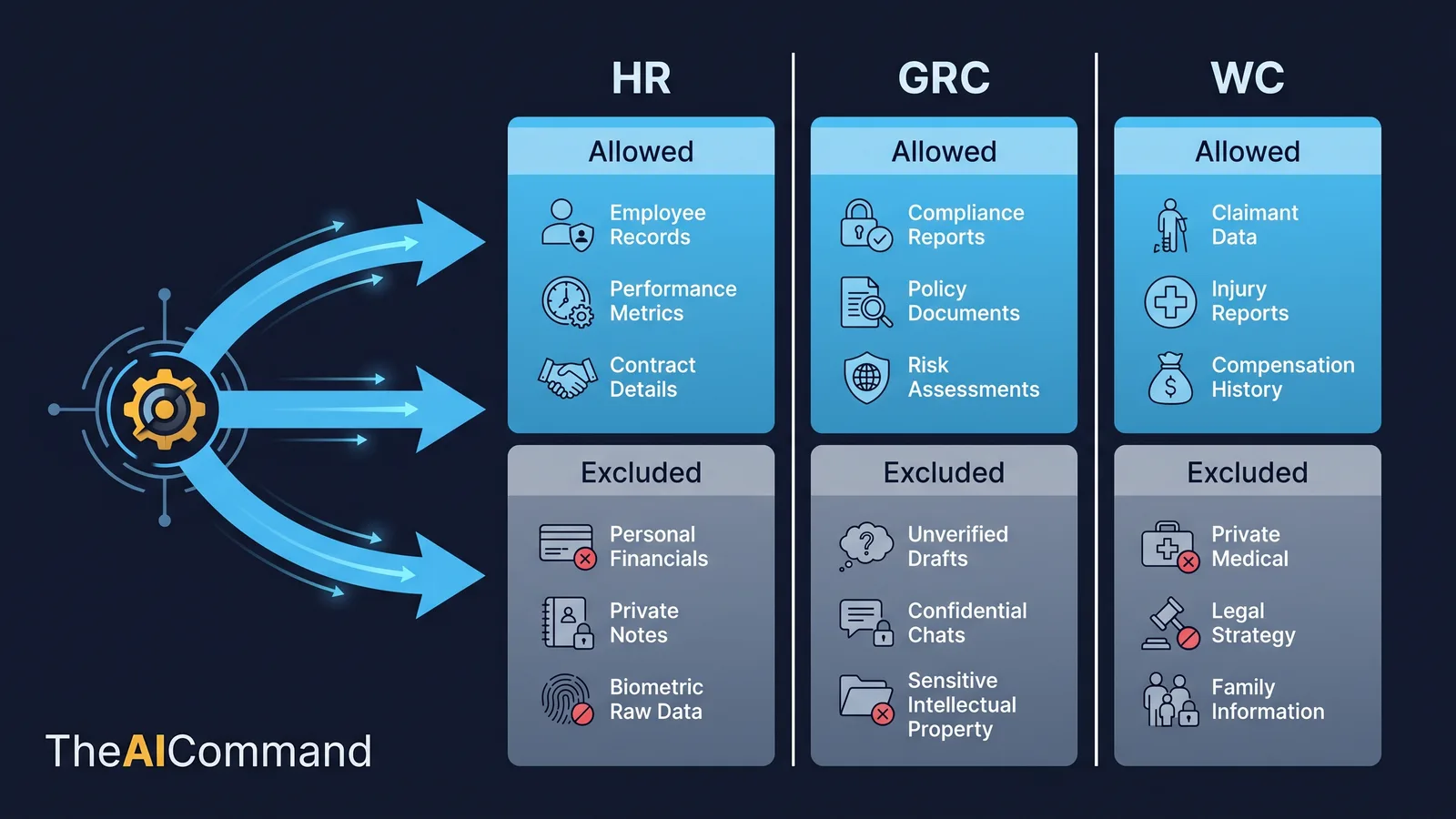
These boundaries are not just good manners; they are how the spine stays aligned with recognised governance expectations. The NIST AI Risk Management Framework organises AI governance around four functions, Govern, Map, Measure and Manage, and a retrieval boundary is a concrete way to exercise the Govern and Manage functions over what context a model can use [9]. ISO/IEC 42001:2023, the AI management system standard, frames AI as something to be managed through a deliberate system rather than ad hoc adoption, which is exactly what a bounded spine provides [10]. And where information security obligations apply, such as APRA's CPS 234 Information Security standard, retrieval boundaries are part of protecting sensitive information assets from inappropriate access [11]. The Australian Privacy Principles, including APP 11 on the security of personal information, reinforce that personal information must be protected from misuse and unauthorised access, which a retrieval boundary directly supports [7][12].
The boundary belongs in the design, not in someone's head. Here is the prompt that produces it.
A worked retrieval-boundary table makes the principle concrete across the three audiences.
How retrieval actually works, in plain terms
For readers who are not technical, it helps to know what "retrieval" means before deciding how to govern it. The plumbing behind a grounded answer is simpler than the jargon suggests, and our plain-English guide to how AI reads your documents covers it end to end.
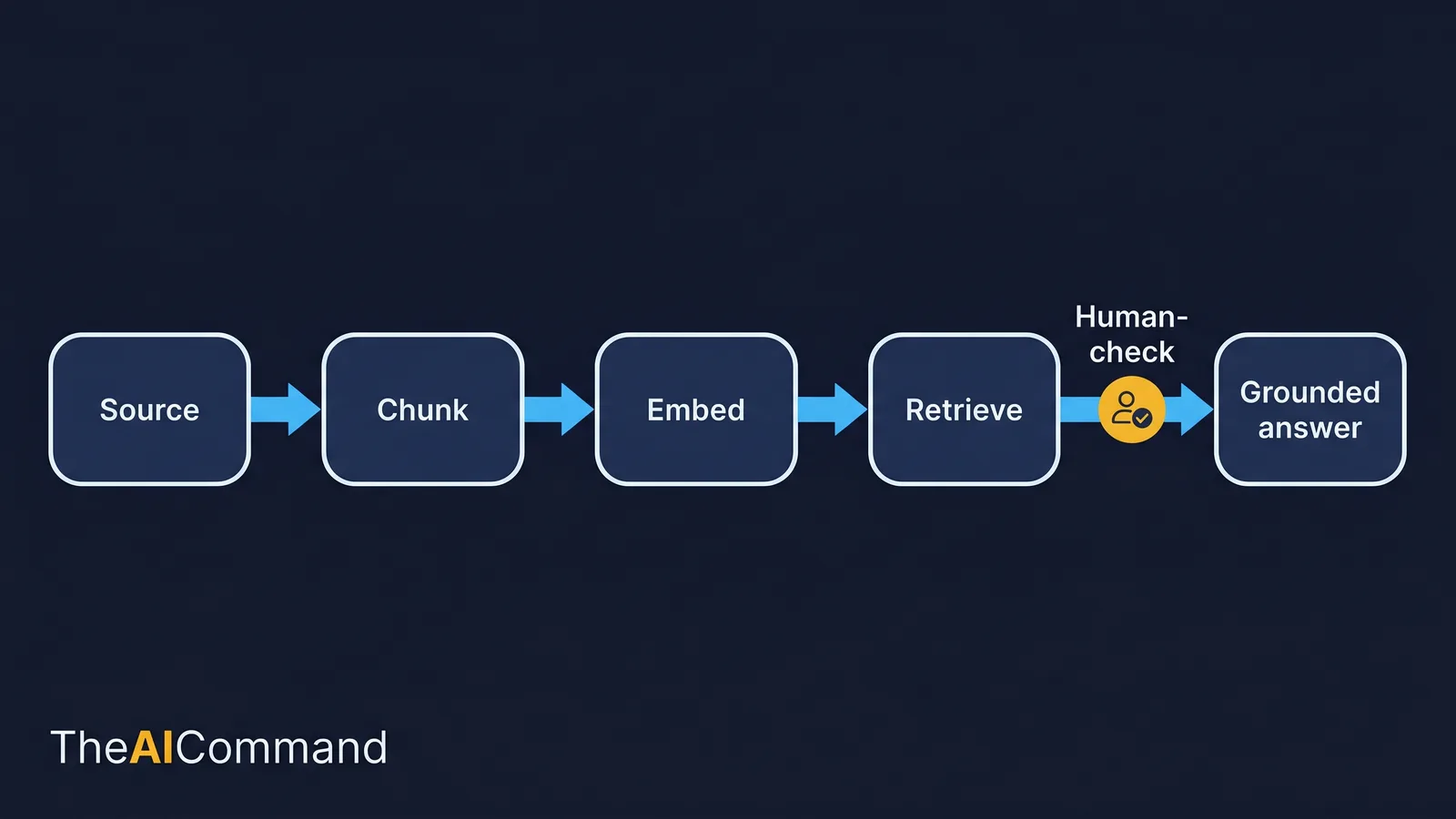
Start with a source: an approved note in the domain pack, say a CPS 230 obligation summary. The system breaks that source into chunks, small passages a few sentences long, because a model works better with focused fragments than whole documents. Each chunk is turned into an embedding, a numeric representation of its meaning, so the system can compare passages by what they mean rather than by exact words. When a user asks a question, the system finds the chunks whose meaning is closest to the question and retrieves them. Those retrieved chunks are placed alongside the question, and the model writes a grounded answer that draws on them. Then a human checks it before anything is used.
That pattern is Retrieval-Augmented Generation, and the standard reference survey is Gao et al., which lays out how retrieval, generation and augmentation fit together and why source preparation and evaluation drive quality [13]. A more recent line of work, GraphRAG from Edge et al., adds a graph structure over the sources so the system can reason across connected facts rather than isolated chunks, which helps with questions that need a global view of a knowledge base [14][15]. The detail to carry away is not the architecture. It is that retrieval quality depends on how well the sources were prepared, chunked and evaluated. A swamp produces swamp answers; a spine produces spine answers. Open-source tooling such as LlamaIndex and LangChain exists to wire these pipelines together, but the tooling is downstream of the knowledge discipline, not a substitute for it [16][17].
The note that earns its place
A spine is only as good as its notes, and a good note is short, sourced and connected. Long documents make poor retrieval units because a single chunk drags in unrelated material. Atomic notes retrieve cleanly and review quickly.
Each note carries a small, consistent set of metadata. That metadata is what makes a note safe to retrieve, easy to govern and possible to keep fresh. The schema below is a sensible default; adapt the field names to your environment.
Different note types carry different bodies under that same metadata. A policy-rule note holds the rule, scope, exceptions, related SOPs and examples. A lesson note holds the original failure, the correction, the preferred future behaviour and the prompt or file it should change. A prompt-pattern note holds the task, the required context, the output format, the risk boundary and the review requirement. The discipline is identical; only the content differs.
The spine, layer by layer
The patterns borrowed from personal knowledge management map onto enterprise layers cleanly. The table below is the working reference for the whole architecture. Treat it as an artefact to copy into a planning document, not as decoration.
The learning loop that compounds
The reason a spine beats a one-off prompt library is that it learns. When a reviewer corrects an output, that correction is information about what the spine was missing. Capture it, and the next output improves. Discard it, and the team will make the same correction next quarter.
The loop is small. If the model misunderstood a term, update the glossary note. If it over-claimed a control, add a lesson note. If it used stale context, fix the review date and the underlying source. If it missed an example, add an approved example note. Corrected work becomes better context, and better context reduces future correction. Over a year, this is how an organisation builds a working memory of how it wants AI to behave, without trying to turn every employee into a prompt engineer.
The failure modes that ruin a spine
A spine fails in predictable ways, and naming them is the cheapest insurance you can buy.
- It becomes a data swamp by another name. More files is not more context. A spine that swallows everything has the same problem as the shared drive it replaced. Curate ruthlessly and keep the pilot small.
- Sensitive data leaks into general context. If retrieval boundaries are an afterthought, scale will surface medical, personal or confidential content where it does not belong. Design the boundary before the pack grows.
- Graph beauty is mistaken for usefulness. A pretty graph view proves nothing. A spine earns its keep when it changes what people can find, trust and reuse, not when it screenshots well.
- Stale knowledge becomes confident context. A note without a freshness rule and an owner will eventually feed the model an out-of-date answer, delivered with full confidence. Make review a property of every note.
A reliable governance habit is to ask what the model is not allowed to do, and then make that boundary visible in the workflow, the prompt, the interface and the review checklist. A boundary that lives only in one person's head will be missed under time pressure.
A pilot you can actually run
The path from pattern to working spine is a sequence, not a grand design exercise. Start where generic AI output is already painful, and keep the first pilot deliberately small.
- Pick one high-value domain, such as GRC board reporting, WC case-review preparation or HR policy interpretation, and build a pilot pack of 40 to 80 notes rather than mapping the enterprise.
- Define five note templates: policy rule, SOP step, approved example, lesson learned and prompt pattern.
- Make metadata mandatory: owner, source, sensitivity, review date, domain, permitted use and confidence.
- Build a graph or Canvas-style map for human review, without treating any single app as the architecture.
- Test the pack against ten real prompts, running each with and without context, and compare the outputs.
- Run a monthly knowledge-review ritual where corrected outputs become lessons or source-change requests.
Name three roles to make the sequence stick: the domain owner confirms meaning, the AI workflow owner maintains prompts, files and tool behaviour, and the reviewer checks that outputs are grounded, proportionate and safe. Small teams can combine the hats, but they should still name them. For the larger build, the prompt below scales the pattern up.
How do I know if my knowledge spine is working?
A graph screenshot proves almost nothing. A measurable output improvement proves the spine is doing work. Score the pilot on five measures, and judge it on the contextual output, not the longer one.
First, specificity: did the model use the organisation's actual terminology and decision rules? Second, source traceability: can the answer be linked back to notes or sources? Third, reviewer rework: how much expert correction remains after the model has done its part? Fourth, missing-question quality: did the model notice the gaps a person would care about, rather than papering over them? Fifth, safe handling: did retrieval respect the sensitivity boundaries? If the only change a domain pack produced was a longer answer, the spine is not working. If it named the right controls, asked better questions and avoided generic advice, the context architecture is starting to pay off.
The final test is a human one. Could another capable person use the artefact next week without the original author explaining it for ten minutes? If not, the workflow needs clearer labels, stronger fields, better examples or a shorter user guide. The whole purpose of grounded AI output is to reduce handover friction. A private maze of undocumented prompts fails that test even when the first output looked impressive.
What to do next
Pick one workflow, one artefact and one review loop, and build the smallest useful version first. Use synthetic or low-sensitivity information where you can. Run the prompt stack, capture what failed, and convert each correction into a durable note, template or lesson. Then repeat with a slightly harder task. That is how professional AI capability compounds: not through a better prompt, but through a knowledge spine that remembers what the last correction taught it.
Bottom line
Generic AI output is a context problem, not a prompt problem, and a governed knowledge spine is the layer that fixes it. Build it one domain pack at a time from atomic, metadata-tagged notes, bound what each prompt can retrieve, and let reviewer corrections feed back as better context, while the source evidence, professional judgement and accountable approval stay with named people.
Do this Monday:
- Pick one high-value domain and build a small pilot pack of 40 to 80 notes rather than mapping the enterprise.
- Make metadata mandatory on every note: owner, source, sensitivity, review date, domain, permitted use and confidence.
- Define the retrieval boundary before the pack grows, treating personal, medical, claim-level or confidential content as excluded by default.
- Test the pack against ten real prompts, running each with and without context, and compare the outputs.
- Name three roles: the domain owner, the AI workflow owner and the reviewer.
This article is general guidance and education only. It is not legal, compliance, privacy or professional advice, and it does not account for your organisation's specific obligations, contracts or regulatory context. Workers compensation, GRC and HR work carry real regulatory and privacy duties, including under the SRC Act 1988, the Australian Privacy Principles, and standards such as APRA CPS 230 and CPS 234 where they apply. Before you place any real or sensitive information into an AI workflow, confirm your approach with your privacy, compliance, security and information-governance functions, and keep a named human accountable for every output.
For more practical AI workflow ideas, follow TheAICommand on Instagram at @the_aicommand and X at @TheAICommand.
References
- Obsidian Help, Internal links. https://obsidian.md/help/links
- Obsidian Help, Graph view. https://obsidian.md/help/plugins/graph
- Obsidian Help, Canvas. https://obsidian.md/help/plugins/canvas
- Obsidian Help, Properties. https://obsidian.md/help/properties
- APRA, CPS 230 Operational Risk Management. https://www.apra.gov.au/standard/cps-230
- APRA, Prudential Practice Guide CPG 230. https://handbook.apra.gov.au/ppg/cpg-230
- OAIC, Australian Privacy Principles. https://www.oaic.gov.au/privacy/australian-privacy-principles
- OAIC, Employee records exemption. https://www.oaic.gov.au/privacy/privacy-guidance-for-organisations-and-government-agencies/organisations/employee-records-exemption
- NIST, AI Risk Management Framework. https://www.nist.gov/itl/ai-risk-management-framework
- ISO/IEC 42001:2023, AI management systems. https://www.iso.org/standard/42001
- APRA, CPS 234 Information Security. https://www.apra.gov.au/standard/cps-234
- OAIC, APP 11 Security of personal information. https://www.oaic.gov.au/privacy/australian-privacy-principles/australian-privacy-principles-guidelines/chapter-11-app-11-security-of-personal-information
- Gao et al., Retrieval-Augmented Generation for Large Language Models: A Survey (arXiv 2312.10997). https://arxiv.org/abs/2312.10997
- Edge et al., From Local to Global: A Graph RAG Approach to Query-Focused Summarization (arXiv 2404.16130). https://arxiv.org/abs/2404.16130
- Microsoft GraphRAG (repository). https://github.com/microsoft/graphrag
- LlamaIndex (repository). https://github.com/run-llama/llama_index
- LangChain (repository). https://github.com/langchain-ai/langchain
TheAICommand. Intelligence, At Your Command.