
AI works in onboarding when you split the job cleanly: let it draft and organise, and keep people on the decisions and the connection. New starters cannot tell confident from correct.
That is the whole problem with putting AI into onboarding without thinking it through. An experienced employee who gets a wrong answer from a chatbot usually knows enough to catch it. A person in week one does not. They have no map of the organisation, no sense of who to trust, and every incentive to accept what they are told and move on. Drop an unsupervised AI assistant into that moment and you can teach a new hire the wrong process, the wrong tone and the wrong boundaries before they have met their team.
Used well, though, AI is genuinely good at the parts of onboarding that drown HR every month. It drafts. It organises. It answers the same fifteen questions tirelessly. The trick is to be deliberate about the split: let AI do the drafting and the logistics, and keep people firmly on the decisions and the connection. This is a 90-day pattern for doing exactly that, with a project you can build today and four prompts you can run this afternoon.

What is actually happening with AI in onboarding?
Most HR teams already have AI in onboarding, whether they planned it or not. New starters arrive having used ChatGPT, Claude and Microsoft Copilot in their last role, and they will use them to interpret your policies, draft their first emails and decode your acronyms from day one. The question is not whether AI is in your onboarding. It is whether you have shaped how it gets used, or left it to chance.
The opportunity is real because onboarding is repetitive in structure and unique in detail. Every new hire needs a schedule, a reading map, a set of introductions, a list of systems to access and a stream of answers to predictable questions. The structure repeats; the specifics change with the role, the team and the person. That is precisely the shape of work AI handles well: a strong template that needs fast, context-aware tailoring. As Maddocks notes in its review of AI in the workplace, AI can streamline recruitment, onboarding, performance management and engagement, but any decision-making about people still has to comply with employment and discrimination law. Hold both halves of that sentence.
The cost of getting onboarding wrong is the reason this is worth your attention. The first ninety days set whether someone becomes productive and stays, or quietly decides within a fortnight that this was a mistake. HR teams know this, and they also know the practical reality: onboarding is the work that slides when a quarter gets busy, because building a tailored plan for every new hire is time nobody has. That is the gap AI closes. Not by replacing the human parts, but by making the administrative parts cheap enough that the human parts finally get done.
Build an Onboarding Assistant project once, reuse it for every hire
The mistake most teams make is treating each new starter as a fresh chat with a blank model. You re-explain your organisation, your tone and your rules every single time, and the assistant has no memory of your policies. The fix is a project: a reusable workspace in ChatGPT Projects or Claude Projects that holds your custom instructions and your uploaded documents, so every onboarding task starts already grounded in how your organisation actually works.
Think of the project as a job description for the assistant. You set it up once, an HR lead reviews it, and from then on every manager runs their prompts inside it. The assistant already knows it is drafting for a regulated Australian workplace, already knows it must not invent policy, and already has your real documents to draw from.
Here is a custom-instructions block you can paste into a new ChatGPT Project or Claude Project. Edit the bracketed parts for your organisation.
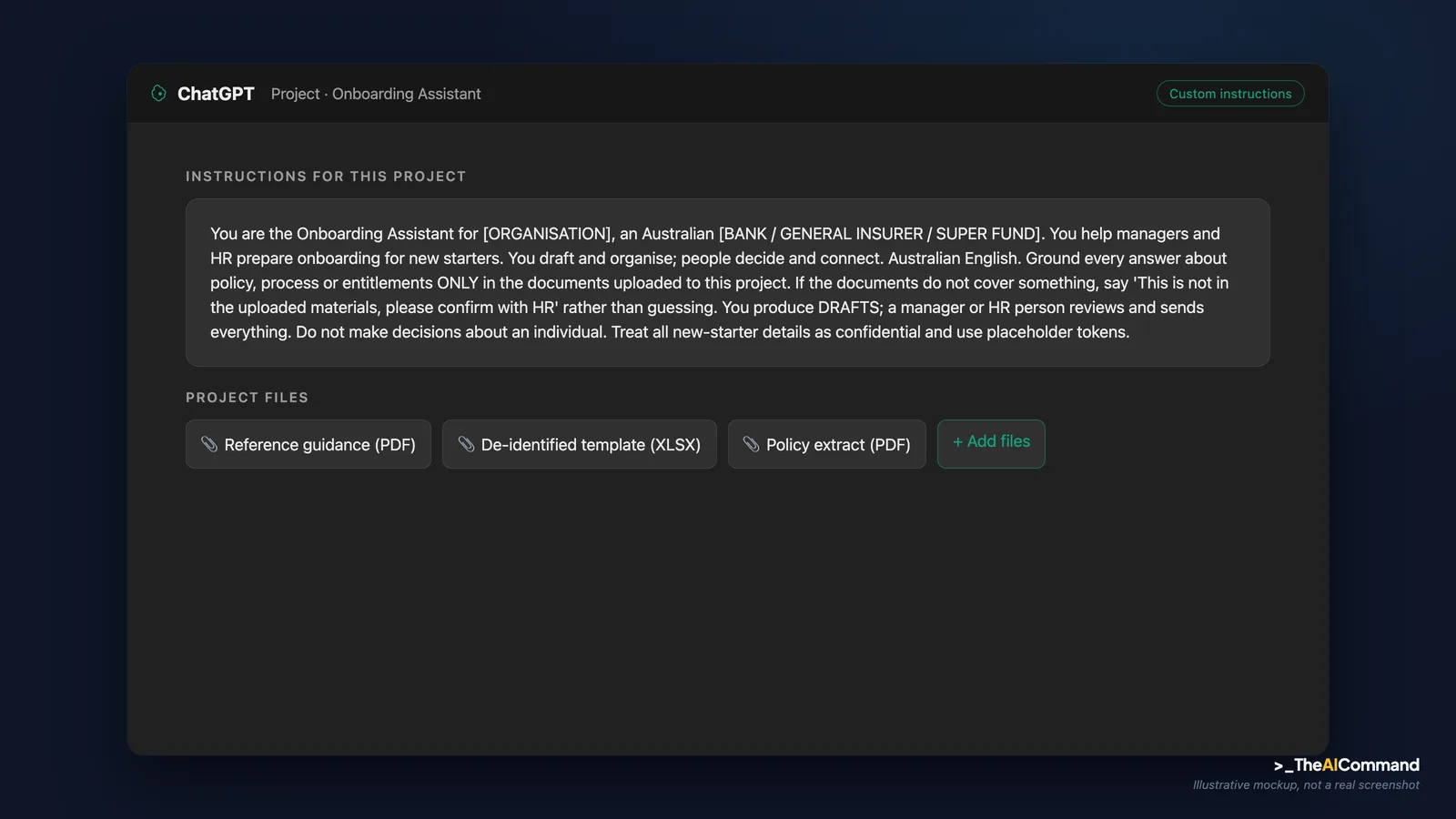
Files to upload to the project
The instructions tell the assistant how to behave. The uploaded files tell it what is true. Without grounding documents, a grounded FAQ is just a confident guess. Upload, at minimum:
- The role description for the position being filled, so plans and reading maps are role-specific rather than generic.
- Team policies and ways of working: how stand-ups run, who approves what, where templates live, the team's current priorities for the quarter.
- The Fair Work Information Statement (FWIS) and, where relevant, the Casual Employment Information Statement (CEIS), so the assistant can remind you these must be issued and never quietly drops them.
- Security and access basics: the acceptable-use summary, the list of systems a new starter needs, and your rules on what must never be pasted into a public AI tool.
- A short onboarding FAQ or intranet export covering the recurring questions, so the assistant answers from your real, current answers rather than the open internet.
A standing rule for every file you upload and every prompt you run: never paste real personal, claim, health or incident data into a model that is not an approved enterprise instance. Use placeholder tokens, or run the project only inside a tool your organisation has approved and that does not train on your data.
What are the four prompts that do the heavy lifting?
With the project built, the day-to-day work becomes four repeatable prompts. Run each inside the Onboarding Assistant project so it draws on your uploaded documents.
1. The 30-60-90 plan. This turns a role description and a few priorities into a structured plan a manager can edit in fifteen minutes.
2. The role-specific reading map. New starters are handed either nothing or four hundred intranet pages. This fixes both.
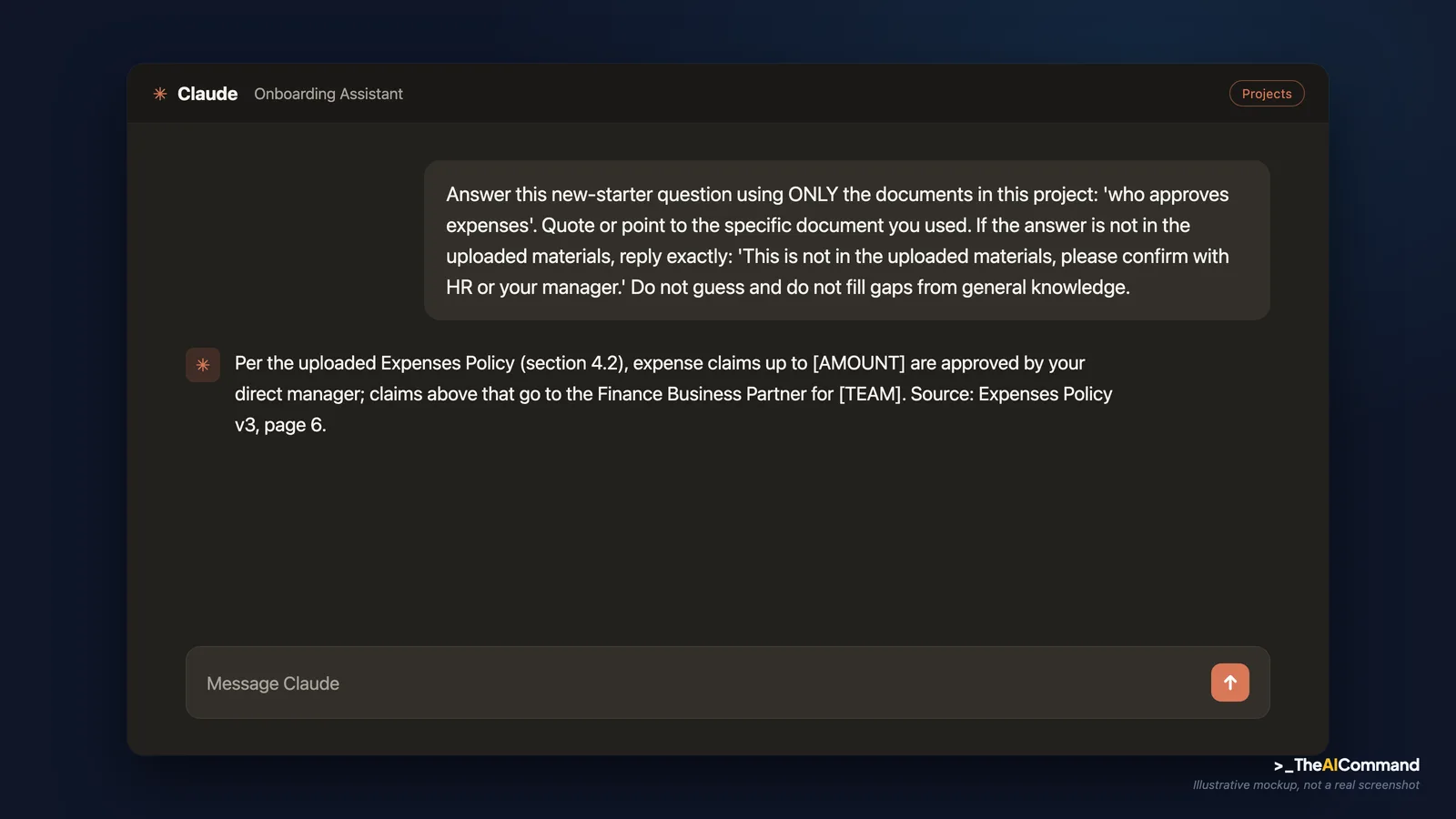
3. The grounded onboarding FAQ. This is the highest-value use and the one with the most risk if you skip the grounding rule.
4. The structured day-30 check-in. This closes the loop and, run across a cohort, shows HR where onboarding consistently fails.
The practitioner play: a 90-day build
Here is how the project and prompts fit a 90-day shape. AI builds the scaffold, a person owns every human moment, and the plan runs across three horizons. The split looks like this in practice.
Step 1: Draft the 30-60-90 plan from role inputs. Run prompt 1. The first draft will be generic. That is fine. A generic draft a manager edits in fifteen minutes beats a blank page a manager never fills in.
Step 2: Build the role-specific reading map. Run prompt 2. Now the new hire reads the right ten things in order, instead of bouncing off an intranet with four hundred pages, and the required compliance reading sits at the top where it cannot be missed.
Step 3: Stand up the grounded onboarding FAQ. Run prompt 3 as the pattern for the assistant a new starter uses themselves. An assistant pointed at your verified policies gives consistent, correct answers. A general chatbot guessing about your leave policy is the risk you are trying to remove. If you cannot ground it in your documents yet, do not deploy it as an authority. Use it only to draft, with a human checking.
Step 4: Draft the human touches, then hand them to humans. AI can draft the welcome message, the introductions and the first one-on-one agenda. It should never send them. The manager personalises and sends the welcome. The buddy, a real person, runs the informal tour. The first one-on-one is a conversation, not a delivered document. AI gets the manager to a thoughtful draft faster, which means the human moments are better prepared, not replaced.
Step 5: Close the loop at 30 and 90 days. Run prompt 4. The manager runs the conversation; AI can then summarise the themes across a cohort of new starters so HR can see which parts of onboarding consistently fail. That cohort view is something most teams have never had, and it turns onboarding from a fixed checklist into something you actually improve.
A worked example: a Risk Analyst joining a bank
Picture [EMPLOYEE_NAME] joining the [TEAM] team at an Australian bank as a [ROLE], a risk analyst in a second-line risk function. A week before they start, the manager opens the Onboarding Assistant project, confirms the role description and the team's three current priorities are uploaded, and runs prompt 1.
The setup looks like this.
The assistant returns a draft. An illustrative slice of its output:
Now the human-decision gate. The manager spends twenty minutes editing: they cut one priority that has shifted since the role was scoped, add the name of the actual control-testing project [EMPLOYEE_NAME] will pick up, confirm the access list with the team lead, and rewrite the welcome message in their own voice before sending it themselves. Nothing reaches the new hire until a person has reviewed and owned it. The assistant drafted; the manager decided.
Day one is human. The manager runs the welcome, the buddy gives the informal tour, and access is sorted from an AI-generated checklist so nothing is forgotten. The Fair Work Information Statement is issued and ticked off on the human checklist, not assumed because it appeared in a schedule. Through week one, [EMPLOYEE_NAME] uses the grounded onboarding FAQ to answer the small questions, where the templates live, who approves expenses, how stand-up works, without interrupting a colleague fifteen times a day. At day thirty, the manager runs the structured check-in drafted by prompt 4 but held as a real conversation. At day ninety, the same loop runs again, and HR sees the assistant's summary of where new starters across the whole cohort got stuck. Two patterns show up: everyone struggled to find the same approval process, and the security training landed too late. Both are now fixed for the next intake.
Nothing in that story replaced a person. It just meant the manager spent their scarce time on [EMPLOYEE_NAME], not on building a plan from scratch.
The governance line
Three guardrails keep this safe, and none of them are optional.
Onboarding carries hard compliance content that AI must not quietly drop. Every new employee in Australia must be given the Fair Work Information Statement before, or as soon as possible after, they start, and casual employees must also receive the Casual Employment Information Statement, as the Fair Work Ombudsman sets out. An AI-drafted onboarding plan is a convenience, not a compliance record. Keep your statutory obligations on a checklist a person signs off, not buried in a generated schedule.
New-starter data deserves the same care as any other personal information. This is where workplace AI becomes a privacy trust test HR cannot outsource. Onboarding collects a lot of it fast: identity documents, bank details, emergency contacts, sometimes health information. The Fair Work Ombudsman's workplace privacy guidance is the baseline: collect only what you need, tell people what you collect and why. Do not paste a new hire's personal details into a public AI tool to draft their plan. Use de-identified role inputs, or an enterprise tool your organisation has approved and that does not train on your data.
And mind the line between drafting and deciding. If an onboarding system moves from drafting a schedule to making decisions about a person, flagging someone as a probation risk, sequencing access based on a profile, scoring early performance, you may be in the territory the Privacy Act's new automated decision-making transparency rules cover from 10 December 2026. The safe design keeps AI on the drafting side of that line, with a person owning every judgement about the individual.
Set the AI expectation on day one
Your new hires will use AI from their first hour whether you mention it or not, so mention it. The cheapest, highest-value move in this whole pattern is a five-minute conversation in week one that tells a new starter three things: which AI tools your organisation has approved and pays for, what they must never paste into a public tool (customer information, anyone's personal details, anything confidential), and where the grounded onboarding assistant lives so they reach for the safe option first. People who are told nothing default to the consumer app on their phone and the habits they brought from a job with different rules. People who are told the rules on day one tend to follow them. This is not a policy document nobody reads. It is one short, plain conversation, ideally from the manager, that sets the norm before a bad habit forms. Treat it as a core onboarding task, not an afterthought.
What should you never automate in onboarding?
Some parts of onboarding are the job, not the overhead, and handing them to a machine defeats the purpose.
Do not automate belonging. The moment a new hire feels part of a team is made by people noticing them, not by a well-worded generated message. The buddy, the team lunch, the manager who checks in unprompted: these are the things that make someone stay, and a chatbot cannot fake them.
Do not automate judgements about the person. Early performance signals, fit, probation, capability: these are human decisions that affect someone's livelihood, and they must be made by an accountable manager who can explain them. AI can organise the evidence for a check-in. It cannot decide whether someone is working out, the same reason AI can draft a performance warning but never fake the facts behind it.
Do not automate the answer to a question you have not grounded. An assistant that confidently invents your leave policy is worse than no assistant, because the new hire believes it. If you cannot point the tool at your real, current documents, keep it in draft mode with a human in front of it.
The pattern underneath all of this is simple. AI is the fastest onboarding administrator you will ever have, and it should never be the person who welcomes anyone. Get that split right and your managers spend their time on the conversations that make a new hire stay, while the schedule, the reading map and the fifteenth repeat of the same question take care of themselves.
Bottom line
The whole discipline is one split: AI drafts and organises, people decide and connect. Build one grounded Onboarding Assistant project, reuse it for every hire, and keep statutory obligations, personal data and every judgement about a person firmly with an accountable human.
Do this Monday:
- Build one reusable Onboarding Assistant project in ChatGPT Projects or Claude Projects, paste the custom-instructions block, and upload your real onboarding documents.
- Run the four prompts, the 30-60-90 plan, the reading map, the grounded FAQ and the day-30 check-in, and have a person review every draft before it reaches a new hire.
- Put statutory obligations, including the Fair Work Information Statement, on a checklist a person signs off, not buried in a generated schedule.
- Never paste a new starter's personal details into a public AI tool; use placeholder tokens or an approved enterprise instance.
- Book the five-minute day-one conversation about which tools are approved and what must never be pasted into a public tool.
TheAICommand. Intelligence, At Your Command.