
How a half-remembered meeting becomes a process nobody trusts
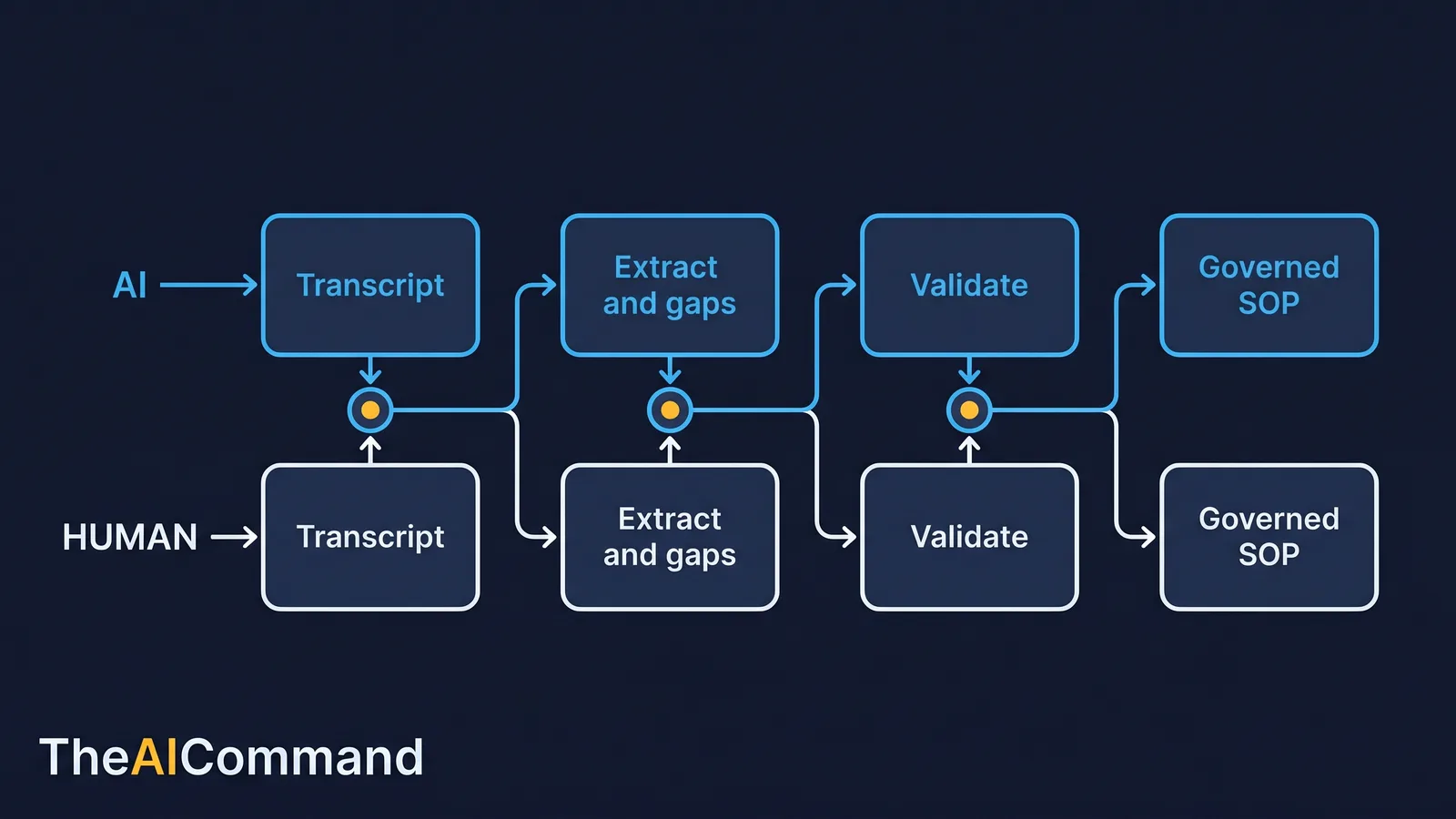
To turn a Teams meeting transcript into a controlled HR SOP, treat the recording as raw evidence, use AI to extract process facts and a gap log, then have people validate, own and approve each step before publishing with a named owner, version history, validation trail and review date. Most HR process knowledge lives in the worst possible place: a meeting that three people half remember and one person wrote down badly. The probation timing rule sits in an HRBP's head. The payroll cut-off lives in a thread. The escalation path was agreed verbally and never recorded. When that person is on leave, the process effectively goes with them.
The opportunity is not simply to record the meeting. A recording on its own is just a longer version of the same problem. The opportunity is to convert the discussion into a controlled standard operating procedure (SOP) that has a named owner, a version history, a validation trail and a scheduled review date. The transcript is the raw material. The SOP is the agreed work design. Treat them as the same thing and you will publish whatever the loudest voice said on the day.
This article sets out a disciplined method for that conversion. The model does the organising, drafting and challenging. The people in the room do the validating, approving and deciding. Keeping those two jobs separate is the difference between a useful workflow and glossy automation theatre.
This is general guidance and education only. It is not legal, HR or professional advice. Verify any process, retention rule or consent requirement with the relevant people in your own organisation before relying on it.
Why a transcript is evidence, and an SOP is a decision
Microsoft Teams can produce live transcription with speaker names and time stamps, and meeting organisers can review or download the transcript afterwards [1]. That makes the transcript usable raw material. It does not make it a policy, an SOP or a training artefact.
The gap between the two is the work. A transcript records what people said. An SOP records what the organisation has agreed to do, who owns each step, what evidence proves completion and when the design is reviewed again. A transcript can contain three contradictory opinions and an unresolved argument. An SOP cannot. Somebody has to decide, and that decision has to be attributable.
So the middle layer matters. Between capture and publication sits a conversion process that extracts process facts, separates them from opinion, marks every gap, and forces a human to close each gap before anything is published. Skip the middle layer and the model will smooth over the disagreement with confident prose, which is exactly the failure you are trying to avoid.
A short worked example, fully de-identified
The clearest way to show the method is to run it. The example below uses no real names, no real employee details and no real claim or case data. Treat every example like this in your own pilots: synthetic first, real data only once the workflow is proven.
Scenario. An HR operations team wants to standardise how a manager's request to extend probation is handled. Today the knowledge is split across one HRBP, two ageing email templates and a few unwritten timing rules. The team runs a short Teams meeting with the HRBP, an employee relations (ER) lead and a payroll representative. Transcription is on, attendees have been told, and examples are kept generic.
A de-identified slice of the transcript reads like this:
Run that slice through the extraction prompt (below) and the model returns a gap log rather than a finished document:
The HRBP reads the gap log and immediately spots that the draft missed an HRIS notification step, because it was only implied in conversation. The payroll lead confirms the 48-hour cut-off and adds the exact pay-run date. The ER lead closes the maximum-extension question. Only then does the model draft the SOP. The published excerpt looks like this:
The value is not that the model wrote HR policy. It is that the model surfaced the structure hidden inside a real operational conversation, including the step nobody said out loud. Humans then made every binding decision.
Which roles keep the workflow accountable?
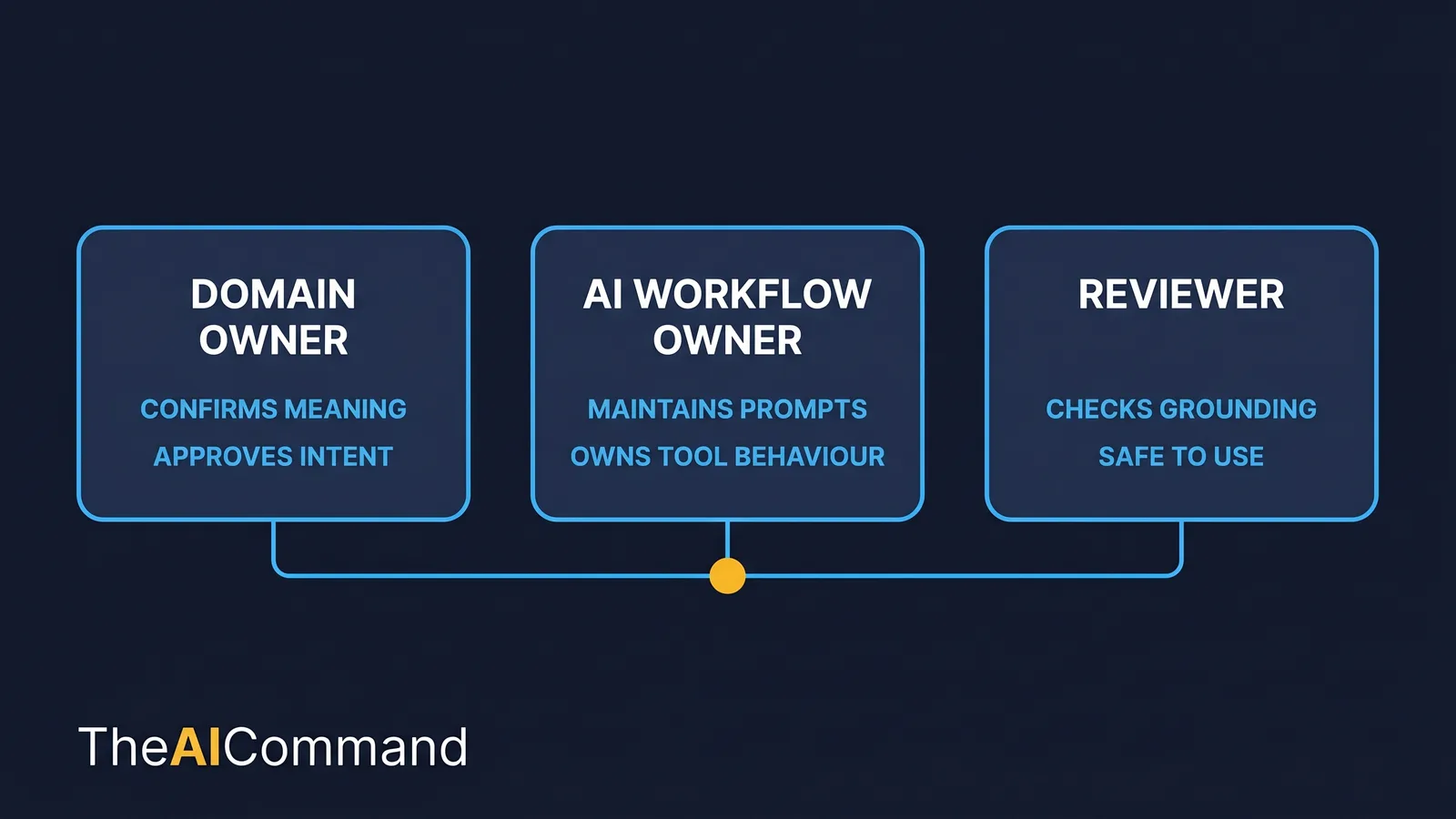
A repeatable workflow needs named accountability, not just a clever prompt. Appoint three roles. Small teams can combine them, but they should still name the hats so the responsibility does not quietly evaporate.
The domain owner confirms meaning. This is the person who actually owns the HR process and can say whether the SOP describes reality or wishful thinking. The AI workflow owner maintains the prompts, the transcript files, the naming conventions and the tool behaviour, so the method stays consistent across SOPs. The reviewer checks that outputs are grounded, proportionate and safe to publish, with particular attention to privacy, retention and the line between manager action and HR escalation.
The same three roles map onto a working RACI for any transcript-derived SOP. The table below is a starting point to adapt, not a template to copy blindly.
R = responsible, A = accountable, C = consulted, I = informed. If two cells claim accountability for the same activity, you have a problem to resolve before publishing, not after.
What Australian rules apply when you record an HR meeting?
Converting a meeting into a record sits on top of real Australian obligations. None of these are optional, and most pre-date AI entirely.
Consent to record varies by state and territory. There is no single national rule. The surveillance, listening and optical devices legislation differs across jurisdictions, for example the Surveillance Devices Acts in Victoria, Western Australia, the Northern Territory and South Australia, the Listening Devices Act in Tasmania, and the Workplace Surveillance Act in New South Wales. The practical implication is the same everywhere: do not assume a recorded meeting is lawful by default. Confirm your organisation's policy and the relevant jurisdiction before transcription becomes routine, and tell attendees clearly, the same discipline that applies to AI note-takers in HR meetings.
Employee records carry privacy obligations. The Office of the Australian Information Commissioner (OAIC) administers the Australian Privacy Principles (APPs), which govern how personal information is collected, used, stored and secured [2]. APP 11 requires reasonable steps to protect personal information from misuse, interference, loss and unauthorised access [3]. The Privacy Act contains a narrow employee-records exemption that can apply to some private-sector handling of records directly related to current or former employment [4]. Treat that exemption as limited, not as a licence to be careless. A transcript discussing a named employee's probation is sensitive material regardless, and Commonwealth bodies and agencies such as Comcare apply privacy obligations to the personal information they hold [5].
Records must be kept and kept properly. Under the Fair Work Act and Regulations, certain employee records must be made and kept for seven years [6]. A transcript that captures a decision about a person's employment can itself become a record subject to your retention schedule and to legal hold if a dispute is foreseeable. It is not a disposable chat artefact.
The straightforward takeaway: de-identify wherever possible, confirm consent for the jurisdiction, store the transcript in a governed location, and treat it as a record from the moment it captures a decision.
What must be true before anything is published
A simple way to keep the discipline visible is to define three gates. A transcript does not become a publishable SOP until it has cleared all three.
The capture gate asks whether the meeting was lawfully and clearly recorded, whether attendees were told, and whether sensitive examples were kept de-identified. The convert gate asks whether the model produced a gap log rather than a fluent guess, and whether every uncertain point is marked for owner confirmation. The control gate asks whether a human owner has confirmed each fact, whether privacy and retention have been checked, and whether approval sits with the right authority.
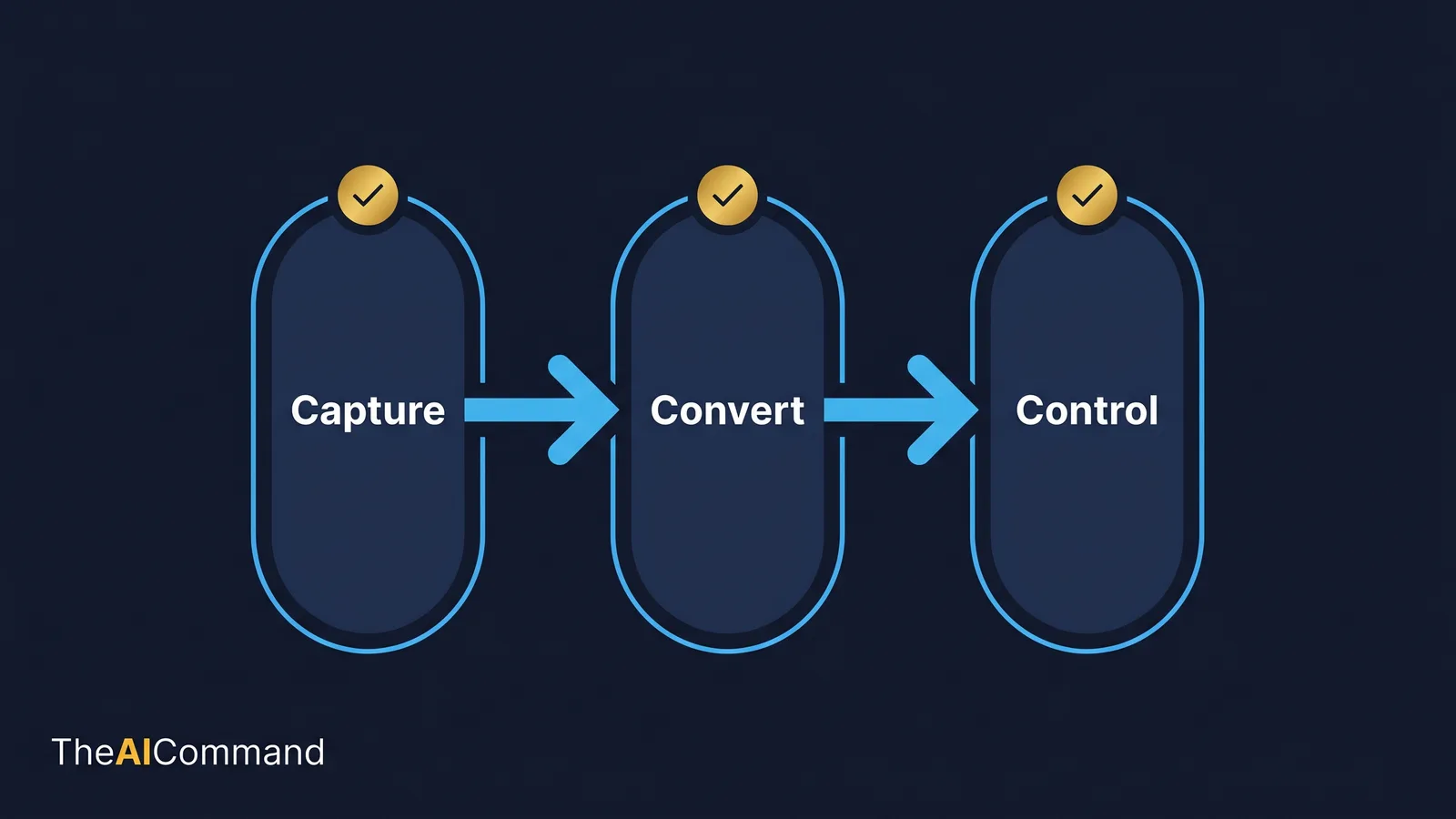
If any gate is unclear, the SOP is not ready. The point of writing the gates down is that they survive time pressure. A boundary that only lives in someone's head will eventually be missed on a busy Friday.
Records classification and retention, made concrete
The retention question is where most transcript workflows quietly fall over. The table below ties the new record types to a classification, a retention basis and a legal-hold trigger. Adapt the periods to your own schedule and to the relevant legislation; the column that matters most is the last one.
Two practical notes. First, Microsoft Teams recordings and transcripts have a default expiry (commonly 120 days) that an administrator can change, so do not assume the platform retains anything for as long as your schedule requires [7]. Second, governed lifecycle controls, for example through Microsoft Purview data lifecycle management, let an organisation apply retention and disposal policies rather than relying on individual users to remember [8]. The tooling is a means to an end; the retention decision is yours.
The staged prompt stack, narrowing before drafting
The prompt stack is deliberately ordered. The first prompt narrows the task and forces gaps to the surface. The middle prompts draft and stress-test the artefact. The final prompts add review, version control and user guidance. That sequence reduces the chance of a beautiful but unsafe output, because the model is never asked to draft until the facts are confirmed.
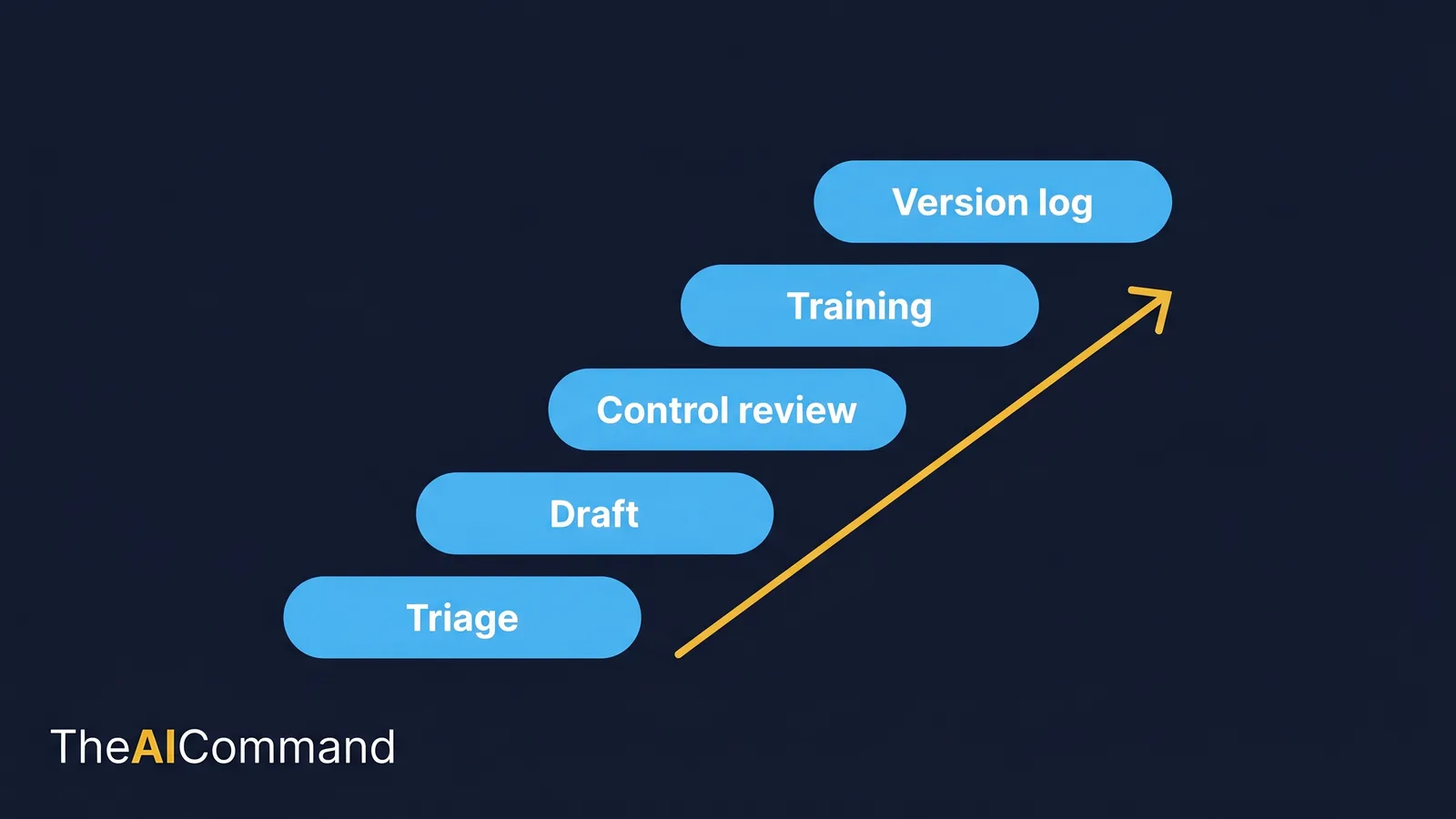
Transcript triage prompt
SOP drafting prompt
Control review prompt
Training conversion prompt
Version log prompt
The working table to brief the conversion
Keep the element-extraction table close. It is a working artefact, not decorative content. A practitioner should be able to copy it into a planning document, adapt the fields and use it to brief the conversion or to onboard a new reviewer.
Where does this break, and how do you stop it?
Four failure modes account for most bad outcomes. Each has a plain countermeasure.
- Treating the transcript as authority. The transcript is a capture artefact, not the approved process. The countermeasure is the gap log: the first draft should contain blanks and questions, never a clean finished document.
- Letting the model fill policy gaps. Blank fields are safer than fluent guesses. A confident paragraph built on an incomplete source is the most expensive kind of error in HR work, because tone makes the unsupported claim look settled.
- Publishing without evidence ownership. Every control needs a named owner and a record. If a step cannot answer "who owns this and what proves it happened", it is not finished.
- Ignoring retention and access. Transcripts discussing employees are sensitive records. Store them in a governed location with controlled access, classification and a defined retention period [8].
The governance habit worth building is to ask, for every workflow, what the model is not allowed to do. That answer should be visible in the prompt, the interface and the review checklist, not only in the workflow owner's memory.
Three HR-specific runs to try first
The method generalises, but the early wins come from picking a process with enough judgement to be useful and not so much legal weight that the pilot becomes heavy. Three good candidates, each with its own trap to watch.
Probation extension. Already worked above. The trap is approval authority: the line manager requests, but sign-off and the consequence of a missed review must sit with HR. The model will happily flatten that distinction unless the gap log forces it open.
Onboarding hand-off. The point where recruitment closes and the line manager or people team takes over. The trap is the silent dropped step: system access, payroll setup, the buddy assignment and the day-one checklist often live in different heads. Run the capture meeting with recruitment, the hiring manager and IT or payroll in the room, and make the model produce a hand-off checklist with a single accountable owner per item.
Employee-relations escalation. When a manager-level conversation must become a formal HR matter. This is the highest-sensitivity candidate, so de-identification is mandatory and the reviewer's privacy and escalation checks are non-negotiable. The model's job is to map the decision tree, for example what triggers escalation, who is notified and what evidence is preserved, without ever drafting an outcome. The human decides; the model structures.
The lesson loop that compounds
After each SOP is reviewed, capture the lesson in one durable place. A good lesson names the failure, the preferred behaviour, a short example and the file or prompt that needs updating. Classify each correction as a source issue, a prompt issue, a process issue or a judgement issue. That classification is what lets the team improve the system rather than fixing one document and repeating the mistake next time.
The goal is not to turn every HR adviser into a prompt engineer. It is to make repeated work easier because the organisation remembers how it wants AI to behave. Over several SOPs, the capture agenda, the naming convention, the extraction prompt, the validation checklist and the version-log template become a reusable pack. The output is a library of approved process patterns, not a pile of disconnected drafts.
Practitioner build pack: the two-week sprint
Treat the first implementation as a two-week sprint, not a transformation programme. The aim is to prove that a transcript can become a controlled artefact without losing accountability.
Source-ready meeting agenda
Make the transcript structured before recording starts. Open with purpose and scope. Ask the process owner to walk the happy path from trigger to closure. Ask the frontline user where the process actually breaks. Ask the ER or risk participant to name the controls, privacy points and escalation paths. Ask the facilitator to repeat key decisions aloud so the transcript captures them cleanly. Close with one question: what did we not resolve today, and who owns each open item? A meeting run this way produces a transcript that is far easier to dissect and far safer to convert.
Advanced prompt variation
Definition of done
The SOP is not done when the model produces a clean document. It is done when the process owner can explain the trigger, each role has confirmed its step, the reviewer has signed off privacy and control points, the version log names the source transcript, and the next review date is visible. The finished artefact should make it obvious where the SOP came from, what changed during validation and who owns future updates.
Reviewer questions before publication
Ask whether the SOP describes what actually happens or what the team wishes happened. Ask whether any step depends on a single person's memory. Ask whether a new HR adviser could follow the procedure without phoning the original owner. Ask whether each evidence field proves completion or merely records activity. These questions reliably separate a useful SOP from a tidy transcript summary.
The portability test
The simplest quality check: could another capable person use the artefact next week without the author explaining it for ten minutes? If not, the workflow needs clearer labels, stronger fields or a shorter user guide. AI outputs should reduce handover friction. If they create a private maze of prompts and undocumented assumptions, the system has failed even when the first output looked impressive.
What to do next
Pick one workflow, one artefact and one review loop. Build the smallest useful version first. Use de-identified or low-sensitivity information. Run the prompt stack in order, capture what failed, and convert each correction into a durable instruction, template or lesson. Then repeat with a slightly harder process. That is how professional AI capability compounds: not through a magic prompt, but through a method that anyone can pick up and trust.
Bottom line
A Teams transcript is raw evidence, not an approved process. The disciplined method keeps the model on organising and drafting while people validate, own and approve, and it publishes nothing until a named owner, version history, validation trail and review date are all in place. Consent, privacy and retention obligations sit on top of the workflow and are not optional.
Do this Monday:
- Pick one low-sensitivity process and run a de-identified capture meeting with the right people in the room.
- Run the extraction prompt first so the model returns a gap log, not a finished document.
- Confirm each fact and close every [NEEDS OWNER CONFIRMATION] gap before the model drafts.
- Name an owner, add a version log and a review date, and store the transcript in a governed location.
- Confirm consent for your jurisdiction and treat the transcript as a record from the moment it captures a decision.
This article is general guidance and education only. It is not legal, HR, privacy or compliance advice, and it does not account for your organisation's policies, your jurisdiction's recording and surveillance laws, or the specific facts of any matter. Consent, record-keeping and retention obligations differ across Australian states and territories and across employers. Confirm your own consent rules, privacy obligations and retention schedule with the relevant people in your organisation, and seek professional advice before relying on any process described here.
For more practical AI workflow ideas, follow TheAICommand on Instagram at @the_aicommand and X at @TheAICommand.
References
- Microsoft Support, View live transcription in Microsoft Teams meetings. https://support.microsoft.com/en-us/office/view-live-transcription-in-microsoft-teams-meetings-dc1a8f23-2e20-4684-885e-2152e06a4a8b
- OAIC, Australian Privacy Principles. https://www.oaic.gov.au/privacy/australian-privacy-principles
- OAIC, Chapter 11: APP 11 Security of personal information. https://www.oaic.gov.au/privacy/australian-privacy-principles/australian-privacy-principles-guidelines/chapter-11-app-11-security-of-personal-information
- OAIC, Employee records exemption. https://www.oaic.gov.au/privacy/privacy-guidance-for-organisations-and-government-agencies/organisations/employee-records-exemption
- Comcare, Privacy. https://www.comcare.gov.au/site-information/privacy
- Fair Work Ombudsman, Record-keeping. https://www.fairwork.gov.au/pay-and-wages/paying-wages/record-keeping
- Microsoft Learn, Manage the expiration of Teams meeting recordings. https://learn.microsoft.com/en-us/microsoftteams/manage-teams-recording-expiration-policy
- Microsoft Learn, Data lifecycle management (Microsoft Purview). https://learn.microsoft.com/en-us/purview/data-lifecycle-management
TheAICommand. Intelligence, At Your Command.