
Nobody knows which final file to open
A shared folder contains a policy called final, another called final-new and a third called final-approved. The modification dates differ, but none of the filenames explains who approved the document. A colleague sends the newest one to a reviewer. Another colleague keeps using an older link embedded in a procedure.
A naming convention can make this folder easier to navigate. It cannot resolve the underlying approval question. That distinction matters before any AI tool proposes a tidy set of replacements. If the model interprets "final" as approved, the clean folder can make an unsupported conclusion look more credible than the messy one did.
Treat the first pass as a proposal. The output is a map from known source paths to candidate destination paths, with reasons, unresolved questions and a decision for each row. Nothing moves. Nothing is deleted. The team can inspect the proposal without losing the evidence needed to correct it.
This method suits a small working collection with an identifiable owner. A records migration involving regulated retention, legal holds or a large document-management system needs its own approved process. A naming exercise must not quietly become a disposal project or a replacement for the organisation's records architecture.
Decide what the name needs to tell a colleague
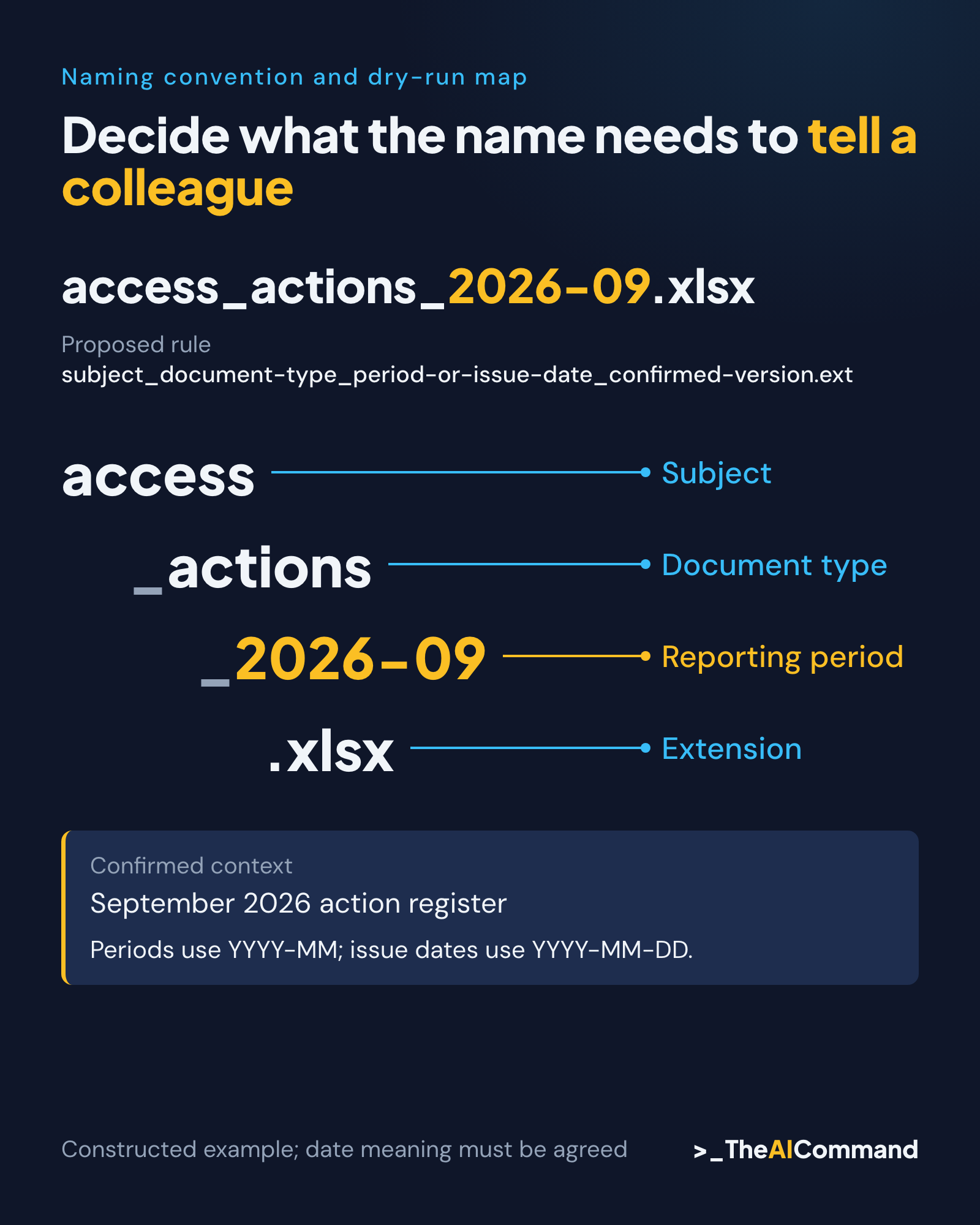
Begin with the question a person is trying to answer when scanning the folder. They may need to identify the subject, the period and the document type. They may also need to distinguish a working draft from an approved issue, but only where approval status can be established from a reliable source.
Do not encode every available detail. A filename that contains a team, division, owner, subject, date, status, classification and several reference numbers may be harder to use than the original. Keep stable identifiers in the name where they help retrieval. Put longer explanations and change history in the register or document metadata.
Agree what a date means. A document's creation date, reporting period and approval date can all be valid, but they answer different questions. For this article's example, the date component represents a reporting period or an owner-confirmed issue date. A filesystem modification date is never silently substituted for either.
Choose a small vocabulary for document types and subjects. If one person writes review and another writes check, a model may group them despite important differences. The owner decides which terms are equivalent. The model can show inconsistent usage and propose a glossary, but it cannot determine the business meaning from spelling alone.
Check the destination before choosing the punctuation
The naming rule has to work in the actual environment where people open, sync and share files. Microsoft's OneDrive and SharePoint documentation identifies restrictions on characters, reserved names and paths. It also contains platform-specific qualifications. Do not assume that a name accepted by one local application will behave identically everywhere. Source: Microsoft
A practical draft convention uses short plain-language terms and a limited punctuation set, then tests representative names through the intended workflow. That is a design choice for this exercise, not a claim that every other character is prohibited. Retain file extensions and check the whole path, including folder names.
Avoid unnecessary platform specificity in the initial AI prompt. If the task is to propose names from an inventory, a plain text conversation is sufficient. A tool with filesystem access is not required. Adding execution capability before the mapping is reviewed creates a larger task without improving the quality of the naming decision.
If a later authorised step uses a coding assistant, separate it from this draft. Give that step an approved map, a bounded folder and explicit stop conditions. The reader should be able to identify exactly when the activity changes from proposing names to changing files. This article stops at the proposal.
Construct a fifteen-file inventory
The worked example is a fictional private-sector assurance team preparing a quarterly evidence pack. Its inventory contains fifteen entries across three folders. Some basenames repeat in different locations. Others contain ambiguous versions, an unclear date or characters that need checking. These are constructed examples, not a scan of a real shared drive.
Assign each entry an inventory ID from F01 to F15. Record its original relative path, extension and any owner-supplied description. That ID remains stable even when the proposed name changes. A basename alone is not enough to identify a file when two folders both contain Review.xlsx.
Three access-list files illustrate the problem. F01 is Access list.xlsx, F02 is Access list final.xlsx and F03 is Access list FINAL 2.xlsx. The inventory confirms only that they concern the service's privileged-access review. It does not establish that they contain the same rows, which one was reviewed or whether any is approved.
The first draft map therefore holds all three. It can suggest a naming pattern for the eventual selected records, but it cannot collapse them into one destination. Their source paths remain visible while the owner establishes the relationship between them. Ambiguity becomes an explicit work item rather than disappearing into a suffix chosen by the model.
Other entries are more straightforward. An owner-confirmed procedure issue can receive a stable issue date and version. A September action register can use its reporting period. A readme can remain a readme when renaming it adds no useful information. Consistency does not require changing every item.
Ask for a mapping with reasons, not a batch command
Give the model the fifteen-row inventory, the proposed naming rule and the confirmed metadata. Ask for one output row per input ID, in the same order. Require a candidate path, a reason, an ambiguity field and a proposed disposition such as ready for review, hold or no change.
The prompt must prohibit inventing version numbers, approval states and dates. It should also prohibit treating similar names as duplicate content. Two records can have nearly identical names and different purposes. Conversely, two differently named files may contain the same bytes. The inventory alone establishes neither situation.
For this example, the proposed pattern is subject, document type, period or issue date, and confirmed version where useful. Components are separated with underscores. The pattern is deliberately simple enough to explain in a short readme. If a component is unknown, the row is held rather than filled with an authoritative-looking guess.
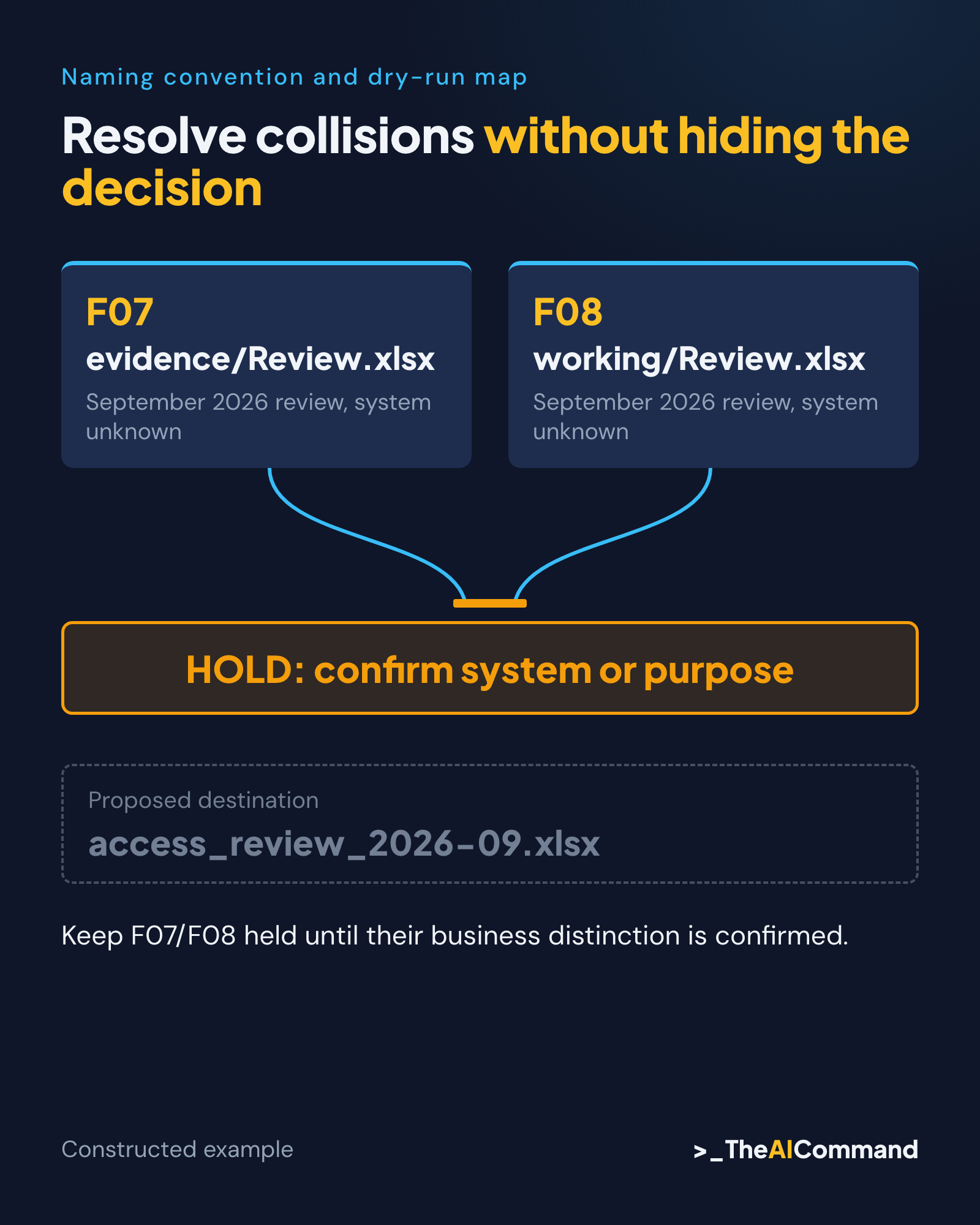
A useful draft output maps the confirmed September register to access_actions_2026-09.xlsx. It leaves the three access-list candidates unresolved. It also flags that two separate source paths would otherwise become access_review_2026-09.xlsx. This collision is a naming problem to resolve, even if the files later prove to have different content.
Resolve collisions without hiding the decision
Do not let the model fix every collision by adding an arbitrary number. The names review_1 and review_2 avoid a technical overwrite but tell a colleague nothing about why the files differ. Ask the owner whether the distinction is system, period, purpose or issue. Use that confirmed distinction in the proposed name.
If the owner cannot resolve it, retain the hold. A migration map is useful precisely because it can show that some files are ready and others are not. There is no benefit in achieving a perfect-looking set of destination names by concealing uncertainty that will return during the next review.
Check collisions under the destination's actual comparison rules. Names that differ only in letter case may not remain distinct in every environment. Also inspect collisions introduced by removing punctuation or shortening a subject. These checks concern the proposed strings; they do not establish content identity or approval status.
Keep an explicit no-change row where a file already follows the rule or serves a technical purpose. That row demonstrates that the item was considered. It also prevents the migration operator from interpreting an omitted entry as permission to delete it or place it in a miscellaneous archive.
Protect the relationships around the file
Before any later rename, identify where the source path is used. A spreadsheet formula, shared link, shortcut, procedure or automation may refer to it. The person proposing a new name may not know all of those dependencies. Ask the responsible users and inspect the known references within the authorised scope.
Do not promise that links will either all survive or all break. Behaviour depends on the storage system, link type and surrounding applications. Record the dependencies to test. A successful open in a browser is different from a formula resolving in a workbook or an automated process finding the expected file.
Retain original paths in the mapping even after an approved change. A useful map records the proposed path, actual resulting path, execution time and any exception. For this drafting exercise, those execution fields remain blank. Prepopulating them would confuse an intended action with an observed result.
Reversibility also requires care. An inverse map is not automatically a safe rollback if files have been edited or new files now occupy the old names. A later operator must check current state before reversing changes. Preserve originals through the organisation's approved method rather than assuming that renaming alone creates a recoverable backup.
Test the rule with a colleague and a small dry run
Give a colleague several candidate names without explaining the convention. Ask what period, document type and status they infer. Compare that interpretation with the confirmed metadata. If the name suggests approval when it only means working draft, revise the rule before it spreads across the folder.
Next, check the complete mapping mechanically. There must be fifteen input IDs and fifteen output rows. Each original path appears once. Every ready row has a unique proposed destination under the relevant comparison rules. Every hold has a specific question and an owner role. None of these checks requires renaming a file.
Review the held rows manually. A model can identify obvious uncertainty and still miss a misleading date embedded in a title. It can also overstate a problem by treating a useful legacy identifier as meaningless text. Preserve identifiers that people actually use to trace records, even when they make a name less elegant.
Document the result of the dry run honestly. The mapping can pass the row-count and collision checks while remaining incomplete because owners have not answered version questions. That is a controlled intermediate state. It is more informative than calling the entire folder cleaned before a single dependency has been tested.
Make the convention easy to maintain
Write the rule where people create new files, not only in a handover document that nobody opens. Include a few representative examples and explain the date component. Name a role that can resolve exceptions. The convention needs an owner because business language and working practices change over time.
Keep the initial vocabulary small and revise it only when a real retrieval problem appears. Do not create a catalogue of speculative document types. A good exception record explains why the standard pattern did not fit and what the owner approved. It prevents each colleague from inventing a private workaround.
Apply the convention prospectively while older ambiguous records remain under review. New work can become easier to find without forcing an unsupported conclusion about the past. Keep the legacy-to-new mapping available to people who hold older references. Review a sample after use to see whether colleagues can retrieve the intended records.
The first useful outcome is a defensible map, not a dramatic before-and-after screenshot. Start with fifteen files, retain the uncertainty and test the rule against real retrieval questions. A shared naming system earns its place when people can follow it without guessing what the author meant.
Reusable materials
Naming convention and dry-run map
Constructed private-sector assurance inventory. No files scanned, renamed, merged or deleted. Owner-confirmed metadata below is part of the fictional setup.
Proposed rule
subject_document-type_period-or-issue-date_confirmed-version.ext
Use only the components confirmed and useful for that item. Periods use YYYY-MM; issue dates use YYYY-MM-DD. Preserve extension. Never derive authority from final, latest or modification time. Holds have no executable destination.
Counts: 15 rows; 4 ready for review, 9 holds, 2 no-change. F07/F08 deliberately show a collision. Held candidate paths must never be executed.
Prompt
Later authorised execution record, blank by design
Dry-run checks
- Count 15 unique IDs and one row for every original path.
- Keep F07/F08 held until their business distinction is confirmed.
- Check platform restrictions and full paths in the actual destination.
- Record known links, formulas, shortcuts and processes before any later rename.
- Do not populate execution fields until actions are observed.
Related reading
References
- Microsoft Support, Restrictions and limitations in OneDrive and SharePoint, What's new log includes entries dated 28 January 2025 and 22 April 2026, accessed 24 October 2026: https://support.microsoft.com/en-us/onedrive/restrictions-and-limitations-in-onedrive-and-sharepoint
General information only. Not legal, compliance, financial, or professional advice.
TheAICommand. Intelligence, At Your Command.