
The tape goes up within minutes.
The plant is left where it stopped, the load is left where it fell, and nothing moves until an inspector attends. Meanwhile the scheduling system that set the run rate keeps working. It rotates its logs overnight, takes a vendor model update across the weekend, and closes the account of a worker who finishes the following month. The physical site is preserved exactly as the law requires. The record that would explain why the task was sequenced as it was is gone.
Section 39 of the Work Health and Safety Act 2011 (Cth) (WHS Act) is written for a physical site, and that is only half of what has to hold still once an automated or artificial intelligence (AI) system is in the loop. Preserving the system state is a decision somebody makes inside the first hour, with a name against it, because no default cloud retention setting performs it.
Read what follows as a control design rather than as settled law. Nothing located for this article shows a court, tribunal or regulator deciding the question.
What does section 39 actually require?
Section 39(1) of the Work Health and Safety Act 2011 (Cth), Compilation No. 16, compilation date 1 July 2024 and in force as at 25 September 2026, puts the duty on one identified person. The person with management or control of a workplace at which a notifiable incident has occurred "must ensure so far as is reasonably practicable, that the site where the incident occurred is not disturbed until an inspector arrives at the site or any earlier time that an inspector directs".
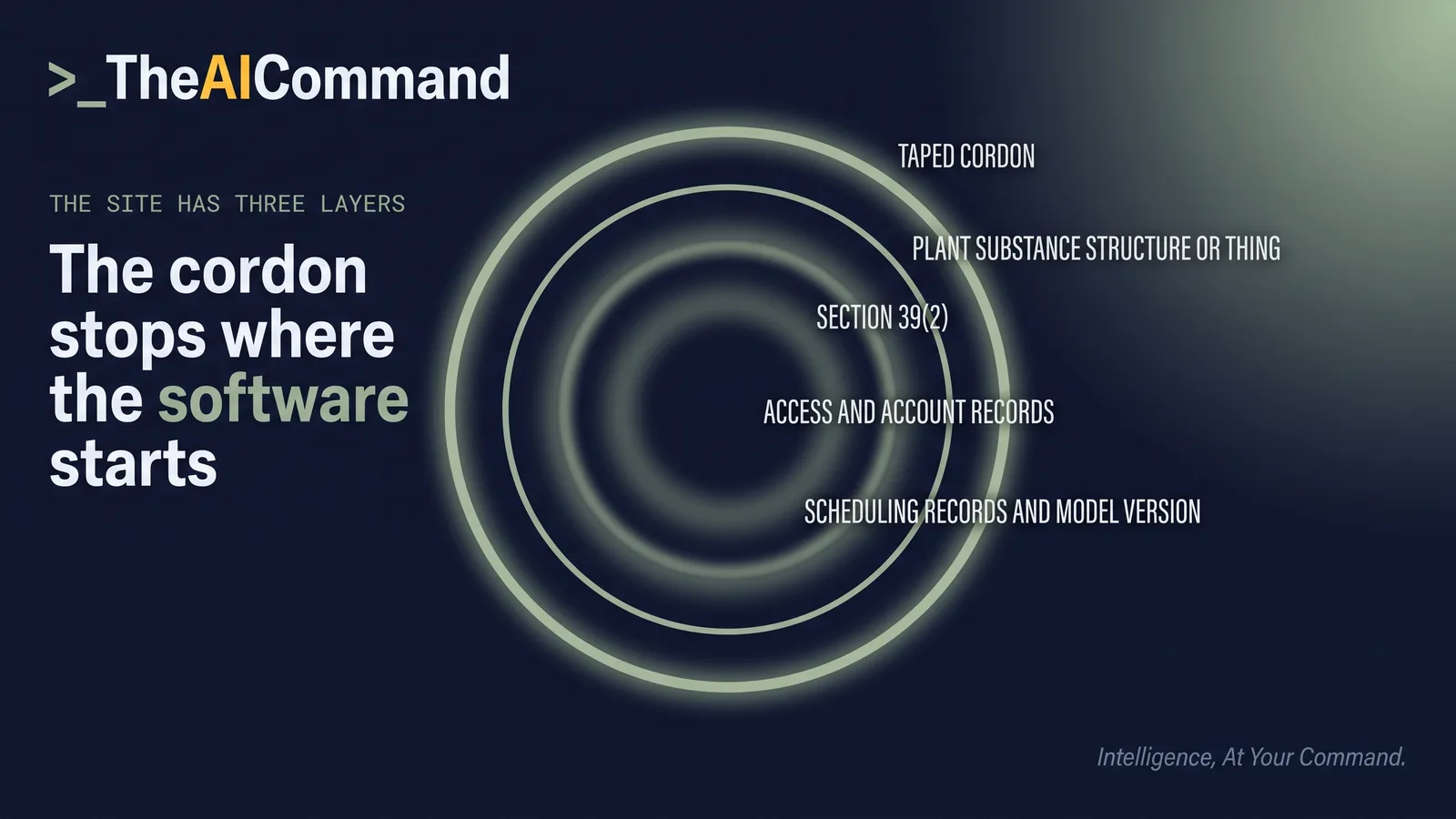
The subsection that carries this article is section 39(2), which provides that "a reference to a site includes any plant, substance, structure or thing associated with the notifiable incident".
The trigger is a notifiable incident, defined in section 35 as the death of a person, a serious injury or illness of a person, or a dangerous incident.
The purpose is not left to inference. Comcare guidance on responding to an incident, as at 25 September 2026, states it directly: "This is to protect evidence that may help determine the cause of the incident."
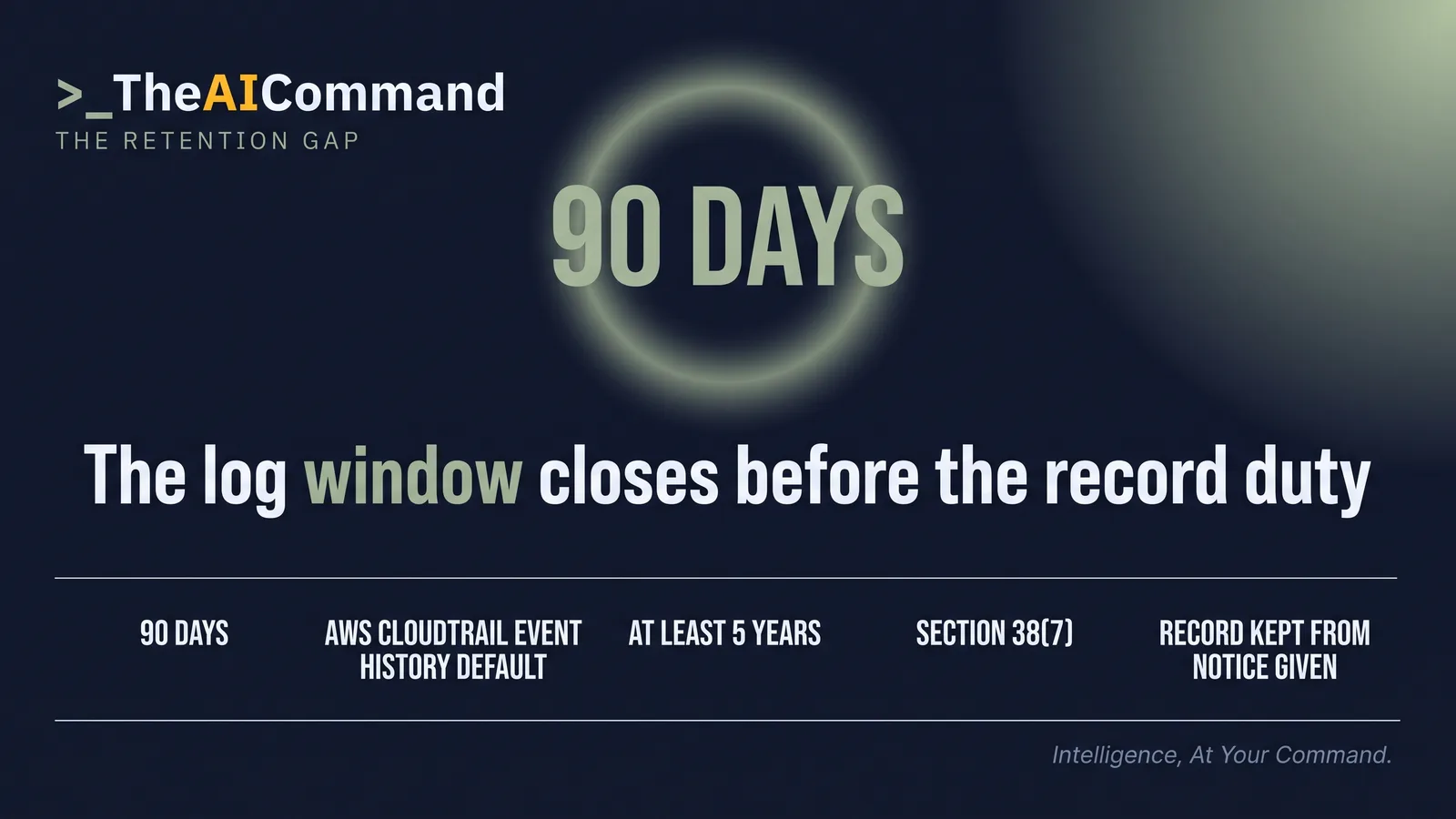
One further duty runs alongside and outlasts the tape. Section 38(7) of Compilation No. 16 requires a person conducting a business or undertaking (PCBU) to "keep a record of each notifiable incident for at least 5 years from the day that notice of the incident is given to the regulator".
Why does the duty reach the system state?
Start with how the technology is treated. Safe Work Australia's Artificial intelligence (AI) and digital technologies: WHS duties, which carries no publication date, states, as at 25 September 2026, that "PCBUs must eliminate or minimise both physical and psychosocial risks so far as is reasonably practicable". An incident in which an assistant produced the instruction is an ordinary notifiable incident.
Now the reach. Where the pace was set by a scheduling engine, the instruction produced by a model, the movement executed by a controller and the access governed by an identity system, the configuration of those systems at the moment of the incident explains the cause.
Be exact. The Commonwealth Act, at Compilation No. 16, does not name software, logs, models or data in section 39. The reach comes from the words "any plant, substance, structure or thing associated with the notifiable incident", read with the regulator's statement that the purpose is to protect evidence of cause. That is a reading, offered because it can be operationalised and because the alternative is to let the record delete itself while the cordon is still up.
The model law has already written it down. The Model Work Health and Safety Legislation Amendment (Incident Notification) 2025, published by Safe Work Australia on 5 December 2025, replaces section 39(1) of the model WHS Act with a duty to ensure that "evidence of the occurrence, including electronic and digital records and witness details, is preserved", and retitles the section "Duty to preserve incident site and evidence". None of that binds anyone until a jurisdiction adopts it. The Australian Capital Territory's Work Health and Safety Act 2011 already carries an equivalent evidence duty in section 39(1)(b), but the Commonwealth Act is unamended at Compilation No. 16, so in the Comcare jurisdiction as at 25 September 2026 the reading above is still the one a practitioner has to make. Check the wording of the Act that applies to your own workplace.
The category is not novel in Australian practice. The National Archives of Australia describes disposal freezes and retention notices as instruments that suspend routine destruction: "Generally, these state that agencies must not destroy any relevant records."
One of those notices already contemplates system state. The National Archives of Australia Notice of Disposal Freeze 2026/137, as revised in June 2026, lists among the records covered "models, algorithms and records of automated processes (including the use of artificial intelligence), and any associated inputs and outputs".
That notice binds the Commonwealth agencies it names, not a private employer except so far as that employer holds Commonwealth records, and it is not a work health and safety instrument. It is cited as a design precedent, and as evidence that the drafting problem has been solved once.
What disappears in the first hour?
The failure mode is not deletion by decision. It is deletion by default, on a schedule nobody in the incident room can see.
The Australian Signals Directorate, through the Australian Cyber Security Centre, states the problem in Best practices for event logging and threat detection, published August 2024: "Default log retention periods are often insufficient." The same publication names the mechanism: "many systems will overwrite old logs when their storage allocation is exhausted". Nobody presses a button. The oldest record is the one that gets written over.
Two dated vendor examples show the gap, as examples and not a rule, each checked on 25 September 2026. The AWS CloudTrail User Guide states that "The event history is limited to the past 90 days of events". Microsoft Learn's Manage audit log retention policies page records that Microsoft Purview Audit (Standard) retention moved from 90 days to 180 days for logs generated on or after 17 October 2023, which is the same default moving under an organisation that did not ask for the change. A vendor default is a configuration decision rather than a floor, and can change without notice.
That is why the step below records the retention setting in force at the moment of the incident, not when somebody goes looking.
There is a floor. The Australian Signals Directorate Guidelines for security assurance, part of the Information Security Manual (ISM), on a page last updated 3 September 2026 and checked on 25 September 2026, carries control ISM-1988: "Event logs are retained in a searchable manner for at least 12 months." Control ISM-1989 ties that retention to the minimum retention requirements for classes of records set by the National Archives of Australia in its Administrative Functions Disposal Authority Express (AFDA Express) Version 2.
That is a cyber security control for Commonwealth entities, not a work health and safety requirement. Treat it as a floor, not as the source of any duty here.
The first-hour software preservation step
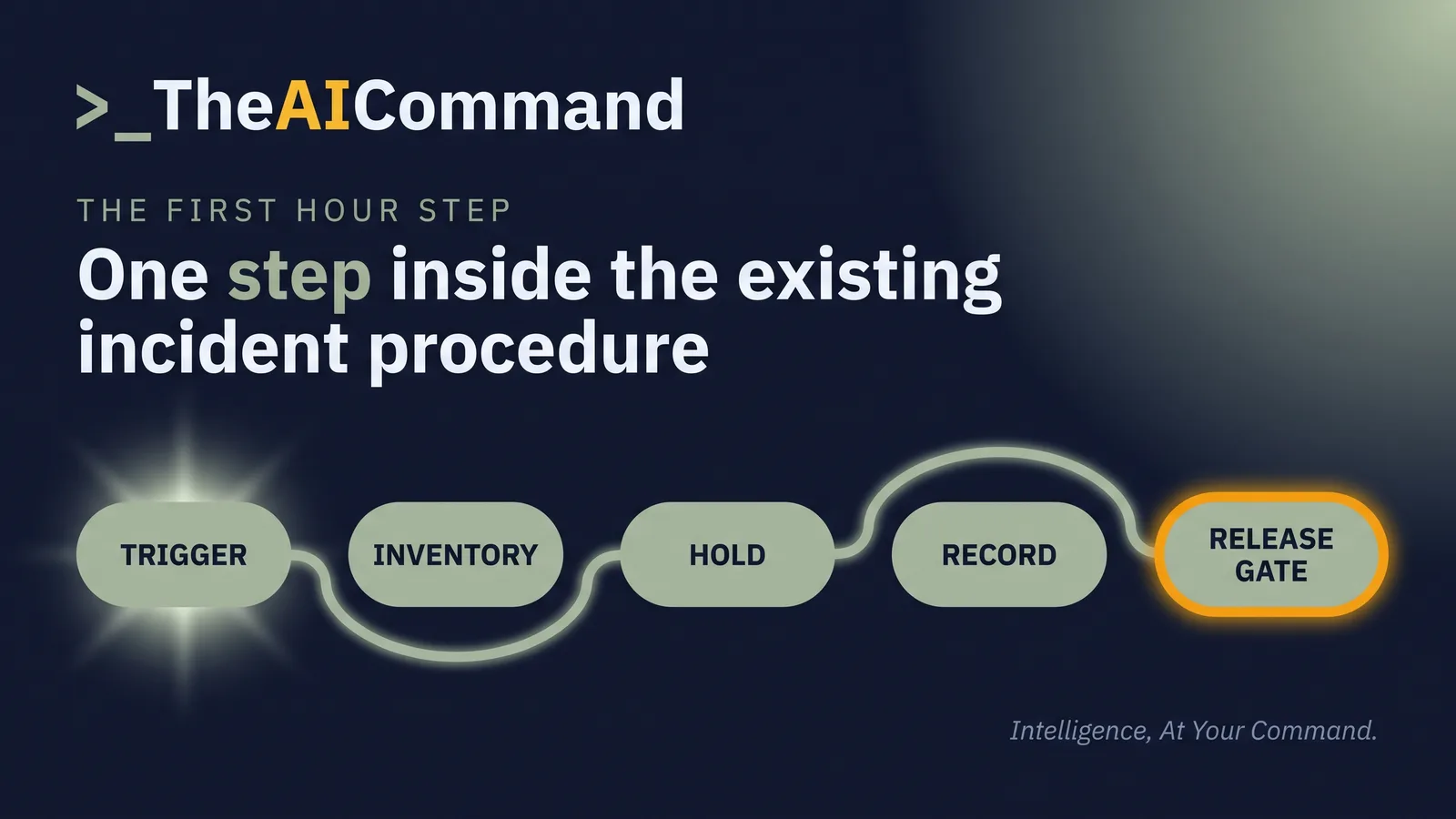
The control is one step inside the existing incident procedure, fired by the same event that triggers notification under section 38, not a new process.
Use placeholders throughout the working copy: [PCBU], [WORKPLACE], [INCIDENT_REFERENCE], [DATE_NOTIFIED], [SYSTEM_NAME], [VENDOR], [SYSTEM_OWNER], [MODEL_OR_VERSION], [RETENTION_DEFAULT], [HOLD_AUTHORISED_BY], [REVIEW_DATE] and [INSPECTOR].
How do you write the hold in the first hour?
Three prompts, run in order, each grounded in documents the organisation already holds.
TheAICommand works to the Verified Draft Method: de-identify the inputs, ground the model in your own source material, keep a person at the decision point, verify against the primary source, and log what happened.
The first prompt takes the incident description and the organisation's own system or application register. Its purpose is coverage, not analysis.
What to check: read the quoted words in each row against the incident description and delete any row where the connection is the model filling a gap rather than the text supporting it. Then read the excluded list, because the row that matters is usually the one excluded for a thin reason. Confirm every empty heading is genuinely empty and no owner has been invented.
The second prompt turns the inventory into the written hold. Speed and consistent wording are the point, since these go to several owners at once.
What to check: confirm every notice names a review date and an authorising role, because a notice missing either turns into a permanent freeze or an unrecorded reset. Check that no notice asserts the system caused anything. Read the deprovisioning line against the capability of the identity and access owner, since some platforms cannot suspend deprovisioning without disabling the account, which is itself a change. Confirm no individual is named, and count the notices headed UNASSIGNED, because that count is the first hour's real finding.
The third prompt runs before any release. It exists to make somebody argue the exception on paper.
What to check: the paragraphs quoted back must match the copy of the Act pasted in, word for word, and the compilation number must match the source. Confirm each fact quoted in item 2 appears word for word in the pasted action, and that the output has not converted the make-safe exception in paragraph (c) into a general operational convenience. The decision is recorded by [HOLD_AUTHORISED_BY], in writing, naming the paragraph relied on. The output is the working, not the determination.
Where does the hold stop?
The exceptions are in section 39(3), and they run the opposite way to the hold. Paragraph (c) permits disturbance "that is essential to make the site safe or to minimise the risk of a further notifiable incident". Paragraph (e) permits disturbance "for which an inspector or the regulator has given permission". Neither requires anything to be preserved, and suspending a log rotation is not making a site safe. Release is a decision taken under an exception and recorded as one.
The inspector has separate levers. Section 198 provides that an inspector may issue a non-disturbance notice to the person with management or control of a workplace "if the inspector reasonably believes that it is necessary", a belief the section ties to facilitating the exercise of the inspector's compliance powers. Section 199(2) of Compilation No. 16 requires that a notice "must specify the period (of no more than 7 days) for which it applies", with subsequent notices available under section 201. Section 200(1) makes it an offence for a person to "refuse or fail to comply with a non-disturbance notice issued to the person" without reasonable excuse. Section 171(1)(b) lets an inspector require a person who has custody of, or access to, a document mentioned in section 171(1)(a) to produce it to the inspector.
On equipment, the limits are easy to overstate. Section 165A(1) gives an inspector who enters a workplace under that division "the power to operate electronic equipment on the premises", and section 165A(2)(b) the power to operate equipment "to put the information in documentary form and remove the documents so produced from the premises". Section 165B lets an inspector secure equipment for up to 24 hours, extendable by a magistrate, where without that action "the evidence may be destroyed, altered or otherwise interfered with", and that power applies to premises to which a warrant relates.
The consequence sits in Schedule 4. A breach of the section 39 preservation duty attracts the tier D monetary penalty, and failure to comply with a non-disturbance notice attracts the tier B monetary penalty, both set as base amounts in Schedule 4 clause 2. Schedule 4 clause 4(1) indexes each monetary penalty from the year commencing 1 July 2024, so the amount in force as at 25 September 2026 is the indexed amount, not the figure printed in Compilation No. 16. Those amounts are the ones Comcare notified under Schedule 4 clause 6 in the Work Health and Safety (Public Notification of Indexed Penalty Amounts) Notifiable Instrument 2026, made 27 July 2026 and repealed at the start of 1 July 2027.
The last limit is the one a software hold is most likely to breach. Safe Work Australia's Notifiable incidents, extended absences and suicides handbook of December 2025 sets the restraint that keeps the model duty workable: "The duty to preserve the site applies to the area where the event occurred (including other relevant areas and plant), and may not include the whole workplace." A software hold mirrors it. Freezing every system in the estate is not a stronger control. It is one that gets overridden by Thursday.
Do this Monday
Build the artefact: a one-page First-Hour Software Preservation Step, appended to the existing incident procedure.
The owner is the WHS manager who holds the incident procedure. The first hour: copy the eight rows above onto one page, then write against each generic owner the job title that holds it in your incident procedure, and list any row with no title as unassigned. Then test it. Open the system or application register, take the three most recent notifiable incidents or near misses, and for each one list the systems that touched the task using the five headings in the first prompt. That needs nothing beyond the register and this article.
The check has two layers. The page passes when every row carries a real job title or sits on the unassigned list. Then, for one system on that list, ask its recorded owner two questions: what is the retention setting today, and who can suspend it inside an hour. If either answer is unknown, the step has earned its place and the gap is the finding. If both arrive with a name against them, record them in the step and set the review date.
The bottom line
Section 39 preserves the site, and section 39(2) extends the site to any plant, substance, structure or thing associated with the incident. Where an automated or AI-assisted system set the pace, routed the task or issued the instruction, the evidence of cause sits in logs, model versions, configuration and account records that expire on a vendor schedule rather than a legal one. The Commonwealth Act, at Compilation No. 16, does not name software in section 39, so the reading has to be made deliberately and recorded, not assumed. Build the first-hour step now, with an owner for each system, a written hold, one role that may authorise a release, and a dated review point. The hour costs nothing on a quiet Monday and cannot be bought back on the day it is needed.
TheAICommand. Intelligence, At Your Command.