
You can build an offline GRC controls console safely by treating it as a governed end-user computing tool rather than shadow IT: keep it offline, use it only to structure evidence and capture reviewer sign-off, and leave the approved GRC platform as the system of record. A single-file HTML tool is unglamorous, and that is exactly why it works for bounded controls testing. The right use case for a governance, risk and compliance team is not to replace Archer, ServiceNow or any system of record. It is to build a local working console that helps a team structure evidence, log exceptions, capture reviewer sign-off and produce a clean review pack, all without sending a single byte anywhere.
Here is the stance this article takes, and it is a deliberate one. An AI-built console is a genuinely useful working layer, but it belongs to a governed risk class called end-user computing, not to a category of free wins. The model is a structure engine, a critique partner and a drafting accelerator. The source evidence, the professional judgement and the accountable sign-off stay with named people. Get that boundary right and the console becomes a governed workbench. Get it wrong and the same file is shadow IT with a friendlier interface.
This is general guidance and education only. It is not legal, compliance, risk or professional advice. Verify every regulatory point against the primary source and confirm the approach with the accountable people in your own organisation before relying on it.
Why build an EUC controls console now?
End-user computing is the long-standing discipline that covers spreadsheets, Access databases, scripts and local tools built by business teams rather than central IT. Most regulated organisations already have an EUC policy, and most already know the failure pattern: a useful spreadsheet quietly becomes load-bearing, nobody owns it, the formulas drift, and an exception report turns out to have been wrong for two quarters. A browser-based controls console built with an AI assistant sits in exactly this risk class. Treating it as anything else is the mistake.
The regulatory backdrop sharpens the point. APRA Prudential Standard CPS 230 Operational Risk Management commenced on 1 July 2025, with amendments scheduled for 1 July 2026 [1]. CPS 230 requires a regulated entity to identify and manage its operational risks, to maintain and test controls, and to remediate control gaps and deficiencies on a timely basis [1]. The accompanying guide, CPG 230, explains APRA's expectations on control design, monitoring and testing in practice [2]. CPS 230 also sets explicit expectations around the management of material service providers, which is one of the better narrow workflows to pilot a console against [1].
A controls console does not satisfy CPS 230 on its own, and no honest article would claim it does. What it can do is make the working layer of control monitoring and testing more consistent before results enter the official platform. That is a worthwhile and modest goal.
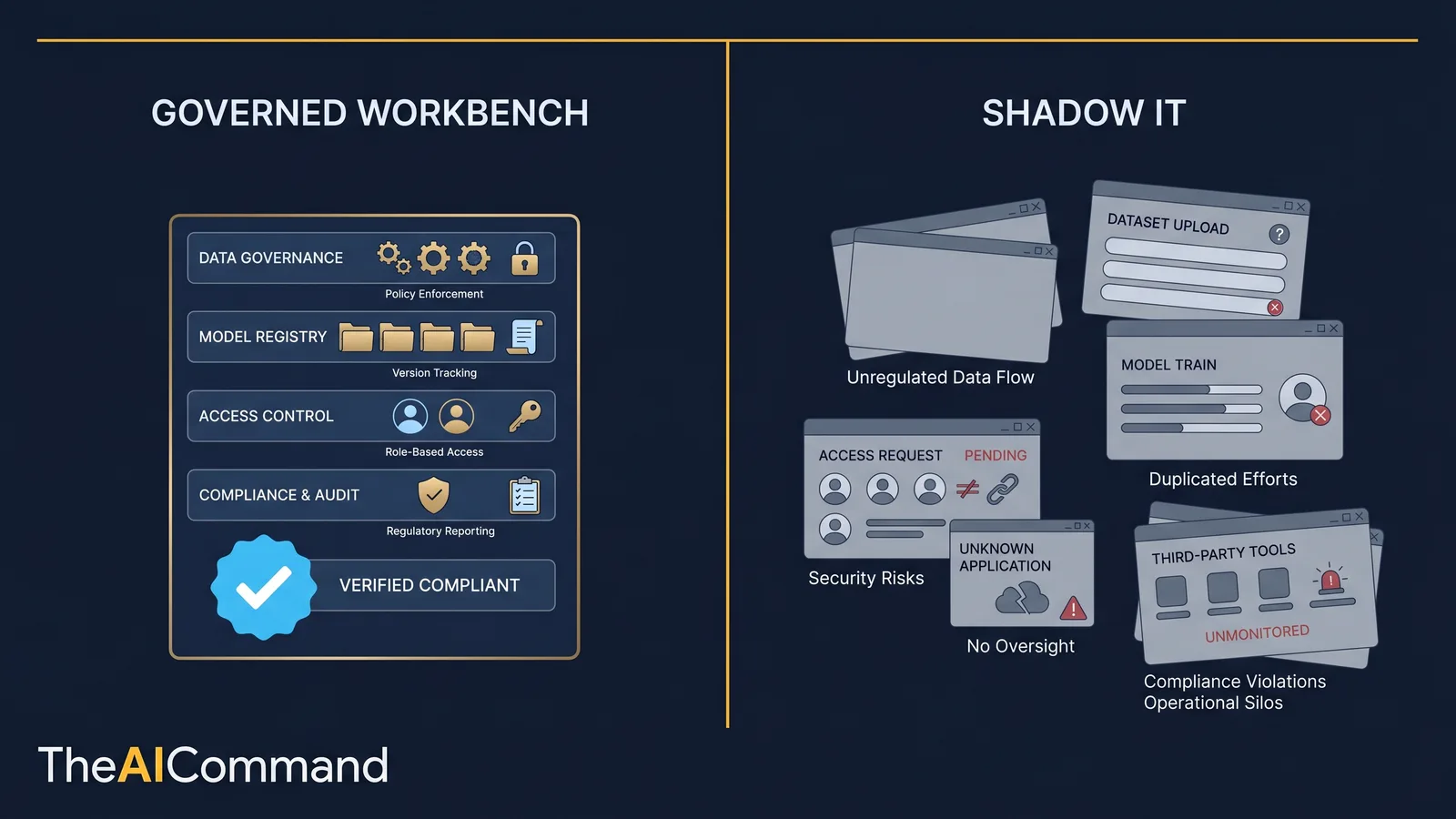
Governed workbench versus shadow IT: the through-line
It helps to hold two pictures side by side. The governed workbench is owned by a named person, runs offline, validates its own inputs, separates preparer from reviewer, ships with a short governance pack, and has a retirement date written down before it is ever used. The shadow IT version is the same file with none of that: no owner, unknown data inside, exports treated as official records, multiple drifting copies on shared drives, and no plan to retire it.
The code can be byte-for-byte identical in both cases. The difference is entirely governance. That is the uncomfortable and useful truth, and it is why this article spends more words on boundaries than on prompts.
This same pattern travels well. The Workers Compensation companion piece, an offline evidence chronology builder, applies the identical safe offline-tool discipline to a different regulated domain. If the console approach earns trust in GRC, the WC version inherits the same controls.
The operating model: where the working layer ends
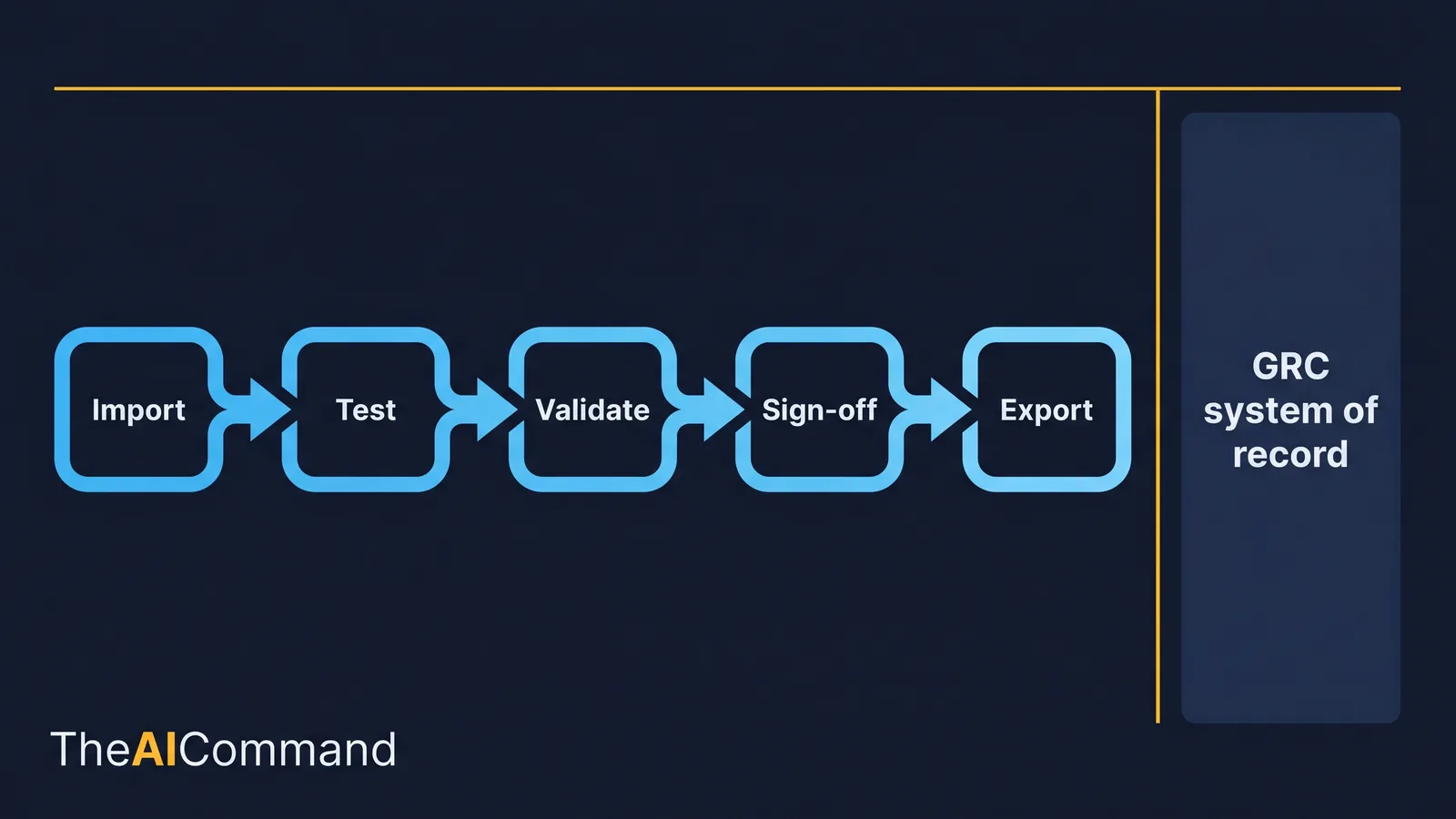
Five moves turn an idea into a controlled tool. Each one is a decision, not a feature.
Start with one narrow control test. Do not build a platform. Pick a single repeatable workflow: monthly evidence review for a key obligation, issue triage for control exceptions, or a readiness check for one CPS 230 material service provider process [1].
Define the data model before asking for any code. Controls tools fail when the assistant starts with interface design instead of obligations, controls, evidence, exceptions, reviewer notes and export fields. The first prompt has to force schema thinking, not screen thinking.
Generate a single-file tool with no external dependencies. Plain HTML, CSS and JavaScript, with tables, filters, summary counts and local import and export. If any library is used, it must be vendored into the file, never pulled from a content delivery network. More on why below.
Add validation and review states. Required fields, date logic, status rules and reviewer sign-off are what stop the tool from degrading into another uncontrolled spreadsheet.
Keep it as a working console only. Final records, evidence storage and authoritative status remain in approved systems. The console prepares and tests. It never overrides governance.
Most AI failures in professional work are not caused by a missing magic prompt. They are caused by an unclear task boundary, weak source material, hidden assumptions, thin review and nowhere to store lessons. The console design above converts each of those weak points into a field, a check, a prompt or a review step.
What belongs in the console versus the system of record?
Before building anything, settle what the console is allowed to be. The table below is the line that keeps an EUC tool on the right side of governance. If a task lands in the right-hand column, it does not belong in the console.
The console exists to make the work feeding the system of record cleaner. The moment anyone treats a console export as the official answer, the EUC has failed its one governance test.
Secure-by-design and the offline promise
The single biggest claim a console makes is that it sends data nowhere. That promise is easy to assert and easy to break. A single stylesheet link, web font or analytics snippet quietly turns an offline tool into a networked one. So the offline property has to be designed in and then proven, not assumed. The wider case for keeping data on the user's own device, often described as local-first software, is set out well by Ink and Switch [10].
A few technical facts are worth stating plainly, because vague claims here are how teams fool themselves:
- A browser page holds data in memory only. Nothing persists after the tab closes unless the code writes to
localStorage,sessionStorage, IndexedDB or a downloaded file. The safest first version uses none of those and relies purely on user-triggered export. localStorageandsessionStoragedo persist to disk, are readable by any script on the same origin, and are not encrypted. If they are added later, that is a documented decision, not a default.- Opening the file with the
file://protocol changes browser behaviour. Some features are restricted, and some browsers treat the file as a unique opaque origin, which affects storage and module loading. Test the tool the way it will actually be opened. - Charting and table libraries such as Chart.js, Tabulator, PapaParse and SheetJS are useful, but each must be vendored into the file or shipped alongside it locally, never loaded from a CDN [6][7][8][9]. A CDN reference is a live network call, and a live network call breaks the offline promise.
The checklist below is the secure-by-design standard to apply before any real working data touches the file. The most important row is the last one, because it is the only proof.
That final row is the method that turns a claim into evidence. Open the developer tools, switch to the Network tab, reload the file, then import, validate, filter and export. If the request count stays at zero, the offline promise holds. Repeat the test with the machine disconnected from the network entirely. A tool that still works with the network cable out is genuinely offline. A tool that fails is not, and you have just found out cheaply.
The guardrail stack that keeps an EUC controlled
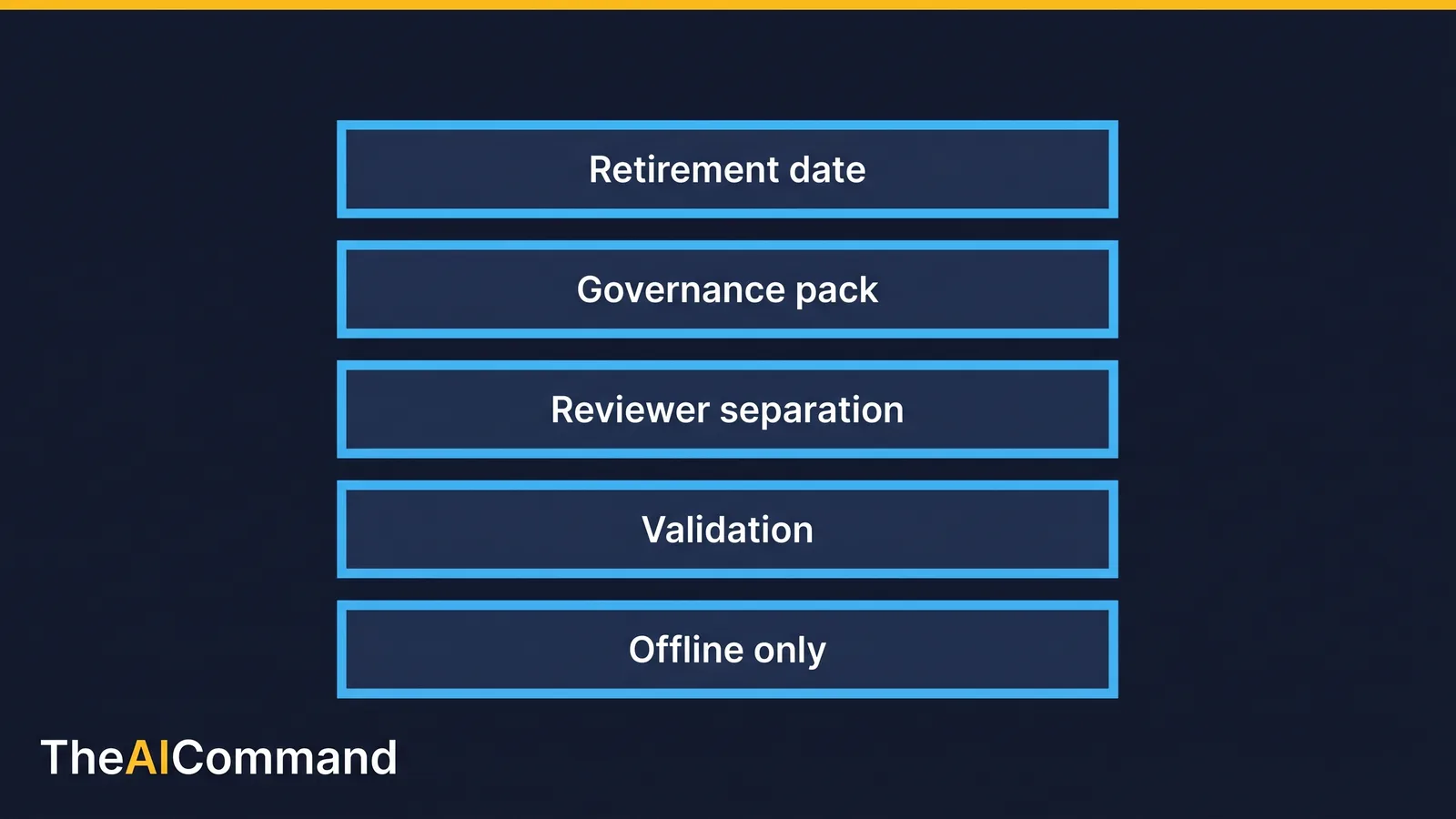
Governance for this tool is layered, and each layer is independently checkable. Offline-only operation is the foundation. Validation sits on top, so bad records cannot pass quietly. Reviewer separation enforces independence between preparer and approver. A governance pack travels with the file so a manager who will never read the code can still assess it. A retirement date sits at the top, because the most dangerous EUC is the one nobody ever decided to switch off.
Information security is part of this picture, not separate from it. APRA CPS 234 Information Security, which commenced on 1 July 2019, requires regulated entities to maintain information security capability commensurate with the size and sensitivity of the information assets involved, and to protect those assets [3]. A console that holds working evidence is an information asset while it exists, however briefly. Keeping it offline, keeping sensitive data out of it, and retiring it on schedule are the practical expressions of that obligation.
Two voluntary frameworks help structure the wider governance conversation without overcomplicating a small tool. The NIST AI Risk Management Framework organises AI governance around four functions, Govern, Map, Measure and Manage, and is a useful lens for deciding what the tool is for and what could go wrong [4]. ISO/IEC 42001:2023 sets out requirements for an AI management system, which is the formal home for repeatable controls if console-building becomes a recurring practice rather than a one-off [5]. Neither is a regulatory obligation in Australia, and neither should be cited as one. They are scaffolding for thinking, used here as such.
A useful governance habit is to ask what the model and the tool are explicitly not allowed to do. The answer should be visible in the workflow, the prompts, the interface and the review checklist. If that boundary only lives in someone's head, it will be missed under deadline pressure.
A short worked scenario
A GRC analyst is preparing a control test for incident escalation evidence. The obligations, control statements, screenshots, incident tickets and exception comments sit in separate folders. Rather than stitch a status view together by hand in a spreadsheet, the analyst asks an AI assistant to generate a single-file console. The console imports a CSV of controls, accepts pasted evidence summaries, flags missing reviewer fields, marks exceptions and exports a clean review pack. No server, no login, no data transfer.
The manager opens the file locally during the review meeting, filters to weak evidence, and agrees which exceptions need a formal issue raised. After the meeting, the agreed outcomes are entered into the approved GRC platform, which remains the system of record. That is the pattern working as intended. The assistant built the workbench. The accountable people decided the official record.
The lesson is not that AI removes work. It changes the shape of the work. Instead of hours spent tidying a messy table, the team spends more time validating the structure, improving the evidence, asking sharper questions and deciding what the output is allowed to mean.
The working table: the field specification
The data model is the heart of the tool. Define it before any code exists, and review it with the control owner. The specification below is a working artefact, not decoration. A practitioner should be able to lift it into a planning document, adapt the fields, and brief a manager, analyst or reviewer from it.
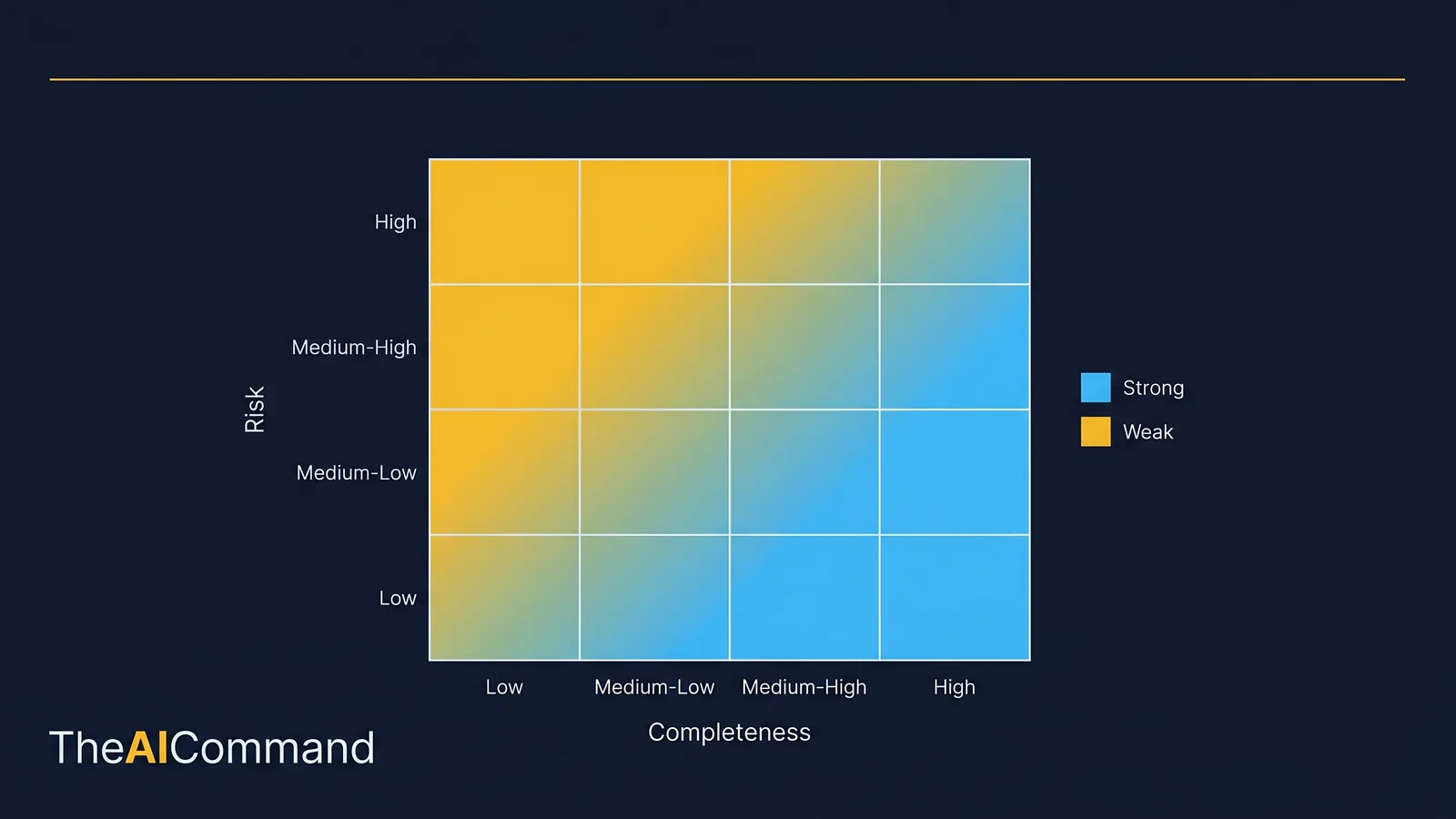
The evidence confidence field is what powers the visual triage layer described next. Without it, weak evidence hides in a long list. With it, weak evidence becomes impossible to miss.
A sample CSV import and export template
Keep the import and export format boring and explicit. A predictable CSV template is what lets a reviewer sanity-check the file in any text editor and what keeps the tool from depending on hidden parsing tricks. The header row and three synthetic rows below show the shape without dumping a full code listing.
Note the deliberate test cases. The first row is a clean, complete record. The second is a real-but-weak evidence record that should pass validation yet stand out in the heat matrix. The third is an exception that should be blocked from export until the issue owner and due date are present, which they are here, so it would pass only because both fields are filled. Build a fourth synthetic row that leaves those exception fields blank to confirm the block actually fires.
The matching export should add the derived export_status column and refuse to mark a record ready while any conditional field is missing. Keep the column order identical between import and export so a reviewer can diff the two files directly.
The prompt stack
The prompt stack is staged on purpose. The first prompt narrows the task. The middle prompts generate and test the artefact. The final prompts produce the review, the dependency check and the user guidance. That order reduces the chance of a polished but unsafe output. Each block below is runnable as written; replace the bracketed text with your own narrow workflow.
Define the data model first
Generate the single-file tool
Add local validation and review states
Run the security and dependency review
Produce the user guide and version log
Add a local-only summary view
Build and verification sequence
A controlled build follows a fixed order. Skipping a step is how a prototype becomes shadow infrastructure.
- Choose one control test and write the intended workflow in plain English.
- Ask the assistant for the data model first, then review it with the control owner.
- Generate the single-file prototype with no external dependencies.
- Run the security and dependency review prompt before any real information is used.
- Test with synthetic data, including deliberately broken records, to confirm validation fires.
- Prove the offline property with the Network tab open and then with the network disconnected.
- Document where final results must be stored in the approved GRC system.
Make the sequence stick by naming three roles, even if one person wears all three hats. The domain owner confirms meaning. The AI workflow owner maintains the prompts, the file and the tool behaviour. The reviewer checks that outputs are grounded, proportionate and safe to use.
Testing with deliberately bad data
Synthetic records that break the rules are the cheapest assurance available. Create one record with no evidence summary, one where the reviewer equals the preparer, one exception with no owner, one sign-off date before the preparation date, and one row with a malformed obligation ID. The tool should catch every one. If it misses any, fix validation before a practitioner relies on the export. Testing with bad data on purpose is more honest than testing with tidy data and hoping.
Running the review meeting
Run the review meeting with the console on screen. Filter first to missing or weak evidence. For each weakness, decide whether it is a documentation gap, a real control concern, a timing issue or a misread of the evidence standard. Then filter to exceptions and assign an issue owner, a due date and an escalation path. Export only once every exception has an action.
Treat the model's output like a junior analyst's draft: quick, useful and incomplete until checked. Record each correction as a source issue, a prompt issue, a process issue or a judgement issue. That classification improves the system, not just the one document. Over time it becomes the organisation's working memory for how it wants AI used, which matters far more than turning every employee into a prompt engineer.
Failure modes worth naming
- Using the console as the source of truth. It is a working aid. The approved platform holds the record.
- Loading remote scripts or fonts. One CDN link breaks the offline and data-handling promise at once.
- Accepting generated code without review. Hidden dependencies, unsafe rendering and broken validation need a human inspection.
- Drawing regulatory conclusions from tool status. Evidence ratings support review. Accountable judgement stays with the GRC function.
- Letting the file outlive its purpose. Multiple drifting versions, exports treated as official, and sensitive evidence accumulating outside approved systems are the markers of an EUC that has slipped into shadow IT.
When to retire the tool
An offline console is excellent for pilots, workshops and bounded review packs. It becomes risky when several teams run different versions, when exports get treated as official records, or when sensitive evidence piles up outside approved systems. The version log should carry a retirement date and a review point where the owner decides to retire, formalise or rebuild the tool. The hardest discipline in EUC is switching something off while it still works. Write the date down before you need it.
Ship a governance pack with the file
Ship the HTML file with a short governance pack: purpose, owner, approved users, data-handling limits, test evidence, validation summary, version log and retirement date. The pack lets a manager who will not read code still assess the tool. It also reduces the risk that the file is forwarded without context and quietly becomes a shadow process. The practical test of the whole thing is simple. Could another capable person use the file next week without the author explaining it for ten minutes? If not, the tool needs clearer labels, stronger fields or a shorter guide before anyone relies on it.
What to do next
Pick one workflow, one artefact and one review loop. Build the smallest useful version first. Use synthetic or low-sensitivity data wherever possible. Run the prompt stack in order. Prove the file is offline. Capture what failed and turn the correction into a durable instruction, template or lesson. Then repeat with a slightly harder task. That is how a governed capability compounds, and it is the opposite of letting a clever spreadsheet metastasise into a control nobody owns.
Bottom line
An offline single-file controls console is a genuinely useful working layer, but it belongs to the governed end-user computing risk class, not to a category of free wins. The code can be byte-for-byte identical to shadow IT, so only the governance around it keeps the file on the right side. Keep the console as a working layer that feeds the approved system of record, and prove it is offline before any real evidence touches it.
Do this Monday:
- Pick one narrow control test and write the intended workflow in plain English.
- Ask the assistant for the data model first, then review it with the control owner.
- Generate a single-file tool with no external dependencies and no CDN calls.
- Prove zero network calls with the developer tools Network tab open, then again with the machine disconnected.
- Ship a short governance pack with a named owner and a retirement date before anyone relies on it.
This article is general guidance and education only. It is not legal, compliance, risk, audit or other professional advice, and it does not establish that any tool meets a regulatory obligation. APRA standards, NIST and ISO frameworks, and your own organisation's EUC, information security and AI policies take precedence. Confirm every regulatory point against the primary source and confirm the approach with your accountable control owners, risk function and information security team before relying on it in a regulated process.
References
- APRA, Operational Risk Management (CPS 230), commenced 1 July 2025, amendments effective 1 July 2026. https://www.apra.gov.au/standard/cps-230
- APRA, Prudential Practice Guide CPG 230 Operational Risk Management. https://handbook.apra.gov.au/ppg/cpg-230
- APRA, Information Security (CPS 234), commenced 1 July 2019. https://www.apra.gov.au/standard/cps-234
- NIST, AI Risk Management Framework (AI RMF 1.0), Govern, Map, Measure and Manage functions. https://www.nist.gov/itl/ai-risk-management-framework
- ISO/IEC 42001:2023, Artificial intelligence management system. https://www.iso.org/standard/42001
- Chart.js (vendor and embed locally, never load from a CDN). https://github.com/chartjs/Chart.js
- Tabulator (vendor and embed locally, never load from a CDN). https://github.com/olifolkerd/tabulator
- PapaParse (vendor and embed locally, never load from a CDN). https://github.com/mholt/PapaParse
- SheetJS (vendor and embed locally, never load from a CDN). https://github.com/SheetJS/sheetjs
- Ink and Switch, Local-first software. https://www.inkandswitch.com/essay/local-first/
For more practical AI workflow ideas, follow TheAICommand on Instagram at @the_aicommand and X at @TheAICommand.
TheAICommand. Intelligence, At Your Command.