
The tier decides the default, not the prompt. Four assistants are read here, being ChatGPT, Claude, Gemini and Microsoft Copilot, and all four publish a position on whether what is typed into them trains a model. As at 24 September 2026, those positions are set by the account tier that was signed in, and inside the consumer band they differ.
The account you signed in with is the control
The question "is it safe to paste this" has no general answer, and the assistant cannot supply one. The answer is a lookup against the account: which product, which tier, which toggle state, which retention window, checked on which date. That is a register, and the only form in which this information survives a staff change or an audit question.
Three facts drive the register. Consumer defaults differ between vendors, so a rule of thumb learned on one assistant is wrong on the next. Every business, enterprise and commercial tier read for this article publishes a no-training position, but each is scoped differently, which makes the tier and the exact wording the highest-value fields. None of that touches Australian obligations, because the paste itself is a use or a disclosure of personal information before any vendor setting is applied.
No vendor is said to have changed its position, because no archived earlier version was read.
What do the four vendor pages actually say?
OpenAI's help centre page, "How your data is used to improve model performance", states, as at 24 September 2026, "By default, we don't use inputs or outputs from ChatGPT Business, ChatGPT Enterprise, ChatGPT Edu, or our API to improve our models." Anthropic's commercial privacy page, "Is my data used for model training?" (commercial), dated 18 August 2026, states "By default, we will not use your inputs or outputs from our commercial products (e.g. Claude for Work, Anthropic API, Claude Gov, etc.) to train our models." Microsoft Learn's page, "Data, Privacy, and Security for Microsoft Copilot", last updated 18 August 2026, states "Prompts, responses, and data accessed through Microsoft Graph aren't used to train foundation LLMs, including those used by Microsoft Copilot." The Google Workspace privacy hub for generative AI, whose body carries 14 August 2026, states "Your content is not human reviewed or otherwise used for Generative AI model training outside your domain without permission."
Read those four sentences closely and the scope is narrow in every case. Microsoft's page separates optional customer feedback, which may be used to improve Copilot but not to train the foundation models, and is managed by an administrator control. Anthropic's commercial page keeps a feedback carve-out alongside the default. Google's Workspace wording turns on the phrase "outside your domain without permission", which is a boundary rather than an absence of processing. OpenAI's page keeps an opt-in route open for API customers, so a business-tier register row records whether anyone has opted the API in, not only that the default holds. A register field that reads "does not train on data" is therefore wrong on all four. The accurate field transcribes that vendor's own scope, being inputs and outputs at OpenAI and Anthropic, foundation models at Microsoft, and training outside the domain without permission at Google Workspace, with feedback handled separately and the tier confirmed on [DATE_CHECKED].
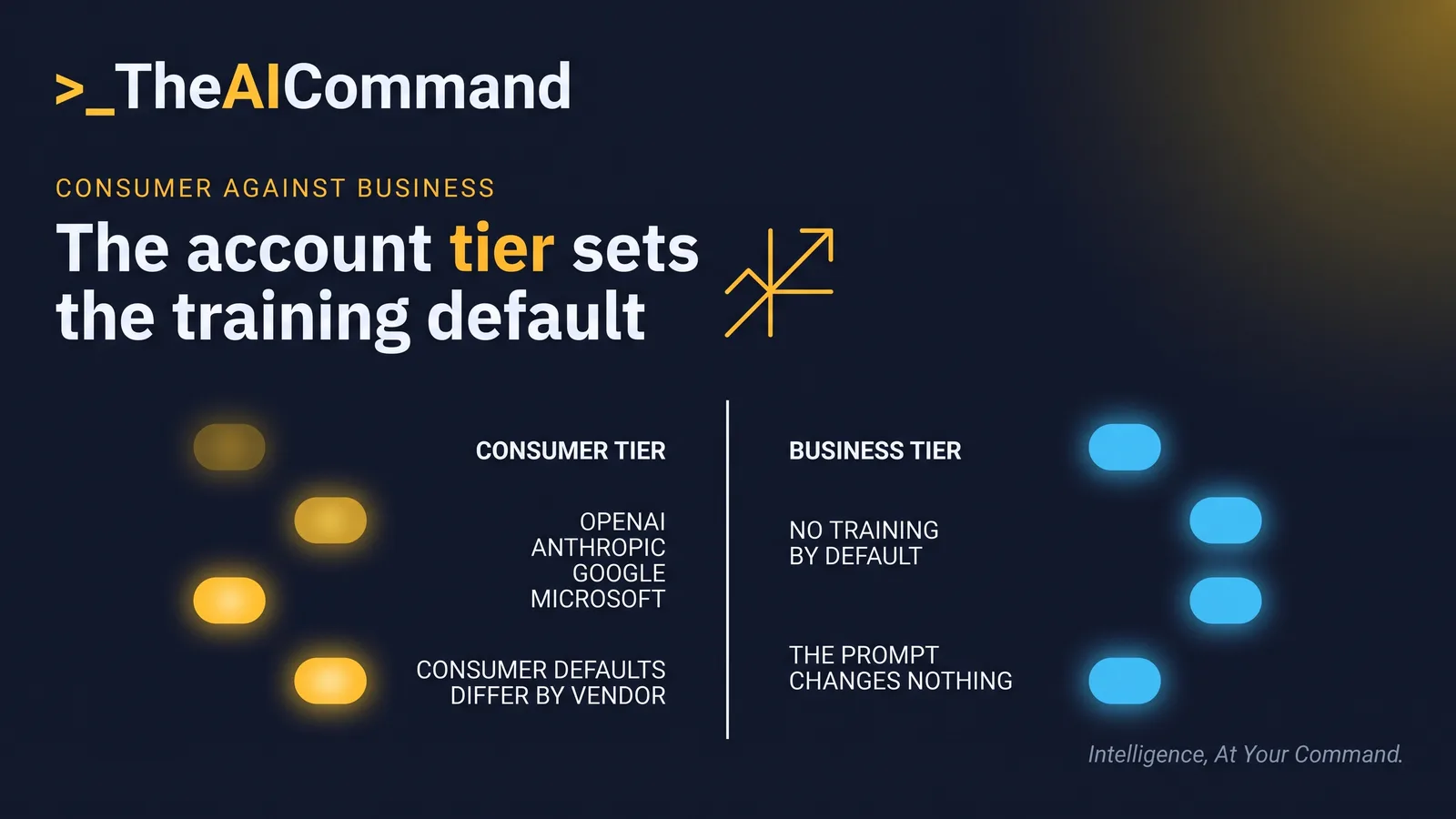
Why do two consumer tiers behave in opposite ways?
The same OpenAI help page states "When you use our services for individuals, such as ChatGPT and Codex, we may use your content to train our models." The opt-out sits in Settings, under Data Controls, in the setting labelled Improve the model for everyone, according to OpenAI's page "Data controls in ChatGPT" as at 24 September 2026. Neither OpenAI page displays a date, only a relative label, so the register records the date the page was read and the URL beside it.
Anthropic's consumer privacy page, "Is my data used for model training?" (consumer), dated 16 March 2026, runs the other way. It lists the circumstances in which consumer chats are used to improve models, the first being that the user chose to allow it, alongside chats flagged for safety review and other forms of opt-in. The same page states "Your Incognito chats are not used to improve Claude, even if you have enabled Model Improvement in your Privacy Settings."
Same task, same paste, opposite defaults. On one consumer product the content is in scope unless the user turns it off. On the other it is out of scope unless the user turns it on, with the separate route that a chat flagged for safety review is used whether or not the user allowed it. A staff handbook that says "turn training off in your AI tool" does not survive that difference: on one product it is a required action, on the other a check that nothing was switched on. Record it per assistant, not per organisation.
The eighteen month default nobody set
Google's consumer position is not a training toggle in the first instance, it is a retention default. The Gemini Apps Privacy Hub carries the Gemini Apps Privacy Notice, last updated 29 June 2026, which states "You can change your auto-delete setting in Gemini Apps Activity from the default of 18 months to 3 months, 36 months, or indefinite." Eighteen months applies where nobody changed the setting.
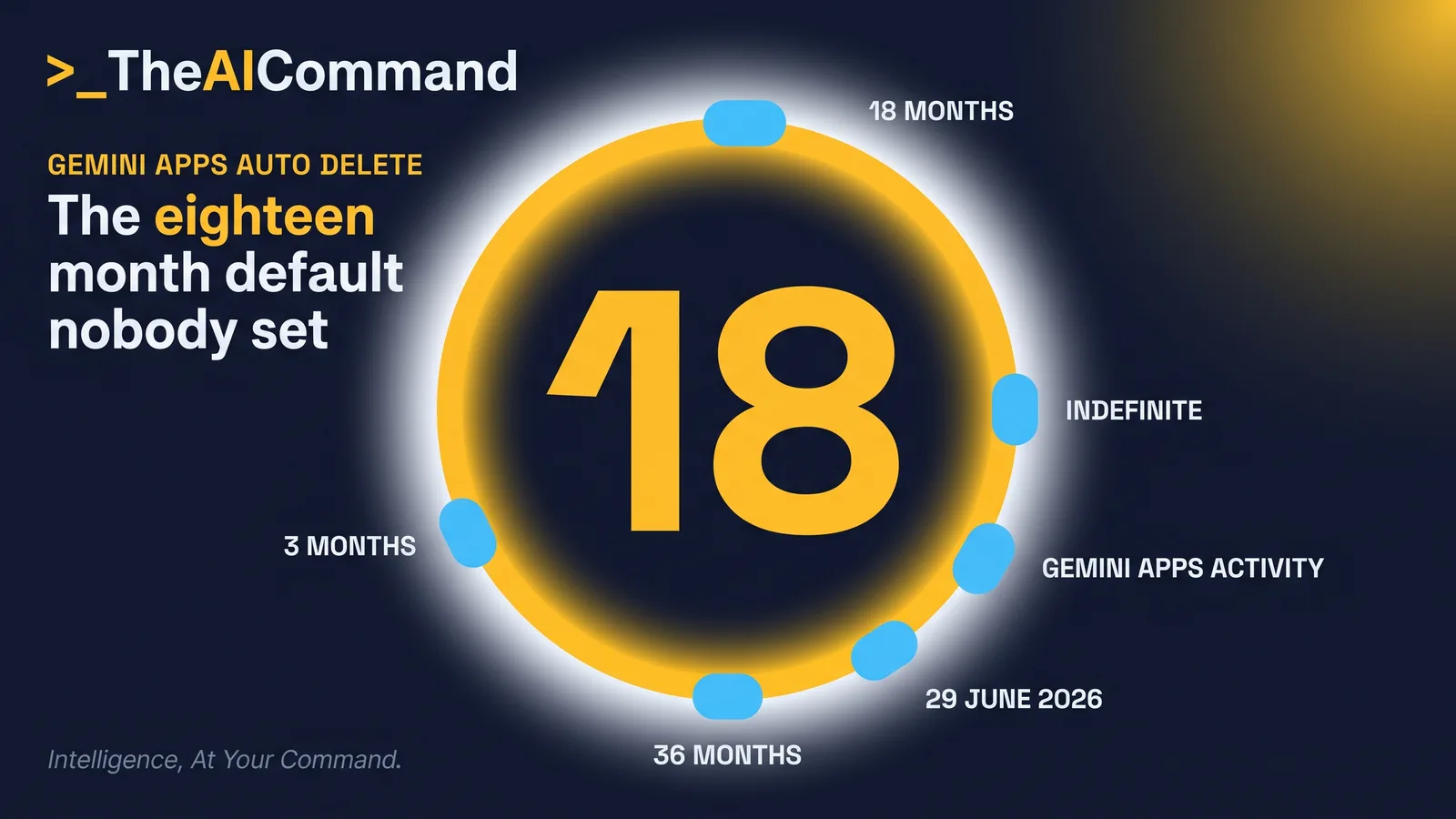
Two further mechanics matter more than the headline number, and they sit on differently dated parts of that hub. The privacy questions section, last updated 10 August 2026, states that temporary chats, and chats taken with Keep Activity off, are retained with the account for 72 hours. Temporary chats are not used to train Google's AI models, and with Keep Activity off the same applies to future chats where the user does not submit feedback. Submit feedback with Keep Activity off and the conversation is reviewed by trained teams and retained for up to three years, disconnected from the account. The Privacy Notice, last updated 29 June 2026, separately states that a subset of conversations is sent to service providers for human review, and that chats already reviewed are not deleted when activity is deleted but retained for up to three years. Deleting activity is therefore not a complete erasure claim, and a register recording only the auto-delete number overstates it.
Google states the practical instruction itself in the notice: "Please don't enter confidential information that you wouldn't want a reviewer to see or Google to use to improve our services, including machine-learning technologies." That is a more defensible line in an internal policy than anything paraphrased.
The privacy questions section also states Gemini on a work or school Google Account may be subject to different data handling terms, and points to the Workspace material quoted earlier, so the surface can look identical on two devices while the governing terms differ.
How long does the text survive after deletion?
Retention is a second axis, and it does not move with the training toggle. Anthropic's consumer page, "How long do you store my data?", dated 1 July 2026, states "If you allow us to use your chats or coding sessions to improve Claude, we may retain your data in a de-identified format for up to 5 years in our model training pipelines." The same page sets longer windows where a chat is flagged under the usage policy, including trust and safety classification scores for up to seven years. OpenAI's page Data controls in ChatGPT, as at 24 September 2026, states that temporary chats may be retained for up to 30 days for safety purposes.
The seven year classification-score window sits outside the table below, and the two year row inside it applies only where a chat is flagged.
The ladder runs from 72 hours to five years across the three products that publish a retention window. Record the window for ordinary use of the tier, and note the flagged window beside it.
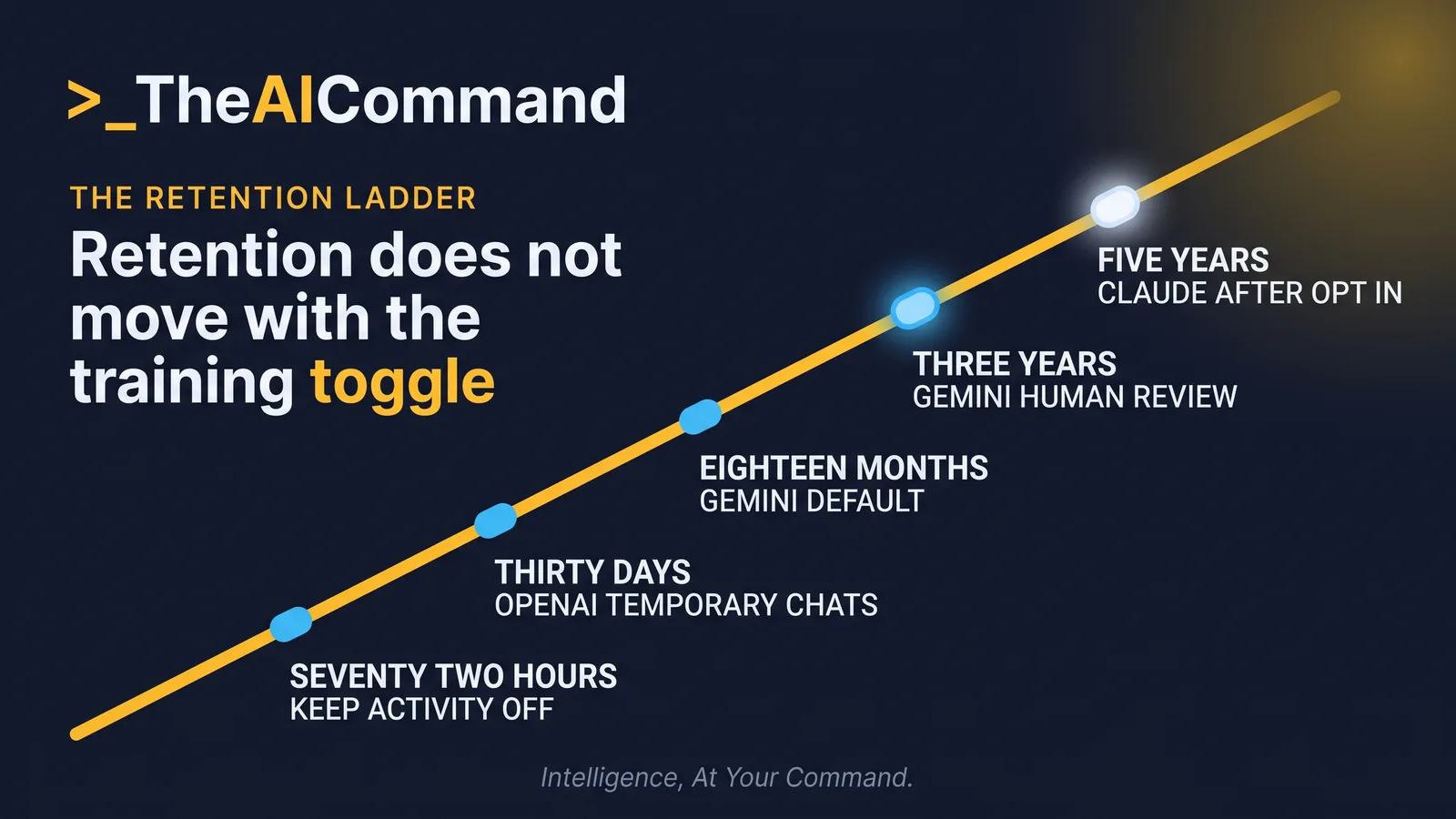
Two cautions belong beside the ladder. First, every one of these numbers came from a help page that can be edited without notice, so each row carries the date its page displays, or the date it was read where the page displays none. Second, nothing on any of these pages states that switching training off removes content already collected. Opting out and erasure are separate operations with separate evidence, and a policy that treats them as one overstates what the toggle does.
Does a business tier make the paste lawful?
It does not, and no source read for this article suggests otherwise. The vendor page answers what the vendor does with the content. Australian law asks a prior question, whether the content was permitted to leave the organisation's control at all.
The Office of the Australian Information Commissioner's guidance on privacy and the use of commercially available AI products, published 21 October 2024 and last updated 17 January 2025, states that "the OAIC recommends that organisations do not enter personal information, and particularly sensitive information, into publicly available AI chatbots and other publicly available generative AI tools". The guidance also frames the operational distinction: entering personal information into a tool outside the organisation's control is capable of being a disclosure, not merely an internal use, and the regulator expects controls, training and auditing.
The statutory anchor sits in the Privacy Act 1988 (Cth), Schedule 1, Australian Privacy Principle 6.1, in Compilation No. 104, compilation date 4 June 2026, which states that "If an APP entity holds personal information about an individual that was collected for a particular purpose (the primary purpose), the entity must not use or disclose the information for another purpose" unless an exception applies. Personal information collected to administer a claim, a grievance or an employment file was not collected so that a model could process it. Moving it to a business tier changes the vendor's training posture, not the secondary use.
This is general information and not legal advice. The register records the tier as evidence, because a recollection of which plan someone was on in October is not evidence.
Build the register, then the prompts that fill it
The artefact is an assistant register with one row per assistant in actual use. Each fact carries its own source, because one row routinely draws on two vendor pages, as the OpenAI row does.
The governance half is a second table, filled last. Approved destination is a tier whose Australian Privacy Principle 6 assessment is recorded, or "no assistant", because a tier without that assessment is not an approved destination.
Settings text is evidence of the toggle state only, so the toggle state cell reads "settings screen, read [DATE_CHECKED]" and the vendor page URL stays in the cells for the published position. Client, claimant and personnel material is barred from the consumer tier, and moving it to a business or commercial tier answers the vendor question only, not the Australian Privacy Principle 6 question set out above.
TheAICommand works to the Verified Draft Method: de-identify the inputs, ground the model in your own source material, keep a person at the decision point, verify against the primary source, and log what happened.
The prompts below build the register without importing a fact from the model's memory of a vendor policy. Run all three on the highest tier the organisation holds, because the inventory, the policies and the settings text are internal documents, and a register built on a consumer account breaks its own rule.
What to check: exactly four cells per row are populated, being the four you supplied, the toggle state cell reads "not checked", and the rest read "not stated". Any populated fifth cell is the model answering from memory, and the row is discarded, not corrected. The final list names a page type for each blank cell and volunteers no address, and any URL the model offers is memory, deleted before the register is saved.
What to check: everything above the UNGROUNDED heading quotes a clause that actually appears in the attached policy, and the gaps are returned as gaps. A checklist with no "not covered" lines on a policy that predates generative AI is a warning sign. Confirm the output describes the document class and never reproduces content from a real file.
What to check: the model reported no identifier remaining in the pasted text, and the plan tier is taken from the exported text rather than inferred from which features appear. Confirm that every "not verified" entry names a specific screen. The date checked must match the date of the export, not the date the prompt was run.
Do this Monday
Build one row. The artefact is the Assistant Data Register, the tables above, held wherever the organisation keeps its control documents. The owner is the risk or compliance lead who owns the acceptable use policy, because the register is evidence for it.
The first step fits in under an hour.
- Choose the assistant used most across the team.
- Open the vendor's own page for that product, starting from the pages linked above.
- Use the first prompt above to lay out the table.
- Correct every cell against the page, and date the row.
- Set review due to six months after the date checked, or to the next plan change, whichever comes first, because the vendor pages carry no change notification.
This article fills the training default cell for all four vendors and the retention cell for the consumer tiers only. On Microsoft Copilot and Google Workspace no toggle or retention window was read for this article, and both are administered at the tenant, so those cells are filled by the administrator who owns the tenant and until then read "not stated" with the date of the attempt.
The check that proves it worked is mechanical. Read the three fact and source pairs, being training default, toggle location and retention window. Each either sits beside a URL that resolves to the vendor page stating it, or reads "not stated", and no cell carries a number from recollection. The toggle state cell is filled from the account, not from a vendor page. If the row passes, fill the governance table, naming the work classes barred and the approved destination.
The bottom line
The account tier decides the default, and the four vendors do not share a default inside the consumer band. As at 24 September 2026, OpenAI states it may use content from its services for individuals to train models unless the user opts out, Anthropic states consumer chats are used where the user allows it, where a chat is flagged for safety review, or on another opt-in, and Google keeps Gemini Apps activity for 18 months unless the setting is changed. All four publish a no-training position for their business, enterprise or commercial tiers, but each is scoped to its own wording and carries its own carve-out, being feedback at Anthropic and Microsoft, an API opt-in at OpenAI, and the domain boundary at Google Workspace. None of that answers the Australian question, because Australian Privacy Principle 6 and the regulator's guidance apply to the paste itself, whatever the vendor does afterwards. Record the tier, the toggle and the retention window with a date and a URL, and move client, claimant and personnel work off the consumer tier.
TheAICommand. Intelligence, At Your Command.