
What Is the Right to Disconnect in AI-Enabled Workflows?
To respect the right to disconnect, teams should configure AI workflow tools to map every after-hours automated contact, apply Fair Work reasonable-contact principles, suppress or delay non-urgent notifications, keep a human approval step before after-hours escalations, and review settings before rollout. Since 26 August 2024, Australian employees (outside small business) have a statutory right to disconnect. This right allows employees to refuse to monitor, read or respond to work-related contact outside their agreed working hours unless such refusal is deemed unreasonable. The Fair Work Ombudsman provides detailed guidance on factors that influence what is reasonable, including the purpose of the contact, the communication channel used, the level of disruption caused, compensation arrangements, and the employee's role and personal circumstances source.
For human resources (HR) professionals and managers, this right is more than a legal obligation; it presents a practical challenge when configuring AI-enabled workflow tools, alerts, chatbots and escalation rules. These systems often operate continuously, automatically sending notifications or escalating tasks based on algorithms. Without careful design and configuration, they risk breaching the right to disconnect by generating unreasonable after-hours work contact.
AI workflow tools are increasingly embedded in daily operations to streamline processes, improve responsiveness and reduce manual effort. However, their automated nature means they can generate work-related contact at any time, including outside normal working hours, potentially infringing on employees' rights and wellbeing.
Why Do AI Workflow Tools Need Reconfiguration?
AI workflow tools are widely used to automate task assignments, alerts, reminders, escalations and summaries, aiming to improve operational efficiency and responsiveness. However, these automated contacts can:
- Trigger notifications outside normal working hours without human review or intervention.
- Fail to consider individual employee availability, preferences or agreed working hours.
- Escalate issues unnecessarily or prematurely, increasing pressure on employees.
- Amplify psychosocial hazards by creating stress or anxiety related to after-hours work demands.
Safe Work Australia identifies psychosocial hazards as factors that can cause psychological harm, including excessive workload, low job control, poor support, intrusive monitoring and poor organisational justice source. AI-driven after-hours contact can exacerbate these hazards if not managed appropriately, in the same way that AI work allocation needs deliberate psychosocial risk controls.
The New South Wales (NSW) Digital Work Systems Act 2026 reinforces that persons conducting a business or undertaking (PCBUs) must ensure digital work systems do not put worker health and safety at risk, including from unreasonable work allocation or monitoring practices source. This legislation explicitly recognises algorithms, artificial intelligence and automation as part of digital work systems requiring careful governance. It is part of the broader WHS duty NSW teams already hold over AI work allocation.
In practice, this means that AI workflow tools must be configured not only to optimise productivity but also to respect employee boundaries and health and safety obligations. Failure to do so can lead to legal risks, employee dissatisfaction, increased turnover and potential psychosocial harm.
How Do You Align AI Workflow Tools With the Right to Disconnect?
1. Map All AI-Generated Contacts Outside Working Hours
Begin by conducting a comprehensive audit of every AI-enabled workflow tool in use within your organisation. Identify all notifications, alerts, escalations, chatbots or summaries that can reach employees outside their standard working hours.
This mapping exercise should cover all systems that generate automated or semi-automated contact, including:
- Task management platforms that assign or reassign work.
- Alerting systems that notify about deadlines, exceptions or risks.
- Chatbots or virtual assistants that prompt employee action.
- Escalation rules that transfer tasks or alerts to other staff.
- Summary reports or digests sent by email or messaging apps.
Use the following classification checklist to document each contact point:
This mapping helps visualise where after-hours contact risk exists and which contacts can be adjusted, delayed or suppressed to comply with the right to disconnect.
2. Define Reasonable Contact Principles for AI Settings
According to Fair Work guidance, the reasonableness of after-hours contact depends on several factors:
- Purpose: Is the contact urgent or can it wait until working hours? For example, safety incidents or critical system failures may justify immediate contact.
- Channel: Is the contact via email, SMS, phone call or chat? Some channels are more intrusive and disruptive than others.
- Disruption: Does the contact interrupt rest, family time or personal commitments?
- Compensation: Are employees compensated for after-hours work, such as overtime pay or time off in lieu?
- Role and Responsibility: Are the employees' roles critical for after-hours response, such as emergency responders or on-call staff?
Translate these principles into configuration rules for AI systems. For example:
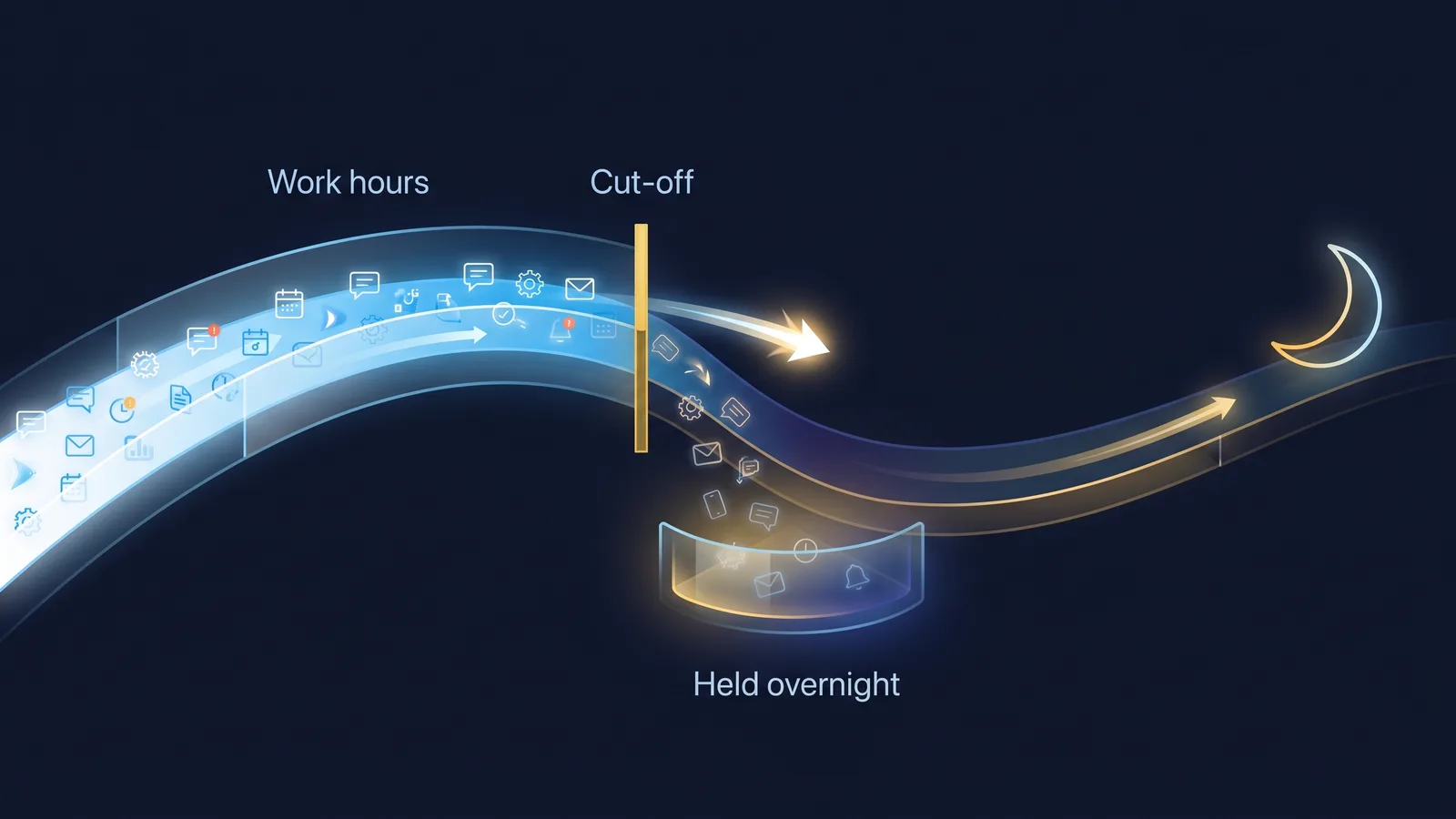
- Suppress low-urgency notifications outside working hours and deliver them as part of a morning summary.
- Require manager approval before any escalation triggers after-hours contact.
- Use less intrusive communication channels for optional notifications.
- Allow employees to set preferences for contact times and methods.
By embedding these principles into AI workflow configurations, organisations can reduce unnecessary after-hours contact while maintaining responsiveness where genuinely needed. AI can surface these factors, but the judgement stays human, just as AI can map a flexible work request without deciding its reasonableness.
3. Build Human Review and Override Controls
AI systems should not act fully autonomously when initiating after-hours contact. Incorporate human-in-the-loop controls such as:
- Escalation Gatekeepers: Managers or designated staff review and approve after-hours escalations flagged by AI before contact is made.
- Employee Preferences: Provide employees with options to set 'do not disturb' periods or preferred contact channels within workflow tools.
- Exception Logging: Maintain detailed logs of all after-hours contacts initiated by AI, including reasons and approvals, to support audits and compliance reviews.
This approach balances the efficiency of automation with respect for employee rights and wellbeing. It also creates accountability and transparency, which are critical for trust and compliance.

4. Establish a Pre-Rollout Review Process
Before deploying new AI workflow tools or updating existing configurations, conduct a formal review involving HR, workplace health and safety (WHS), IT and employee representatives. The review should:
- Validate that AI contact rules align with the right to disconnect principles.
- Assess potential psychosocial risk impacts.
- Confirm transparency and communication plans for employees.
- Document approvals, risk mitigations and any exceptions.
This process helps prevent unintended after-hours contact and supports regulatory compliance. It also provides an opportunity to engage employees and build awareness about the right to disconnect and AI contact protocols.
5. Monitor and Continuously Improve AI Contact Settings
After rollout, establish ongoing monitoring and feedback mechanisms to:
- Track the volume and nature of after-hours AI-generated contacts.
- Collect employee feedback on the impact of notifications and escalations.
- Identify patterns of excessive or unreasonable contact.
- Adjust AI configurations and escalation rules based on data and feedback.
Regular audits and reviews ensure that AI workflow tools remain aligned with evolving work patterns, employee expectations and legal requirements.
Worked Audit Checklist for AI Workflow Tools and Right to Disconnect
Sample AI Contact Policy Wording (Use Placeholders)
AI-Enabled Workflow Contact Policy
>
[Organisation Name] recognises the Fair Work right to disconnect and commits to minimising unreasonable after-hours work contact generated by AI-enabled systems.
>
1. Scope: This policy applies to all AI-enabled workflow tools, alerts, chatbots and escalation systems used within [Organisation Name]. 2. Reasonable Contact: AI systems will be configured to suppress or delay non-urgent notifications outside employees' agreed working hours, except where immediate action is critical. 3. Human Oversight: All after-hours escalations triggered by AI require manager review and approval before contact is made. 4. Employee Preferences: Employees may set preferred contact hours and channels via [system/tool name]. 5. Logging and Transparency: All after-hours contacts initiated by AI systems will be logged with reasons and approvals for audit purposes. 6. Review Process: AI workflow configurations will undergo a formal review involving HR, WHS, IT and employee representatives prior to deployment or significant changes. 7. Support and Queries: Employees with concerns about after-hours contact should raise them with their manager or HR at [contact details].
>
This policy supports employee wellbeing and compliance with the right to disconnect under Australian workplace laws.
Integrating AI Contact Management with Broader WHS and HR Practices
Managing AI-generated after-hours contact is part of a broader duty to ensure safe and healthy work environments. The NSW Digital Work Systems Act 2026 and Safe Work Australia guidance highlight the importance of considering psychosocial risks arising from digital work systems, including AI and algorithms source.
AI workflow tools can influence workload intensity, job control, the monitoring boundaries HR must manage and support availability. For example, excessive or poorly timed notifications can increase stress and reduce perceived control, contributing to psychosocial hazards. HR and WHS teams should collaborate to:
- Include AI contact management in psychosocial risk assessments.
- Monitor employee wellbeing indicators related to after-hours work.
- Provide training and awareness on AI contact protocols and the right to disconnect.
- Ensure AI system changes are communicated clearly and involve employee consultation.
This integrated approach supports compliance with health and safety legislation and promotes a culture of respect and trust.
Final Thoughts
The right to disconnect is reshaping how AI-enabled workflow tools should operate in Australian workplaces. HR and managers must move beyond technical deployment to thoughtful design that respects employee boundaries and psychosocial health. Mapping AI contact points, applying reasonable contact principles, embedding human review and formalising review processes are practical steps to align AI workflows with legal and ethical expectations.
This approach not only reduces the risk of disputes and workplace health and safety issues but also fosters trust and sustainable productivity in an AI-augmented workplace. By proactively managing AI-generated after-hours contact, organisations demonstrate commitment to employee wellbeing and responsible AI use, which are increasingly critical in today's digital work environment.
Bottom line
The right to disconnect makes AI workflow configuration a design decision, not just a technical one. Map every after-hours automated contact, apply Fair Work reasonable-contact principles, keep a human review step before after-hours escalations, and review settings before rollout. Done well, this reduces psychosocial risk and disputes while keeping genuine urgency responsive.
Do this Monday:
- Pick one workflow tool and list every notification, alert, escalation and summary it can send outside working hours.
- Classify each contact by urgency, channel, disruption, compensation and role.
- Suppress or batch non-urgent after-hours notifications into a morning summary.
- Add a manager approval step before any AI-triggered after-hours escalation.
- Log after-hours contacts with reasons and approvals, and schedule a pre-rollout review with HR, WHS and IT.
This article is general educational information only and should be reviewed by a suitably qualified person before use.
TheAICommand. Intelligence, At Your Command.